> Source: https://docs.cyberelements.io/bastion/4.7/el/Installation/ClientAndAgent/AgentLinuxInstallation/
# Installation of the Linux agent
The Linux agent is used by CyberElements Bastion to limit possible network access from SSH servers accessed by users (defined in access policies / contracts).
## Values used on this page
The following values are used in several commands and configuration files of this page. Enter them here: the commands displayed on this page are updated as you type.
A value used by a single command is entered in a table placed just before that command.
| Value | Variable | Definition |
|---|---|---|
| | `AGENT_VERSION` | Version of the downloaded package, as written in its file name. |
## Prerequisites
A few prerequisites are necessary for the agent to function properly:
- Compatible OS: Debian 12 and 13, Red Hat 9 and 10
- Presence of the `iptables` firewall: when it is missing, the installation commands below install it as a dependency of the package (on Debian, `python3` as well)
- Login with a different account than `root`
> **Information**
>
> The Linux agent does not act on the `root` user, as this user always has sufficient rights to remove any restrictions that would be applied to them.
>
> Furthermore, as some services use `root` rights, adding network restrictions could cause these services to become unstable.
## Operation
The Linux agent is broken down into several parts:
- A systemd service named `cleanroom-filter`
- A PAM module named `pam_clr_filter`
- A SELinux policy for Red Hat to allow the SSH server to communicate with the `cleanroom-filter` service
The general operation follows this sequence:
```mermaid
sequenceDiagram
autonumber
participant MED as Mediation Controller
participant GW_SSH as Edge Gateway
SSH Recorder
participant SSH as SSH Target
SSH Server
participant PAM as SSH Target
pam_clr_filter PAM Module
participant svc as SSH Target
cleanroom-filter Service
MED->>GW_SSH: Request to open an
SSH application
GW_SSH->>+MED: Retrieve filtering information
for the session
MED->>-GW_SSH: Send network
filtering information
GW_SSH->>+SSH: SSH Connection
SSH-->-PAM: Creating an SSH session
PAM->>+svc: Sending the username
Note right of svc: Creating an iptables
chain for the user named clr-LOGIN
svc->>-PAM: Sending a unique token
Note over PAM: Adding the CLR_ID environment
variable containing the unique token
to the user's session
GW_SSH->>svc: Sending the list of networks to be authorised
Note over svc: Creating an iptables OUTPUT rule
to redirect the user's traffic to the iptables
chain created previously
Note over svc: Adding authorisations to the iptables
chain created for the user
break End of SSH session
SSH->>+GW_SSH: End of session notification
SSH-->svc: Detection of end of SSH session
Note over svc: Deletion of iptables OUTPUT
rule created for user
Note over svc: Deletion of iptables chain
created for user
GW_SSH->>-MED: End of SSH session
notification for user
end
```
1. The Mediation Controller server sends information to the Edge Gateway to open a new SSH session.
2. The SSH recording service asks the Mediation Controller server for the network filtering information to apply to the SSH session.
3. The Mediation Controller responds with a list of authorised networks.
4. The SSH recording service then establishes the connection to the target SSH server: the SSH server therefore sees the session coming from the address of the Edge Gateway.
5. Connecting to the SSH server triggers the session creation sequence, and therefore the passage through the PAM modules assigned to `sshd`.
6. The Linux agent's `pam_clr_filter` PAM module sends the username to the `cleanroom-filter` service, which then creates a new iptables chain named `clr-LOGIN` where LOGIN is replaced by the received username.
7. After creating the iptables chain, the `cleanroom-filter` service creates and sends a random token to the `pam_clr_filter` PAM module. The latter adds this token to the user's `CLR_ID` environment variable.
8. The SSH recording service sends, via the `/usr/local/ipdiva/bin/cleanroom-netfiltersession.py` executable, the list of networks to be authorised to the `cleanroom-filter` service. The service then creates an `OUTPUT` iptables rule to redirect all traffic from the user, identified by their UID, to the iptables chain created in step 6. All flows to be authorised for the user are added to the iptables chain.
9. When the end of the SSH session is triggered, the information is sent to the SSH recording service of the Edge Gateway.
10. The `cleanroom-filter` service detects the end of the user's session and cleans up the added iptables rules: it deletes the `OUTPUT` directive redirecting the user's traffic to an iptables chain and deletes the chain itself.
11. Once the Edge Gateway has received the end of the SSH session, it forwards this information to the Mediation Controller.
## Installation
> **Required `root` permissions**
>
> `root` privileges are required to install the agent.
The .deb or .rpm package can be downloaded from the administration console:
1. Access the “Configurations” workspace using the gear button located at the top left: 
2. Open the “Toolbox” tile 
3. In the first tab, “Integration tools”, download the package that matches the operating system of the SSH server: 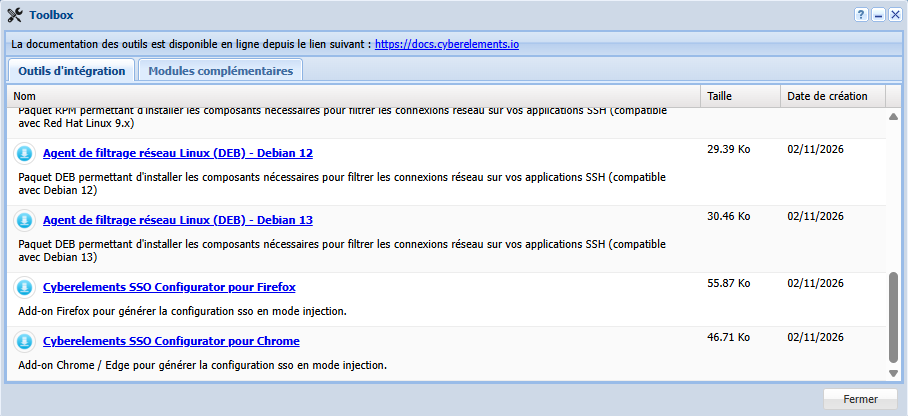
| Operating system | Item in the Toolbox | Package file |
|---|---|---|
| Debian 13 | “Linux network filtering agent (DEB) - Debian 13” | `cleanroom-netfilter__amd64.deb` |
| Debian 12 | “Linux network filtering agent (DEB) - Debian 12” | `cleanroom-netfilter-deb12__amd64.deb` |
| Red Hat 10 | “Linux network filtering agent (RPM) - Red Hat 10.x” | `CleanroomFilter--Linux.rpm` |
| Red Hat 9 | “Linux network filtering agent (RPM) - Red Hat 9.x” | `CleanroomFilter-rh9--Linux.rpm` |
Once you have retrieved the package, send it to the Linux server in the `/tmp/` directory. Then follow the installation instructions for your operating system:
**Debian**
> Run the following commands with the appropriate `root` permissions, the first one with the name of the package for Debian 13 or for Debian 12:
>
> ```
> 1
> 2
> ```
>
> Unlike `dpkg -i`, which stops when `iptables` or `python3` is missing, `apt install` also installs the dependencies of the package.
>
> The second command automates the addition of two lines to the `/etc/pam.d/sshd` file, but this operation can also be performed manually:
>
> ```
> 27
> 28
> 29
> 30
> 31
> 32
> 33
> 34
> 35
> 36
> 37
> ```
**Red Hat**
> Run the following commands with `root` permissions, the first one with the name of the package for Red Hat 10 (`CleanroomFilter--Linux.rpm`) or for Red Hat 9 (`CleanroomFilter-rh9--Linux.rpm`):
>
> ```
> 1
> 2
> ```
>
> The second command automates the addition of two lines to the `/etc/pam.d/sshd` file, but this operation can also be performed manually:
>
> ```
> 11
> 12
> 13
> 14
> 15
> 16
> 17
> ```
## Verification
1. On the SSH server, the `cleanroom-filter` service is active:
```
1
```
2. In the administration console, filtering is enabled in the access contract that grants the SSH application: “Network connections” tab, “Filter network connections” option, then the authorised networks (see [Access contracts](https://docs.cyberelements.io/bastion/4.7/el/Usage/Reference/AdminConsole/AccessContracts/)). As the tab states, network connections can be filtered only for privileged RDS, RDP (HTML5), SSH and SSH (HTML5) applications with the agent installed.
3. While a user (other than `root`) has a session open on the SSH application, `iptables -S`, run as `root` on the SSH server, shows the chain created for the user, the `OUTPUT` rule that redirects their traffic to it, one `ACCEPT` rule per authorised network and a final `REJECT` rule. Example for the user `jdoe` (UID 1001) and an authorised network `192.0.2.10`, TCP port 80:
```
1
2
3
4
```
In the session, the `CLR_ID` environment variable contains the token of the session.
4. In the session, an authorised network responds normally; a connection to any other destination fails with “Connection refused”, for example:
```
1
2
```
5. At the end of the session, the `OUTPUT` rule and the `clr-` chain are deleted: `iptables -S` no longer shows them.