> Source: https://docs.cyberelements.io/saas/et/Usage/Administration/AdminConsole/MainWorkPanel/Applications/StandardApplications/VpnStandard/
# VPN
> **Application fact sheet**
>
> | Video recording | CyberElements client | Desktop client |
> |---|---|---|
> | ❌ | ✅ | ❌ |
The **VPN** type raises a partitioned tunnel between the user's workstation and an internal network. The workstation receives an address, routes and DNS servers, then reaches the network as though it were plugged into it.
## Comparison with the generic tunnel
| Criterion | VPN | [Generic tunnel](https://docs.cyberelements.io/saas/et/Usage/Administration/AdminConsole/MainWorkPanel/Applications/StandardApplications/GenericTunnelStandard/) |
|---|---|---|
| What is opened | a network interface and subnets | named ports towards named targets |
| Reach | whatever the pushed routes reach | the declared list, nothing else |
| Desktop client | absent | available |
The VPN is a last-resort solution: it opens far more than an application access. It suits cases where the list of targets cannot be established: an administration workstation that must reach a whole segment, a thick client that negotiates its own ports. *Full tunneling* mode extends that opening to all the workstation's traffic, redirected into the tunnel.
## Prerequisites
1. The **CyberElements client** on the workstation: it raises the interface.
2. An [Edge Gateway](https://docs.cyberelements.io/saas/et/Usage/Administration/AdminConsole/MainWorkPanel/SitesAndGateways/Gateways/) **able to record**, online in the [site](https://docs.cyberelements.io/saas/et/Usage/Administration/AdminConsole/MainWorkPanel/SitesAndGateways/Sites/). The type records nothing, but without one the application is not offered to the user.
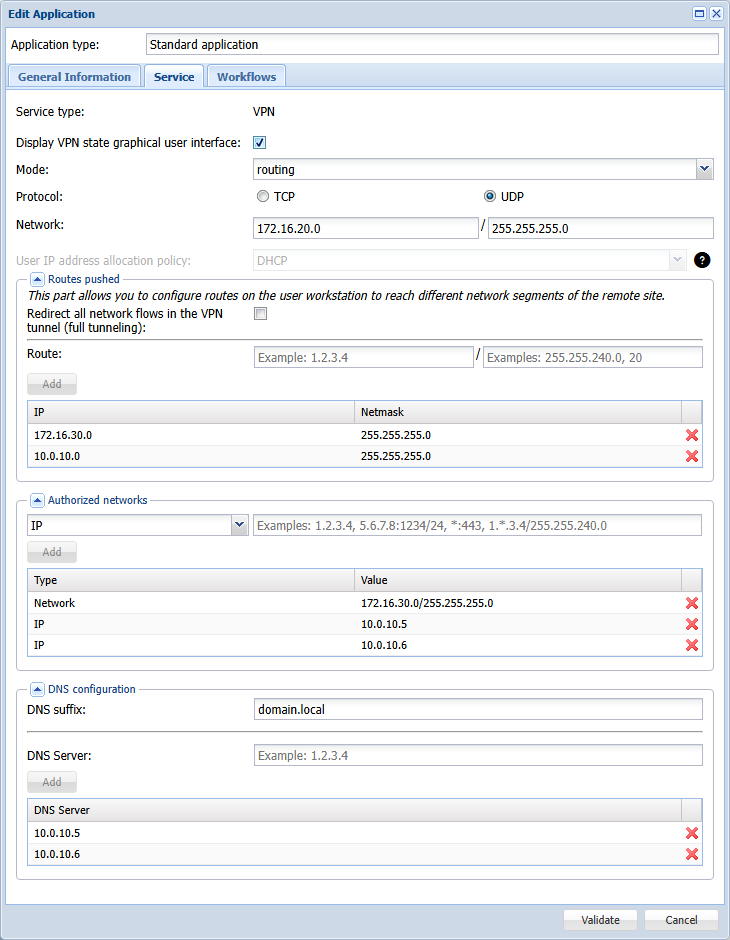
3. The addressing plan: network and mask, address allocation policy, pushed routes, DNS servers, allowed and forbidden addresses.
## Routing and bridge modes
The **Mode** determines how the workstation joins the network.
- **routing**: the default, a **layer 3** VPN. The tunnel has its own subnet, entered in **Network:** with its mask, and the workstation reaches the internal network through the pushed routes. The user's VPN address is **translated (NAT)** to that of the Edge Gateway: the machines of the internal network see the Edge Gateway, not the workstation. Addresses are always handed out by **DHCP**: the **User IP address allocation policy** stays greyed out.
- **bridge**: a **layer 2** VPN. The workstation is placed on the internal network segment itself and keeps its VPN address, without translation. The window then asks for the bridge **Interface** (`br0` by default), the **First network address** and the **Last network address** of the range given to users, and the **Netmask**. The **User IP address allocation policy** becomes a choice: **DHCP**, **DHCP local** (an address from a DHCP server of the network) or **Fixed IP from an attribute**, which adds the **User attribute holding the fixed IP**. Each pushed route then takes a **Gateway**, and **Redirect all network flows in the VPN tunnel (full tunnelling)** adds a **Default gateway**, which is then mandatory.
> **Return to routing mode**
>
> Switching the mode back to routing sets the allocation policy to DHCP again; the bridge range is no longer asked for.
The last address of the range cannot be lower than the first: the window refuses it.
### What the internal network sees
In **routing**, the workstation stays in the tunnel's subnet; the Edge Gateway translates its address, and the internal server only sees the Edge Gateway.
```mermaid
flowchart LR
P["User's workstation
VPN address 172.16.20.x"] -- "VPN tunnel (layer 3: IP packets)" --> G["Edge Gateway
NAT"]
G -- "source: address of the Edge Gateway" --> S["Internal server
10.0.10.21"]
```
In **bridge**, the workstation is attached to the segment itself, with an address from the bridge range; the internal server sees the workstation's address.
```mermaid
flowchart LR
P["User's workstation
segment address 10.0.10.x"] -- "VPN tunnel (layer 2: Ethernet frames)" --> G["Edge Gateway
bridge br0"]
G -- "source: address of the workstation" --> S["Internal server
10.0.10.21"]
```
| Network impact | routing (layer 3) | bridge (layer 2) |
|---|---|---|
| Address seen by internal servers | that of the Edge Gateway | that of the workstation |
| Server-side filtering and logs | do not tell VPN users apart | tell each workstation apart |
| Tunnel addresses | own subnet, distinct from the internal network | range of the internal segment, to be reserved for the VPN |
| Segment broadcasts (ARP, service discovery) | do not cross the tunnel | cross the tunnel |
## Pushed routes and authorised networks
The two lists do not play the same role.
- The **Routes pushed** are the setting applied **on the user's workstation**: they tell it which subnets to send through the tunnel. A user with administrator rights on their workstation can modify them.
- The **Authorized IP addresses** and **Allowed network masks** are what the **platform** lets through and monitors: an access, through the tunnel, to an address that is not listed is blocked, whatever routes are present on the workstation.
The pushed **DNS servers** follow the same rule: for them to answer, a route must lead to them and the authorised networks must cover them.
## Limits
- **Absent from the Cleanroom Desktop client.** The application only launches from the user portal: this type and [Isolate (Web)](https://docs.cyberelements.io/saas/et/Usage/Administration/AdminConsole/MainWorkPanel/Applications/StandardApplications/IsolateWebStandard/) are the two in that case.
- **No SSO**: the field does not exist for this type.
- **No video recording**, and no recording option nor comment prompt: nothing travelling through the tunnel is traced.
- **No server field**: the target is an addressing plan, not a machine.
- **Standard only.**
---
The details of the fields are in the [module reference](https://docs.cyberelements.io/saas/et/Usage/AdminConsoleReference/Applications/#create-an-application).
The API endpoints that drive this object are described in the [API reference](https://docs.cyberelements.io/saas/et/API/APIGuide/#get-/publicapi/-org-/standardvpnservices/).