SAML domain
A SAML domain delegates authentication entirely to an external identity provider. Bastion verifies no password for it: it acts as a service provider (SP), sends the user to the IdP, and trusts the identity it gets back.
This type suits an organisation that already runs an IdP (Entra ID, ADFS, Okta, Keycloak) and wants Bastion to connect to it rather than maintain a second authentication. The second factor (MFA) is then the IdP's responsibility as well.
Virtual host activation
SAML domain without a virtual host
The SAML module (Shibboleth) must be enabled on a virtual host, which is set in the system console, not in this module. If no virtual host carries it, the console shows an orange warning when the type is selected, but it still lets the domain be created and saved. Nothing blocks and nothing fails: the domain exists, it is offered to users, and it does not authenticate them, with no usable error message.
The virtual host that carries the SAML module can also serve local and LDAP domains: a user who chooses one of these domains is not redirected to the identity provider. A virtual host therefore does not have to be dedicated to SAML domains.
Implementation
The exchange is two-way: each party must know the other.
- Enable the SAML module on a virtual host from the system console.
- Declare Bastion to the IdP as a service provider.
- Declare the IdP in the domain: metadata, entity identifier, signing certificate.
- Map the attributes the IdP emits to what Bastion expects in order to identify the user and attach them to a group.
The console's Access service tab carries the metadata exchange.
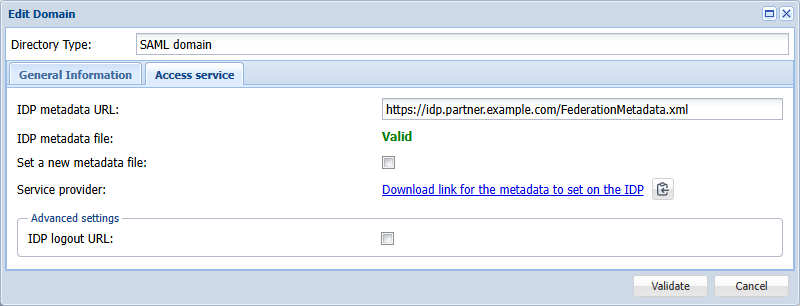
Implementation example
The Microsoft Entra ID integration walks through the whole setup: the enterprise application on the Entra ID side, the SAML domain on the Bastion side, the metadata exchange in both directions, and the retrieval of groups, which SAMLv2 does not carry on its own.
Limits
- Bastion manages no password for this domain: complexity policy, expiry and first-login change all belong to the IdP, as does the second factor (MFA). The corresponding settings of the local directory have no equivalent here.
- Authentication depends on the availability of the IdP. If it is unreachable, users of that domain can no longer log in: plan a fallback domain for administration accounts.
- The directory type cannot be changed after creation.
- The domain cannot be deleted while an access contract, a notification profile or an assistance profile references it.
The details of the General information and Access service tab fields are described in the module reference.
The API endpoints that drive this object are described in the API reference.