General options
The general options gather the cross-cutting settings of the organisation: those that belong to no domain, no application and no contract. It is the only screen in the console whose settings can make other screens appear or disappear.
The screen is made of collapsible field sets, and a single validation button saves all of them at once. As long as nothing has changed, validating simply closes the window.
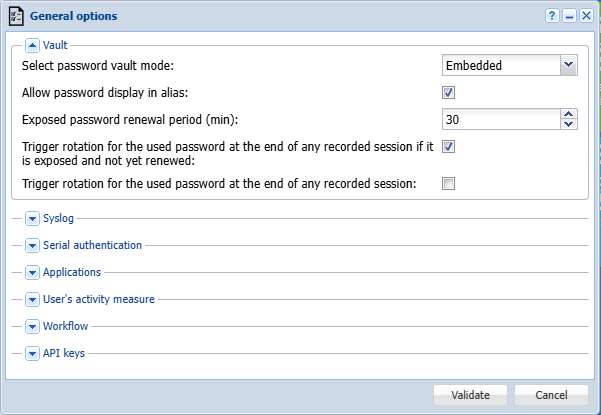
Families of settings
Each field set governs a distinct mechanism. The screen has seven families of settings:
- Vault: the password vault mode, and the exposure and rotation policy for alias passwords.
- Syslog: sending platform events and session events to an external syslog server.
- Serial authentication: how many failures are tolerated, the automatic unlocking delay, and the prompt to change password.
- Applications: the portal behaviour at launch, keystroke obfuscation in the database, the encryption of video recordings, and the expiration of web recording sessions.
- User's activity measure: the computation of an activity indicator and how it is shown in the Control center.
- Workflow: the e-mail notification sent to the user once his access request has been answered.
- API keys: the reminder sent before a public API key expires.
Password vault mode
The choice of the vault mode is the heaviest decision of this screen. The mode determines who holds the secrets: the platform itself in Embedded mode, a CyberElements Access server, or an external vault (Keeper Security, LockSelf or Bitwarden). It commands which screens the main work panel exposes (the detail is in Vault) and it can be changed at any time.
Changing the mode is not a mere display change: the console asks for confirmation before saving, and the message differs depending on whether an external vault is involved.
Alias modification
An alias can only be modified in the mode it was created in. This is the general case, the one the first confirmation announces. After a mode change, aliases created in the previous mode remain usable and deletable, but can no longer be modified. Going back to the original mode makes them modifiable again.
External vault
Entering or leaving an external vault breaks the link with applications. The second confirmation says so, and the effect is immediate on save. When leaving an external vault (towards any other mode), its aliases are deleted, its configuration is erased, every application left without an alias goes from Fixed SSO back to Enabled SSO, and every SSH and HTML5 (SSH) password injection setting is deleted. When entering an external vault from Embedded or CyberElements Access, applications are dissociated from their aliases, but the configuration and the aliases of the former vault are kept. The detail is in Vault.
Applications to update
No screen lists the applications the change has dissociated. The SSO parameter identifies them: those that were Fixed and are now Enabled are exactly the ones to pick up again, one by one, in Applications.
Settings used by other screens
Several settings only have a visible effect in other screens.
Serial authentication must be enabled in this screen for the authentication domains to offer the matching options. The unlocking delay, set to 0, removes automatic unlocking: a locked account stays locked until an administrator releases it from Blocked users.
Keystroke obfuscation changes nothing to what the console displays, but it changes the way events are stored. The keywords of the filter and display of events keep working: they are obfuscated before comparison when an export is produced.
Encryption of video recordings applies to the recordings created after it is enabled, video and SSH sessions alike. The console plays them like the others; downloading an encrypted video session provides an archive that contains its key.
The user's activity measure conditions the three display boxes that follow it (stickers, indices, outlines) and only has an effect in the Control center and the archives.
Workflow notifications and API key reminders both require an SMTP server already declared and a sender address: both fields become mandatory as soon as the matching box is ticked, and saving fails otherwise.
API key expiry reminder
Two families of accounts never receive the API key expiry reminder. The owner's address is
read from the email attribute for a local administrator and from mail for an LDAP
domain. SAML and OIDC domains are not supported: a key held by such an account
expires without anyone being warned, and nothing signals it.
System console authorisation
Sending to syslog is not a free setting. Both boxes stay greyed out as long as the system console has not allowed sending events to syslog for this organization. If the authorisation is withdrawn afterwards, saving forces both options to inactive, whatever the displayed value.
The messages sent are listed in Organisation events (first box) and Session events (second box).
Console reload
Five changes make the console offer to reload the page after saving, and the offer has to be accepted for the interface to reflect the new state:
- the vault mode;
- the authorisation to display the password in aliases;
- enabling serial authentication;
- enabling workflow notifications;
- any one of the four activity measure settings.
Declining the reload
Declining the reload loses nothing: the values are already saved when the question is asked. The console then keeps showing the previous state (menu included) until it is next opened.
Limits
- Every setting is global to the organisation: none of them can be restricted to a domain, a site, a group or an application.
- There is no undo: the only way back is to type the previous values again, and the effects of a vault mode change cannot be undone.
- The web recording session expiration and the two password renewal delays are bounded; an out-of-range value prevents the whole screen from being saved, not just the offending field.
- The API key reminder threshold is counted in days, between 1 and 365: there is no repeated reminder and no second reminder.
Availability
The module is always present, but two of its field sets are conditional.
- The API keys field set only appears if the public API is enabled on the platform.
The field-by-field detail is in module reference.