Password vault in CyberElements Access mode
In CyberElements Access mode, CyberElements Bastion holds no secret at all: it queries an external CyberElements Access server, which keeps the passwords and rotates them through its agents deployed on the machines.
This mode suits cases where the accounts to protect are already in a CyberElements Access directory, or where the places a service account is used must be discovered automatically, which Embedded mode cannot do.
Access to the server
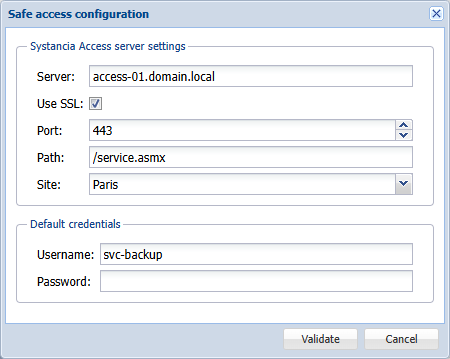
The console does not reach the CyberElements Access server directly: it opens a tunnel through the Edge Gateway of the site chosen in the configuration. The target is a web service, designated by a path and a port.
Site with no gateway
Validation checks that the chosen site holds at least one Edge Gateway, master or slave. Failing that, saving fails and says so: the site is declared, but nothing can travel through it.
Opening of the configuration window
The first time the module is opened, the console queries the server; if no configuration exists yet, it presents the configuration window straight away instead of an empty list. This is not an error.
Every write (alias, account, policy, agent) starts with a check of the server: the console makes sure the configured service account does own its container on the CyberElements Access side, and creates it if it is missing. An unreachable server or wrong credentials therefore mean a refusal of every operation, not just the first.
Change of server address
Changing the address of an already configured server asks for confirmation. Accepting deletes the aliases that referenced the old server (which is expected), but it also returns every application in Fixed SSO to Enabled SSO, including those relying on embedded vault aliases, which are left in place. The applications concerned have to be revisited one by one.
Refusing the purge keeps the aliases: they go on designating a server that is no longer the right one.
Alias families
Two radio buttons determine the form, then a Mode field states the variant. The choice is final: neither the family nor the mode can be changed afterwards.
User vault
- Personal: at launch, the secret is looked up in the container of the connected user themselves. One and the same alias therefore serves a different password to each person. This is the mode for named accounts.
- Specific: the secret is looked up in the container named in the form, the same one for everybody.
Personal and Specific
Both forms are identical, and yet the container entered plays two opposite roles: in Specific it designates where the secret lives, while in Personal it only serves the declaration: the user's identity is what designates the real location at launch. A Personal alias therefore only serves the users for whom the matching service exists in their own container.
Shared vault
- Password rotation: the alias is backed by a managed account, and therefore by an account the agents rotate. The user name and the domain are read-only: they come from the account, picked from a list.
- Account entry: the account is entered by hand, and the full DN of the container is expected, not its short name. An orange warning in the form recalls this.
Password fields disabled
In Password rotation, the password fields are disabled as soon as the chosen managed account has undergone at least one rotation: its current secret is held by the mechanism, and there is nothing left to enter. They stay active for an account never renewed, whose initial password has to be supplied.
Embedded mode aliases
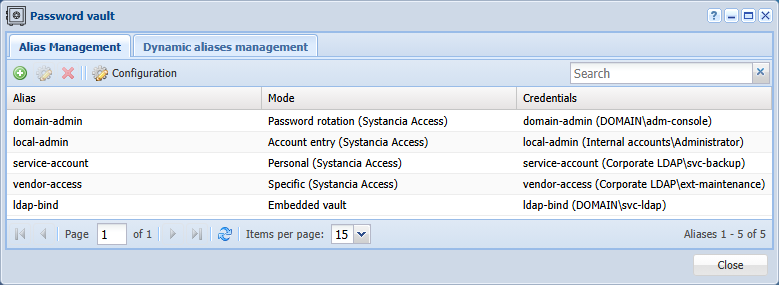
The list mixes the aliases of both mechanisms, and the Mode column tells them apart: CyberElements Access aliases carry the product name in brackets, the others are marked Embedded vault. The latter remain deletable but are no longer editable: the edit button goes out as soon as an embedded alias is selected.
Implementation order
- The CyberElements Access server is reachable, and a site holding an Edge Gateway serves it.
- The access configuration is saved, with the default credentials.
- The policies and the agents are in place if the secrets are to rotate.
- The managed accounts exist, for the aliases in Password rotation mode.
- The alias is declared, then attached to an application.
Limits
- An alias's family and mode are frozen at creation; only the secret and, depending on the mode, the application name stay editable.
- Renaming an alias's application name deletes the matching service on the CyberElements Access side before creating a new one: the operation is not a plain rename.
- Every write depends on the CyberElements Access server. If it is unreachable, the console no longer displays nor saves anything in this mode, whereas the embedded vault aliases go on working.
- The configuration holds one server only: there is neither a second server nor a failover.
The detail of the fields (configuration, alias forms per family) is in the module reference.