Blocked administrators list
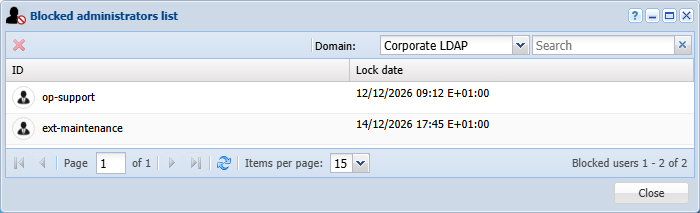
An administrator who fails to authenticate on their organisation's administration console too many times is blocked: the account is refused until someone unblocks it. This screen is that someone of last resort, from the system console.
Why this screen exists
Blocking is set in the organisation, and it is normally lifted in the organisation. But there
is a case where that is not enough: the one where all the administrators of an organisation
are blocked at the same time, or where the sole admin account is. Nobody can then open the
administration console, so nobody can unblock anybody.
The system console works around that deadlock because it depends on no organisation.
How to get there
Two paths lead to the same screen, and the second is the safer:
- from the system console synoptic;
- from Organizations, by selecting an organisation then clicking the Blocked administrators list button: the screen then opens already pointed at that organisation and at its local domain.
The button requires a completed organisation
In the Organizations module, this button stays greyed out as long as no row is selected, and it is greyed out too for an organisation whose creation is not complete.
What the system console does NOT allow here
One can only unblock
The button that blocks an account by hand is not offered in the system console: it is removed from the toolbar, whatever the context. Deliberately blocking an administrator remains an administration console operation: Blocked users.
Only local domains are offered
The domain selector of this screen lists only the local, visible domains of the organisation. An administrator blocked on an LDAP domain is therefore not unblocked from here: their organisation's administration console must be used. This is a difference with the same screen seen from the other console, which offers every domain.
What the list shows
One row per blocked account of the selected domain, with its login and its lock date. Select one or several rows, then Unlock. A confirmation is asked, and the list reloads once the operation is done.
As long as no domain is available, the whole toolbar stays inactive: that is the symptom of an organisation whose creation did not complete.
Not to be confused with two other locks
- The super-user account also locks itself after three failures, but for two minutes and automatically. It never appears in this list, and nothing allows it to be unlocked earlier.
- The users of an organisation (those of the portal) are blocked and unblocked in their organisation's administration console, not here. This screen shows only the accounts of the local domain, that is, those that open the console.
Limits
- No manual blocking from this console.
- No domain other than local.
- No information on the cause of the block: the list gives the login and the date, nothing more. The detail of the attempts is read in the organisation's event log.
- Unblocking does not reset the password: an administrator who has forgotten theirs is blocked again as soon as they have used up the number of attempts their domain allows.
The detail of the screen is in the module reference.