User groups
A user group is the unit rights are granted to. Bastion never gives an application to an account: it gives it to a group, through an access contract. The breakdown into groups therefore shapes all the configuration that follows.
A group belongs to one and only one domain. There is no cross-domain group: two domains that must receive the same access require two groups, and one access contract naming both.
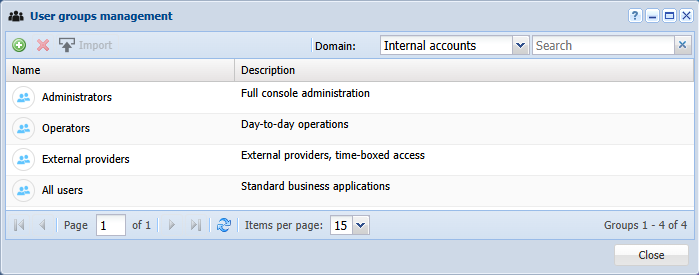
Management by domain type
Depending on the selected domain, group management differs, and the add buttons may be greyed out without that indicating a missing right.
| Domain | Who creates the groups |
|---|---|
| Local directory | The administrator, by hand. |
| LDAP in standard mode | The directory. The module is read-only (by design, not through lack of rights). |
| LDAP with manual group management | The administrator. The Description field stays hidden: it comes from the directory. |
| SAML domain | The administrator, each group carrying the external identifier of the group on the identity provider side. A CSV import or the API are available. |
External identifier of a SAML group
It is that identifier, not the displayed name, that must match what the IdP emits in its assertion. With a wrong external identifier, the group matches no user, whatever its name on the Bastion side, and no error is visible.
Manual group management of an LDAP domain
By default, the groups of an LDAP domain come from the directory, and the module is read-only. The Manual groups management box, in the domain's LDAP settings, changes this behaviour: groups are no longer taken automatically from the directory, and the administrator adds and removes the ones Bastion must know, under the name they carry in the directory. Only those groups can then receive accesses.
In this mode, the group's Description field is hidden: it comes from the directory.
Group breakdown
Two breakdowns usually coexist:
- by job or population: these are the ones that receive applications;
- by privilege level (administrators, privileged accounts, contractors), because these are the ones subjected to stricter access conditions or to a second factor.
Since an account can belong to several groups, the two breakdowns overlay without conflicting.
Import of SAML domain groups
A SAML domain exposes no directory to browse: its groups are declared by hand, each carrying the identifier its identity provider gives it. When there are many, two means avoid entering them one by one:
- a CSV import, which follows a specific format (columns, delimiters) described in the module reference. The import creates groups, it does not update them;
- the API, which exposes the creation of the groups of a SAML domain (see the API reference).
Limits
- A group cannot change domain: the attachment is made at creation.
- On a standard LDAP domain it can be neither created nor deleted from the console.
- Deleting a group still named by an access contract is refused; the console returns a report stating what was deleted and what was not.
The details of the form fields and of the special cases of deletion are described in the module reference.