Virtual machines
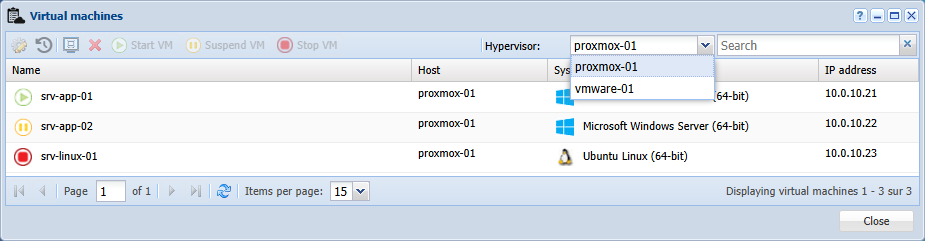
This screen is used to drive the virtual machines carried by a declared virtualisation host: reading them, changing their power state, opening their console, managing their snapshots and destroying them.
No machine is created here. What the list shows is what the hypervisor declares, machine by machine, and the window only ever shows the machines of one host at a time.
Availability
The module only appears once virtual machine management is enabled on the platform.
Hosts without virtual machines
That condition is narrower than the one of the hosts screen, which Isolate alone is enough to reveal. A platform where only Isolate is enabled therefore shows the hosts and not the machines.
Hypervisor selector
The list stays empty until a host is picked, and the first of the list is selected automatically when the window opens.
Docker registries excluded
The selector only lists hosts of the virtualisation type. The server applies the same filter: asked about a container host, it answers an empty list. A Docker registry has no machines: it only has images.
When no virtualisation host is declared, the selector says so, and the only possible action is to declare one.
Available actions
The three power commands exclude one another according to the current state: a running machine can be suspended or stopped, a suspended or stopped machine can be started. The order is submitted to the hypervisor, then followed in the background: the icon in the name column only changes once the hypervisor confirms the new state.
The properties record is read-only throughout: it recalls the name, the IP address, the state, the operating system, the size and the memory. Nothing can be changed there: this screen drives machines, it does not configure them.
Machine console
The console is the access of last resort: it shows the machine whatever happens to its network. It is only offered on a running machine, and the path differs with the host.
- On a VMWare host the console opens in both cases: if the host is attached to a site, the flow goes through an Edge Gateway of that site; otherwise the platform reaches the hypervisor directly.
- On a Proxmox host, going through a gateway is mandatory.
Proxmox host without a site
The button stays greyed out and its tooltip explains that the feature is unavailable because the host has no site configured. The correction is made in the host record, not on this screen: there, the box for authenticating through a site is ticked and a site is picked.
Machine deletion
Deletion is permanent on the host: this is not an inventory removal, it is the destruction of the machine by the hypervisor.
Deletion conditions
A machine can only be deleted once it is stopped and the hypervisor allows it to be destroyed. The refusal message names the most frequent case: the machine serves as a desktop clone of a Virtual desktop application.
The operation is then done from the application itself (emptying the desktop or deleting it), not this screen.
Limits
- No creation: a machine is created on the hypervisor, or by the cloning a Virtual desktop application triggers.
- No modification: the properties record is read-only.
- One host at a time; there is no consolidated view of every machine.
- Actions bear on one machine at a time: no multiple selection.
- Snapshots are only offered on a Proxmox host.
- The console of a machine is never offered on a stopped or suspended machine.
- Sorting only works on the name column; the other columns cannot be sorted.
The field-by-field detail is in the module reference.
The API endpoints that drive this object are described in the API reference.