SSH record contracts
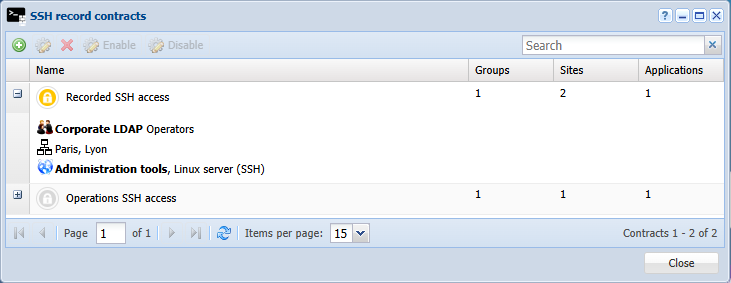
An SSH record contract brings together user groups, sites and SSH applications, and allows those users to launch them in direct access, without going through the user portal.
It is the object of the SSH chain by application, the one in which the user authenticates against CyberElements Bastion and in which the session receives the application's own settings.
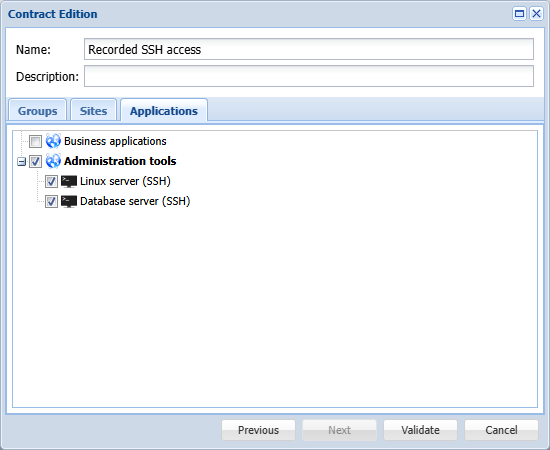
Eligible applications
The tree in the Applications tab only shows applications of the SSH type and of the privileged family. A standard SSH application never appears: direct access is a recording feature, and a standard application does not record.
User connection
The user points their SSH client at an Edge Gateway and authenticates there with their login, a slash, their domain, then their password. The platform then presents the applications of their contracts, and only theirs.
Examples of logon names
| Command typed on the user's workstation | Effect |
|---|---|
ssh 'op-support/DOMAIN:Linux server (SSH)'@gw-paris-01.domain.local -p <port> |
opens the application Linux server (SSH) directly |
ssh 'op-support/DOMAIN'@gw-paris-01.domain.local -p <port> |
shows the menu of authorised applications ("Available resources"); the user types the number of theirs |
sftp -P <port> 'op-support/DOMAIN:Linux server (SSH)'@gw-paris-01.domain.local |
file transfer to the application; in SFTP, the application must be named |
The password asked for is the domain password, followed by the one-time code if the domain requires one. When the application has several accounts, a second menu ("Available aliases") lets the user choose which one to use.
Contract sites and Edge Gateway
The contract names sites, the connection arrives through an Edge Gateway: the match is made at run time. A contract none of whose sites contains that gateway shows none of its applications, with no message to explain it: the list is shorter than expected.
Authentication
A wrong password counts towards the account lockout tally, exactly as on the portal, and a domain fitted with a one-time password generator demands one here too. SAML domains, on the other hand, are excluded: direct access requires an identifier and a password.
Applications in file transfer and in terminal
File transfer does not show the same applications as the terminal. The console does not indicate it.
A file transfer session cannot ask the user anything: there is no screen on which to put a question during an SFTP transfer. Applications that would require an entry are therefore removed from the list, without notice. Excluded are those whose file transfer is not enabled, those that are dynamic (the target is typed at launch), those that ask for a comment, those whose SSO is set to "ask", and those offering several non-personal aliases.
In terminal mode, conversely, only applications whose terminal is enabled appear, which follows from the general rule of the privileged SSH type, where recording is conditioned on the terminal.
Application missing from the list
Before suspecting the contract, check which mode is in use. The same application, the same user and the same contract give two different lists depending on whether the session is opened for a terminal or for a file transfer.
Session settings and differences from access contracts
The application is launched with its own configuration: SSO and password vault aliases, command to run at launch, file transfer permission, dynamic target, mandatory comment. When the application offers several aliases the user chooses, in terminal mode only.
Like the RDP without agent record contracts, this contract rests on a shorter foundation than the portal's access contracts: no access conditions, no restricted applications, no workflow. It carries no tokens either: the token chain belongs to RDP.
Enabling and disabling
A contract carries a state, and the toolbar can enable or disable a whole selection. A disabled contract immediately stops counting without losing its composition: this is the preferred operation to suspend an access.
Contract deletion
No condition prevents a contract from being deleted. Deletion is immediate and the access stops at once.
Category deletion
The Categories module does not look at SSH record contracts before deleting a category. A category used only here can therefore be deleted with no refusal, and the contract loses at once every application the category brought to it.
Limits
- A contract name is unique.
- The validation button stays inactive until at least one group, one site and one application have been selected.
- Only privileged SSH applications are eligible.
- No access conditions, no restricted applications, no workflow, no tokens.
- No alerts: alerts only exist in the agent chain.
- The SSH direct recording service must have been deployed on the Edge Gateways of the selected sites, from the SSH direct recording configurations, failing which the contract has no effect.
The field detail and the three tabs are in the module reference.