Relying parties
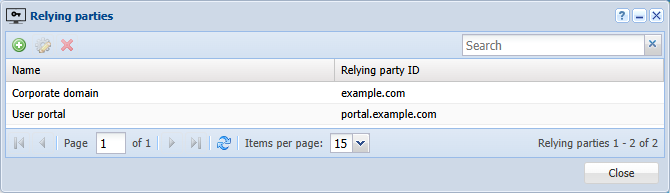
A relying party declares a domain name under which the platform agrees to handle FIDO2 security keys. It grants no right: it only indicates that a key may be enrolled or verified from a page served under this domain.
It is a prerequisite of the whole security keys chain: without one, the feature does not exist in the user portal, and no message explains why.
Matching against the origin
On every key enrolment and every key authentication, the platform compares the origin of the page (the domain name the browser has in its address bar) with the identifiers declared here, in two steps:
- it first looks for an identical identifier, case aside;
- failing an exact match, it looks for an identifier that is a parent domain of that origin.
That second step determines how the list should be filled.
Parent domain
Declaring the parent domain covers all its sub-domains. An identifier example.com covers
portal.example.com, auth.example.com and any other sub-domain. Enumerating hosts is
therefore unnecessary: one entry is enough in most installations, and is preferable, since
it remains valid after a new host is added.
IP address
An IP address never benefits from the parent domain search: when the origin is an IP address, only the exact match is attempted. A portal reached by its IP address therefore finds no relying party, and security keys do not work there.
Several matching identifiers
If the list holds both example.com and portal.example.com, an origin
portal.example.com matches the second exactly, and that one is used. But when several
parents fit with no exact match, the one retained is the first in alphabetical order of
identifiers, not the closest nor the most specific.
Order of implementation
- Settle the domain name or names under which users will actually reach the user portal.
- Declare the matching identifier here: the parent domain, preferably.
- Check that the authentication domain concerned is not an anonymous directory.
- Have users enrol their security keys from the portal.
- Add, where relevant, a FIDO2 access condition to the access contracts.
Unavailability of security keys
Two causes make security keys unavailable, with no message on the portal side:
- no relying party declared: the feature is disabled for the whole organisation;
- the user's authentication domain is an anonymous directory: there is no account to attach a key to.
Limits
- The name and the identifier are unique within the organisation, case aside. A duplicate of either is refused.
- Leading and trailing dots are stripped on save: the stored value may therefore differ from what was typed.
- Deleting a relying party is never refused, even if keys were enrolled from the domain it covered. Nothing warns, and authentications coming from that domain immediately stop succeeding.
- The module does not show which keys depend on which relying party: the security keys list carries no trace of it.
The field-by-field detail is in module reference.