Delegated administrator profiles
A delegated administrator profile defines which console screens a delegated administrator may open, with which level of right, and on which domains. It grants no access to an application nor to a session: it only concerns the console.
The account is declared elsewhere: it is a user declared as a delegated administrator. As long as no profile cites him, he logs into the console and sees nothing there.
Profile composition
The form assembles three lists, and the profile is only saved if the first two are filled:
- the delegated administrators concerned (at least one);
- the allowed modules, each with its level of right (at least one);
- the allowed domains, which may stay empty.
Scope of the domain list
The domain list only applies to four modules: authentication domains, user groups, users and blocked users. On those four screens, the delegated administrator only sees and modifies the domains of his profile. Everywhere else (the access contracts in particular) the list has no effect at all: an administrator holding write access on a module may name any domain there.
Granting permissions
Permissions are added one by one: each addition consists of picking a module, possibly a section, ticking or leaving the modification box, then adding the row to the grid. Two levels exist, and only two: read only and read-write.
Module sections
The Control center splits into Live streaming and Archives sections. For a module without sections, the only possible value is Whole module, and the drop-down does not appear. Granting a module without naming a section gives access to all its sections.
The global add button places every module at once, at the level ticked at that moment, and only in their default section, never in a particular one.
Combining profiles
A delegated administrator may be associated with several profiles, and he then cumulates the highest rights of each: if one profile gives a module read only and another gives the same module read-write, he gets read-write. Several narrow profiles are therefore preferable to one broad profile: splitting by job rather than by person avoids having to touch a profile every time someone joins.
Prerequisites between modules
Only two modules work solely alongside another one, and the console checks this on save, not while typing:
- the comments require a permission on the Control center (the whole module, or either of its two sections);
- the log data cleanup requires a permission on the logs.
In both cases one of the candidate modules is enough. The refusal names the offending module and the list of permissions that would unblock it; nothing is saved while a prerequisite is missing.
Modules offered
The drop-down only shows the modules the platform actually exposes, and three screens are absent from it in all circumstances: backup and restore, the API keys, and this module itself. They cannot be delegated.
The rest depends on the configuration:
- the two CyberElements Access screens (password monitoring agents and managed account usages) only appear in that vault mode;
- the five ACM screens only appear if ACM is allowed;
- the six screens tied to Workplace (SSO modes, firewall, resource access, VDI desktops, virtual machines, hypervisors) only appear if console merging is in place.
Platform state at entry time
The available choice depends on the state of the platform at the time of entry. Creating profiles before settling the vault mode or the Workplace association means revisiting them afterwards: the missing modules were not offered.
Order of implementation
- Declare the accounts as delegated administrators, or, for an LDAP domain, through an administrator group.
- Settle the settings that command the module list: vault mode, ACM, Workplace association.
- Create the profile, add its permissions, then its domains where relevant.
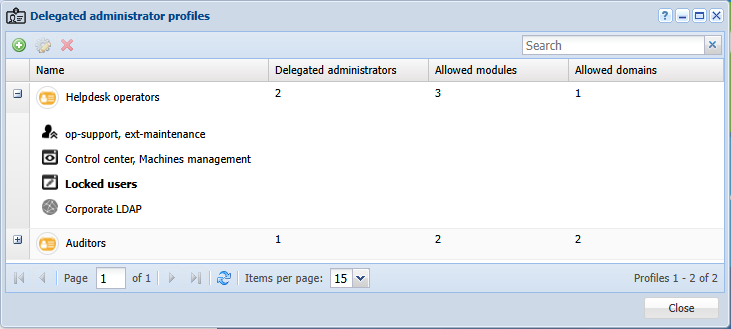
- Check the result by expanding the profile row: the console lists the read-only modules, the read-write ones in bold, and the domains.
Limits
- A profile name is unique within the organisation, on creation as on rename.
- A profile with no administrator or no module is not saved.
- Nothing signals that a profile overlaps another, nor that an administrator cumulates contradictory rights: the cumulation is read profile by profile.
- Permissions bear on screens only. They restrict neither the applications, nor the sites, nor the groups a delegated administrator may handle inside a screen he is entitled to.
- A domain added to a profile is taken into account without reconnection of the delegated administrator concerned; module permissions are not.
The detail of the three tabs and of the permissions grid is in module reference.