Isolate (Web)
Application fact sheet
| Video recording | Recording agent | CyberElements client | Desktop client | Direct access |
|---|---|---|---|---|
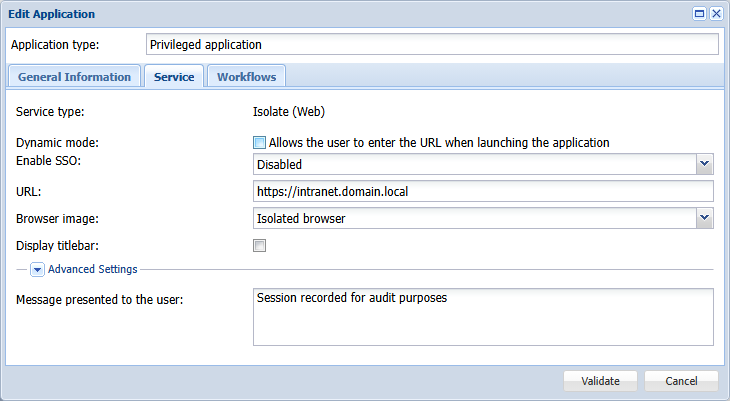
The Isolate (Web) type opens a web application in a containerised browser, created for the session and destroyed when it closes. The browser does not run on the workstation, which receives only its display: nothing the page loads, downloads or executes reaches it.
In the privileged family, that isolated browser is also recorded.
Edge Gateway capable of recording
The gateway is chosen when the session opens, with the recording requirement. On a site whose gateways are all of the Basic type, the privileged application therefore does not open, whereas its standard twin would. This is the first point to check when an Isolate (Web) works as standard and fails as privileged.
Prerequisites
- Browser Isolation enabled on the platform: without it, the type appears in neither family.
- A Docker host declared in Container or virtualization hosts.
- An image template declared in Image templates: it decides which browser is served. The field is mandatory.
- An external Isolate Engine server, reachable by the platform.
- An Edge Gateway capable of recording on the application's site, specific to this family.
- Edge Gateways prepared for recording the visited URLs: see Preparing the Edge Gateways.
- The application's URL, or dynamic mode.
Comparison with the other privileged types
| Criterion | Isolate (Web) | Web | Reverse proxy |
|---|---|---|---|
| What is protected | the user's workstation | the internal network | the internal network |
| Where the browser runs | in a platform container | on the workstation | on the workstation |
| Image template required | |||
| Target | a URL | a URL | a URL |
This type is therefore suited to cases where the risk comes from the content visited (browsing outwards, an untrusted site) rather than from network exposure. It also makes it possible to open sensitive internal web resources from an unmanaged workstation: the workstation only receives the display, and no file or page content reaches it.
Limits
- No recording agent: recording happens outside the target, and traceability does not reach into the page's content.
- No client: the application only launches from the user portal, never from the Cleanroom Desktop client.
- No direct access.
- SSO goes through an injection configuration.
- No file transfer: files can be neither uploaded to nor downloaded from the isolated browser.
- No FIDO or certificate authentication on the pages visited, and no camera or microphone.
- No password injection by the extensions of the user's browser: the password managers of the workstation do not reach the isolated browser.
- Browsing is not controlled: by following links, or with the title bar displayed, the user can reach other sites than the application's URL. With the title bar displayed, the browser is no longer in kiosk mode: the user may be able to disable the extension that records the visited URLs.
Pop-ups
The session opens in a new window of the user's browser: allow pop-ups for the address of the user portal, otherwise the browser blocks the window.
The details of the fields are in the module reference, and the variant without recording in standard Isolate (Web).
The API endpoints that drive this object are described in the API reference.