Apply the licence and certificates
Warning
This documentation does not cover web certificate management. For this topic, please refer to the following documentation: Apply a web certificate.
The Mediation Controller server requires at least the following to function:
- A licence
- Three certificates:
- One certificate for the SSL Router component
- One certificate for the Watchdog component
- One certificate for the CyberElements Bastion client (listed as a plugin in the console)
Information
The information provided on this page applies to all Mediation Controller servers, including those in a cluster configuration. For clusters, it is recommended to access the system interface via the actual IP address of the Mediation Controller server or via a DNS name that redirects to this actual IP address.
Licence Configuration
Access the Mediation Controller server's web interface with the URI /system.
Examples
If access to the Mediation Controller on its web IP address is 10.0.10.10, then access to the system interface will use the URL: https://10.0.10.10/system.
If access to the Mediation Controller is possible with a DNS name, for example cyberelements-bastion.domain.local, then access to the system interface will use the URL: https://cyberelements-bastion.domain.local/system.
Important !
For any changes to the password, licence, or certificates (SSL Router, Watchdog, and CyberElements Bastion client), connect to the actual IP address for clusters (RIP_MC_WEB_MASTER or RIP_MC_WEB_SLAVE).
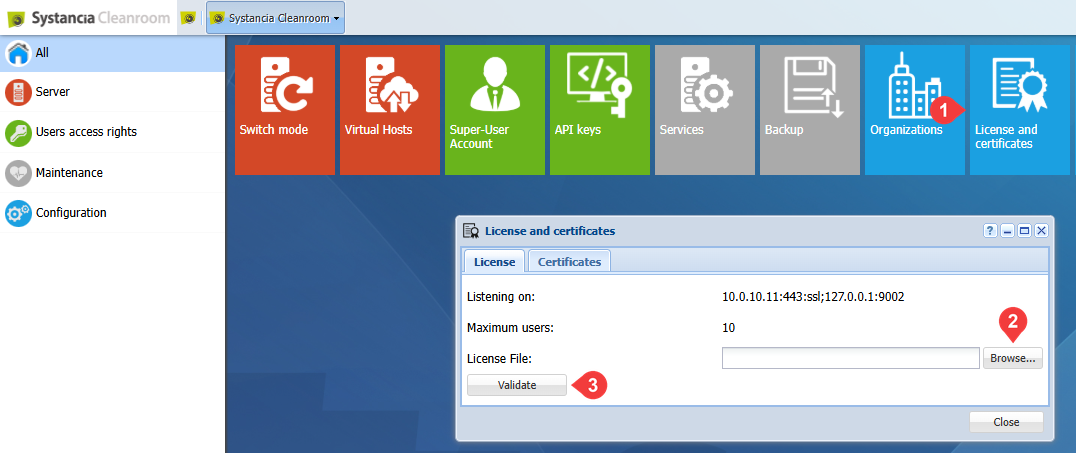
- Click on the
License and certificatestile. - Search for the licence file using the
Browse...button. - Validate the licence file.
The new licence is taken into account when the SSL server is restarted. If certificates are also to be applied, a single restart is enough, after the certificates (see below).
Configuration of certificates
Access the Mediation Controller server's web interface with the URI /system.
Examples
If access to the Mediation Controller on its web IP address is 10.0.10.10, then access to the system interface will use the URL: https://10.0.10.10/system.
If access to the Mediation Controller is possible with a DNS name, for example cyberelements-bastion.domain.local, then access to the system interface will use the URL: https://cyberelements-bastion.domain.local/system.
Important !
For any changes to the password, licence, or certificates (SSL Router, Watchdog, and CyberElements Bastion client), connect to the actual IP address for clusters (RIP_MC_WEB_MASTER or RIP_MC_WEB_SLAVE).
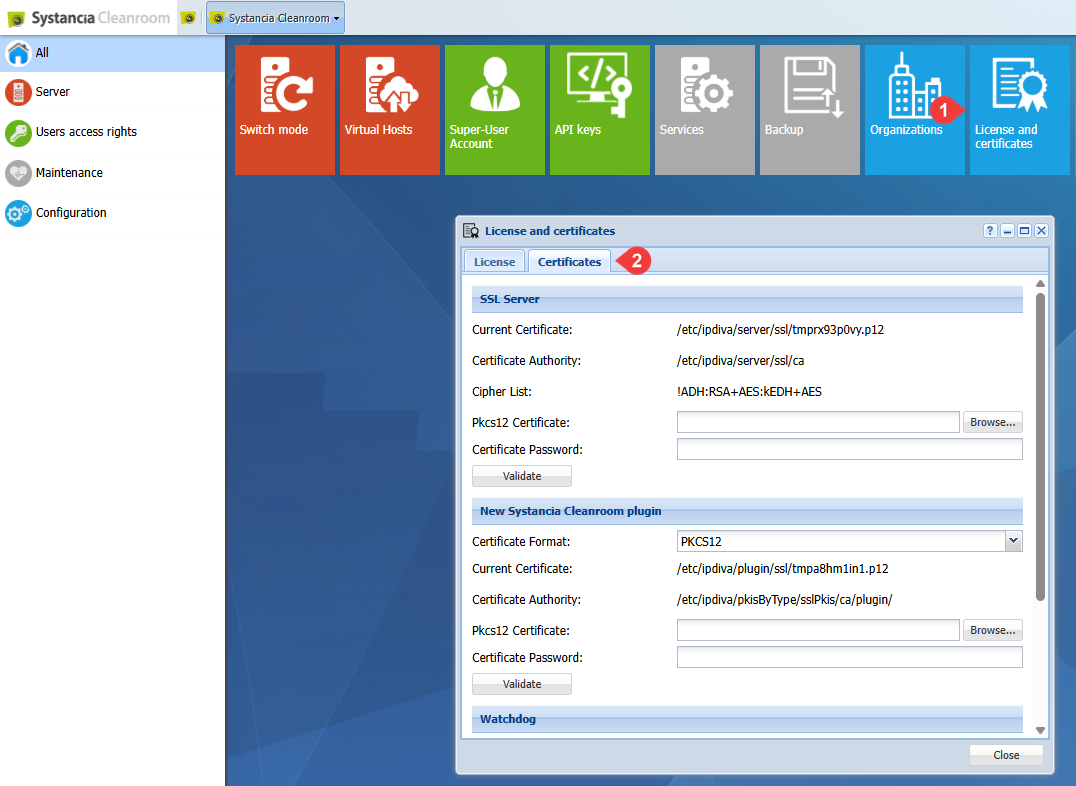
- Click on the
License and certificatestile. - Open the
Certificatestab. - Enter the three certificates with their associated passwords: SSL server, plugin, and Watchdog. Each certificate is validated with the
Validatebutton of its own section. - Close the window.
Attention
To apply the new licence and the new SSL Router certificate, you must restart it. If the platform is already in production, this action will disconnect all Edge Gateways, which will impact user sessions.
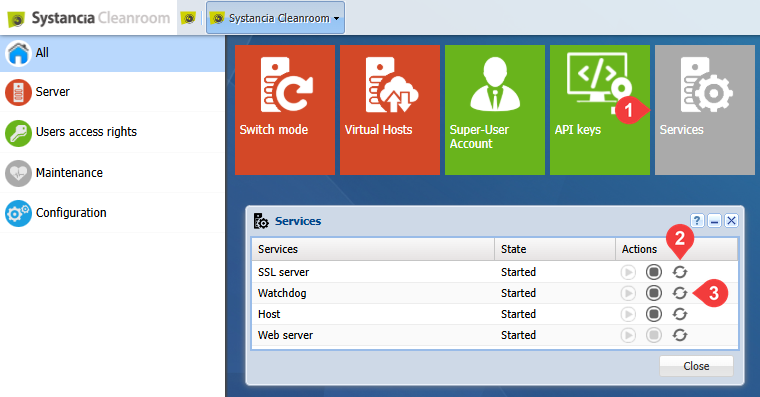
- Click on the
Servicestile. - Restart the
SSL server. - Restart the
Watchdog.