Association of domains
Association of domains links an authentication domain of CyberElements Bastion to a domain declared in Systancia Gate. It lets a user see, in a single portal, the applications of both products after one authentication.
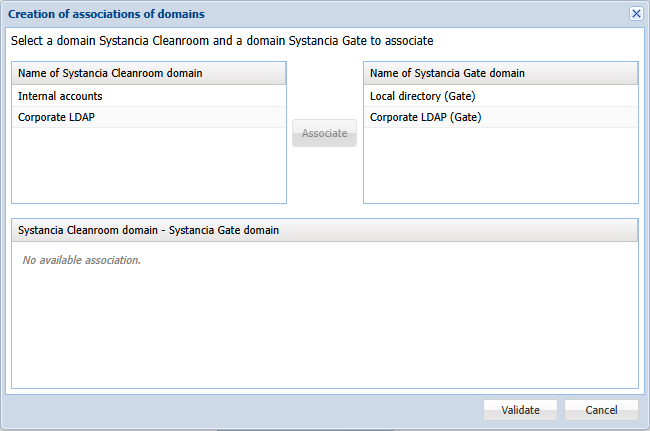
Order of implementation
The association is built top down, and each step conditions the next:
- Systancia Gate must be installed on the same platform and reachable: the console asks it for its list of domains when the creation window opens.
- An association of organizations must exist, and it is created from the system console. Without it, this module does not appear in the Configurations work panel.
- The domains to be associated must exist on both sides.
- The pairs of domains are then declared in this module.
Missing module
If the screen is absent from the Configurations panel, the cause is almost always the absence of an association of organisations, not a permission problem. That is the first point to check, before permissions.
Empty grid on the Gate side
The list of Gate domains is not a stored copy: it is requested from the neighbouring product each time the window opens. An empty grid therefore means either that there really is no free domain, or that Systancia Gate is stopped: the screen does not distinguish the two cases.
Gate technical domain
Systancia Gate's API v1 domain is deliberately removed from the list: it serves
programmatic calls, not users, and so has nothing to associate.
Uniqueness of associations
A domain is associated once, on each side: as soon as a pair is formed, both domains leave their respective grids. There is therefore no multiple association, and no Bastion domain shared between several Gate domains.
An association cannot be modified: it is deleted, then recreated.
Deleting an association
Deleting an association closes the Gate sessions in progress: in addition to removing the link, the platform asks Systancia Gate to disconnect the sessions opened under that pair of domains. The users concerned lose access to the Gate applications immediately.
Automatic removal
A periodic task removes associations whose Gate domain or organisation no longer exists. This task avoids keeping dead links after a deletion made on the Gate side; as a consequence, an association can vanish without any Bastion administrator having asked for it, and with no message.
Effect on login
When a user authenticates on an associated domain, the platform opens a session on the Systancia Gate side at the same time. The applications of both products then appear in the same user portal.
Refusal on the Gate side
A refusal on the Gate side fails the whole login. Before opening the session, the platform asks Systancia Gate whether the user is allowed to connect. A licence ceiling reached, a disallowed address or a rejected certificate on that side prevent the connection, including to Bastion applications, even though nothing in the Bastion configuration is at fault. This cause is the hardest to identify, because it is diagnosed in the other product.
Access rights
Access rights do not merge: each application remains subject to the rules of its originating product. A Bastion access contract grants no right on a Gate application, and vice versa. The association governs authentication and display, not authorisation.
Licence counting
Whether the two products share a single licence count or keep two separate ones is decided on the association of organizations, in the system console.
Limits
- A domain can belong to only one association.
- No modification: an association is deleted and recreated.
- The module depends entirely on an association of organisations created from the system console, and disappears along with it.
- The list of Gate domains is read live: it is empty if the neighbouring product does not answer, without the cause being displayed.
- The association carries no rights: authorisations remain specific to each product.
Field-by-field details are in the module reference.