Services
The Services screen is the platform's control desk: four rows, three actions per row, and nothing else. It is used to restart a component after a configuration change, or to bring it back up after an incident.
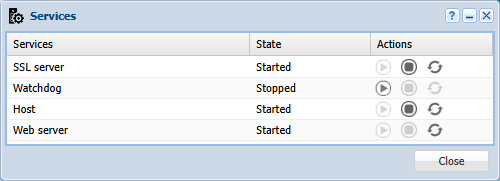
The four rows, and what they cover
The list is fixed: it is not fed by what runs on the machine, it is decided by the product.
- SSL server: the component that receives connections from access clients and gateways. It is the one to restart after applying a licence or a certificate.
- Watchdog: the supervisor of the other components.
- Host: the server itself.
- Web server: the one that serves the user portal and both consoles.
What the State column really says
Two of the four states are not measured
Only the SSL server and the Watchdog are actually queried: their state reflects what the machine answers. Host and Web server always display Started, whatever the circumstances: it is a fixed value, not a measurement. Do not conclude from this column that an incident does not affect those two rows.
Visible consequence: for those two rows, the Start action stays permanently greyed out and Restart is always offered.
The web server cannot be stopped
Only the restart is offered to it
The Stop action of the Web server row is permanently greyed out: it is that server which serves the console from which the order would be given. Only Restart remains, and it cuts sessions for the duration of the restart.
An action takes twenty-five seconds, whatever happens
After a click, the window is covered by a Loading... overlay for twenty-five seconds, then re-reads the state of the four services.
This delay is not a wait for the operation to end
It is a flat delay, chosen to give the service time to complete. It does not mean the operation succeeded: a failure produces no message. The only verdict is the state displayed after the twenty-five seconds (and, for two rows out of four, that state means nothing).
What the grid does not do
Rows cannot be selected, columns can neither be sorted nor moved: actions are triggered directly from the icons. This is deliberate: the screen is a control desk, not a list to explore.
When to use it
- After applying a licence or a certificate: the console itself announces that the SSL Router must be restarted.
- After an incident on the SSL server or the watchdog, whose state is the only one of the four actually reported.
Changes to virtual hosts restart the web server by themselves: there is nothing to do here afterwards.
Limits
- Four services only: no other component of the platform can be driven here.
- The state of two of them is not measured.
- No feedback on the outcome of an action.
- No history in this screen: the actions carried out are, on the other hand, recorded in the system console logs, which offer a dedicated filter.
Dependent sessions are interrupted
Stopping or restarting a service cuts the sessions that depend on it. Plan the operation during a maintenance window announced to the users.
The detail of the columns and of the icons is in the module reference.