Logs
The system console logs record what happened in this console: who connected to it, when, from which address, and what configuration changes were made in it. They are read-only.
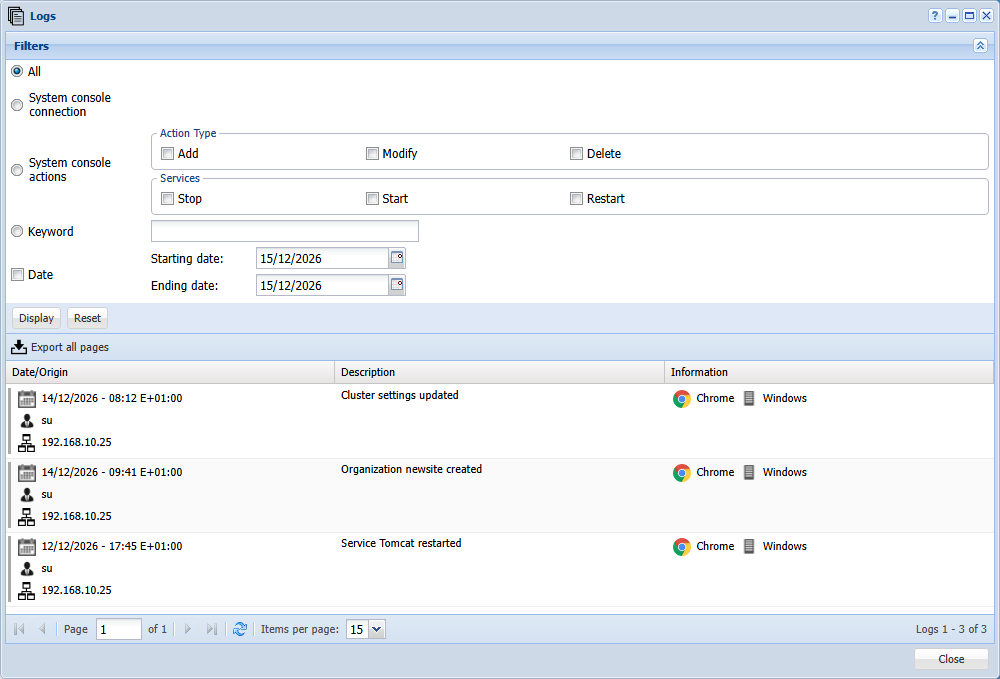
What they contain, and what they do not
Two families of entries, and two only.
- The connections to the system console: session opening, authentication failure, disconnection, with the address of the caller.
- The configuration actions carried out here: creation, modification and deletion of objects (organisations, PKIs, virtual hosts, licence, certificates, logger settings) and the actions on the services.
Nothing that happens inside an organisation appears here
No user connection, no application launch, no session, no recording. Those events live in the event log of the organisation concerned (Logs) and the two logs never meet.
A shared screen, with criteria that are not shared
The administration console carries a module of the same name: it is the same screen, but its search criteria differ.
- The Information search mode (the one that filters by connection, resource launch, gateway or password) is not offered here. What it designates does not exist on the system side.
- Two groups are specific to it: System console connections and System console actions, the latter allowing sorting by action type and by action on a service.
- In this context, session actions bear the name of the services (Stop, Start, Restart) where the administration console speaks of killing, pausing and resuming a session.
What feeds syslog and email
It is these logs, and only these, that the logger settings send to syslog or by mail when their switches are armed. The wording of those switches speaks of "platform events", which is misleading: their scope is that of this page.
The text of each of these logs, as a syslog server receives it, is given in System console events.
Limits
- No purge from this screen: one consults, filters and exports, nothing is deleted.
- No automatic retention is offered by the system console.
- The export covers the whole filtered result, not only the displayed page, but there is no scheduled export.
- The logs do not cross those of the organisations: no view brings a system action and its effect inside an organisation together.
The detail of the columns, of the filters and of the export is in the module reference.