SSH (Secure Shell)
Application fact sheet
| Video recording | Recording agent | CyberElements client | Desktop client | Direct access |
|---|---|---|---|---|
The SSH type opens a terminal in the workstation's SSH client, through the platform. Recording is performed by the Edge Gateway: the target has nothing to install.
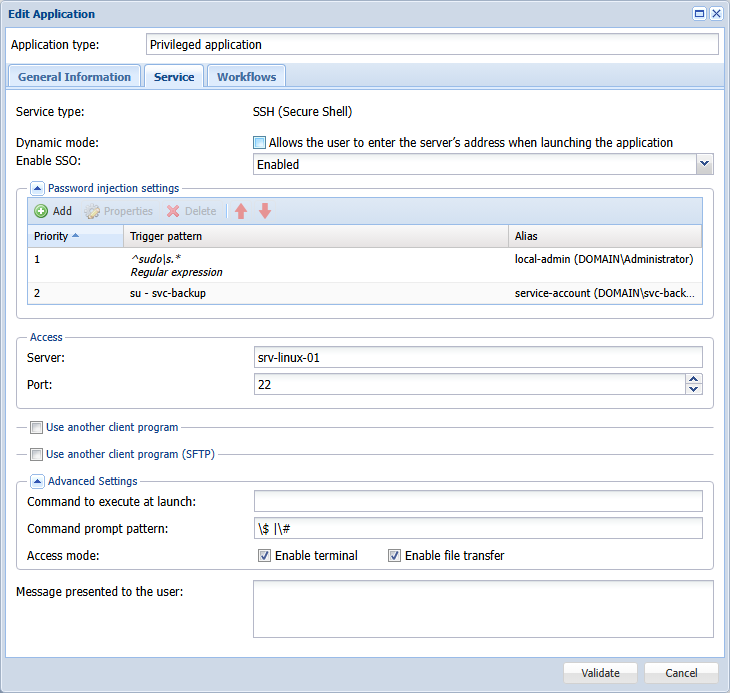
This is the native-client SSH type: the terminal, and file transfer over SFTP. The Access mode field carries these two possibilities, which can be combined: enabling the terminal (enabled by default) and allowing file transfer. When both are active, the user chooses at launch.
Advanced SSH uses
X11 forwarding, port forwarding and running a remote command are reserved for standard applications: their fields are not offered on a privileged application. Specific to the privileged application, on the other hand, are the access mode (terminal, file transfer, or both at the user's choice) and session recording. A need for traced port forwarding therefore cannot be met on this application: it requires a trade-off between the function and the recording.
Traced events
Recording is always active. It carries the terminal's keystrokes and session events; a file transfer access additionally produces the metadata of the SFTP session: the directories and files viewed or deleted.
Two disjoint event families
The SSH session family does not overlap the graphical one: it contains no clipboard, window or launched-program events, as they make no sense on a terminal.
Comparison with HTML5 (SSH)
| Criterion | SSH | HTML5 (SSH) |
|---|---|---|
| Client on the workstation | required | none |
| HTML5 Gateway | not needed | mandatory |
| File transfer | over SFTP, depending on the access mode | from the session in the browser |
| Assistance session sharing |
SSH suits cases where the native client matters; HTML5 (SSH) suits occasional access, from an unmanaged workstation, or cases where assistance must be possible.
Direct access
The type is compatible with direct access: the user connects with their usual SSH or SFTP client, without going through the portal.
Eligible applications
An application for file transfer only, with the terminal disabled, can also be used in direct access.
Limits
- The client is required: there is no browser access for this type.
- No recording agent: recording is done by the Edge Gateway, and traceability does not reach inside the target machine.
- No session sharing: assistance covers only the three HTML5 types.
- With the terminal disabled, recording only carries the metadata of the SFTP session (directories and files viewed or deleted).
Passed credentials and SAML domains
Passing the user's credentials assumes the platform knows their password, which is not the case on a SAML domain, where it is entered at the identity provider. For those users, plan an SSO that takes the credentials elsewhere: entry at launch time, or an alias from the vault.
The details of the fields are in the module reference.
The API endpoints that drive this object are described in the API reference.