Languages
This screen sets the language of the interfaces served by the platform. "The interfaces", in the plural: the system console, the administration console and the user portal may each have their own.
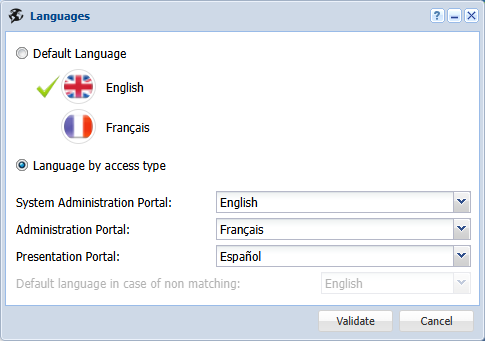
One language for everything, or one language per portal
Two exclusive modes, and the second is the only one that distinguishes the portals.
- Default language: a single language applies everywhere. Two choices: English or French.
- Language per access type: each portal has its own.
The system administration portal appears only in this console
Seen from the administration console, this window offers only two portals: administration and presentation. The system console adds its own, and that is the only difference between the two screens. An organisation therefore cannot change the language of the system console, which is consistent: that console does not belong to it.
The three portals do not offer the same languages
This is what to know before promising a language to somebody.
- The system administration portal and the administration portal offer English and French, plus the value Browser language settings.
- The presentation portal (the user portal) offers more: German, English, Spanish, Swedish and French, plus the same browser-following value.
Both consoles speak only French and English
This is not a restriction of this screen, it is what the product can do. No other language exists for the administration console nor for the system console, whatever the browser language.
What the fallback language is for
Choosing Browser language settings makes the interface follow the language declared by the visitor. The default language in case of no match covers the case where that language is not served; it offers only English and French.
This field is enabled only when it is useful
As long as no portal is set to follow the browser, the list stays greyed out and its value is not saved.
What happens on saving
The change is taken into account immediately server-side, but the open page stays in its old language until it is reloaded.
The reload is offered, never imposed, and not for everything
A confirmation asks whether the page should be refreshed, but only when the setting concerns a console: the default language, that of the system administration portal or that of the administration portal. Changing the language of the presentation portal offers nothing: the change is observed by reopening the user portal.
No service is restarted, and no session is cut.
Limits
- Two languages only for the consoles.
- The setting is global to the platform: it is not broken down per organisation from this screen. An organisation sets the language of its own portals in Languages, on the administration console side.
- The language of the emails sent by the logger settings follows that of the system administration portal, not that of the recipient.
- Nothing is translated in the content entered by administrators: only the product labels change language.
The detail of the fields is in the module reference.