Request history
The request history logs what ACM actually did: who asked for which alias, from which agent and for which executable, and what was answered. It is the only screen that shows the ACM chain in operation: the other modules only show what was declared.
Every request produces a row, whether it succeeded or not.
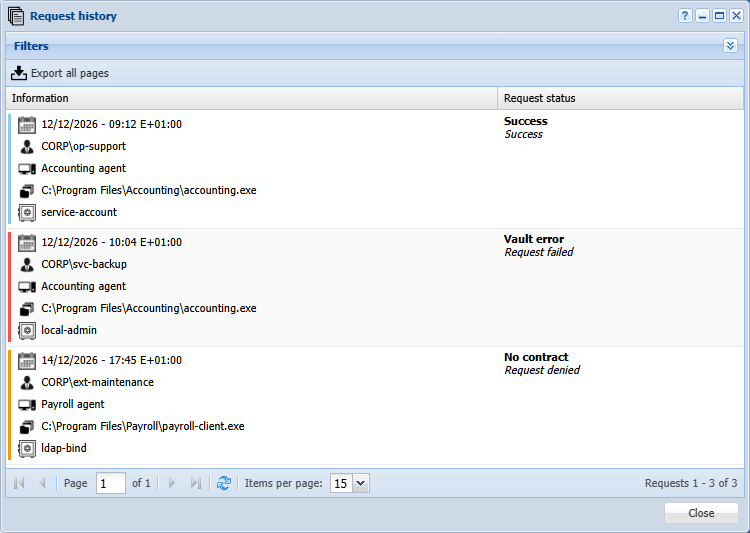
Request statuses
The status indicates the step of the chain at which the request stopped, which makes this screen a diagnostic tool and not merely a log. Results fall into three families, and each names a precise step of the chain.
- Success (the secret was handed over).
- Request denied (the chain stopped on a rule):
- No application: the calling executable is declared nowhere, and no contract accepts every executable;
- No contract: no contract covers the agent, the account, the alias and the executable of this request all at once;
- Request denied: a contract matches, but its period restrictions are not satisfied;
- Unknown alias: the requested alias does not exist.
- Request failed (the chain stopped on an error): invalid parameters, vault error (the secret could not be read) or server error.
No contract and Request denied
No contract signals an incomplete scope: the missing element must be added to a contract. Request denied signals that the scope is right but the time, day, month or date is not. The two statuses call for corrections in different places.
Missing dimension not indicated
The row carries the four elements of the request, but the platform does not indicate which one was not covered: it records that no contract brings them all together. The diagnosis consists of taking the row and comparing it with the contracts, dimension by dimension.
Filters and export
- Filtering by status family, by keyword (searched in the identifier, the alias, the application and the agent) or by period, the three content modes being mutually exclusive.
- Exporting the result of the current filters to CSV, and not just the displayed page.
Export time zone
The grid displays the request date in the console time zone; the export writes it as it stands. Comparing the screen with the file may therefore show a gap that is only due to the time zone.
Limits
- The history is a log, not supervision: nothing in it triggers an alert or a notification, however many refusals occur.
- There is no purge specific to this module; rows accumulate.
- The keyword does not search the date: filtering on a period is done through the date filter.
- A row records the invoked identifier, not the account that actually exists on the machine: this is what allows a typing mistake in ACM users to be spotted.
The detail of the fields (columns, filter panel and export) is in the module reference.