Backup
This screen backs up and restores the whole platform: its system configuration, its organisations and their databases. That is what separates it from the module of the same name in the administration console, which knows only one organisation.
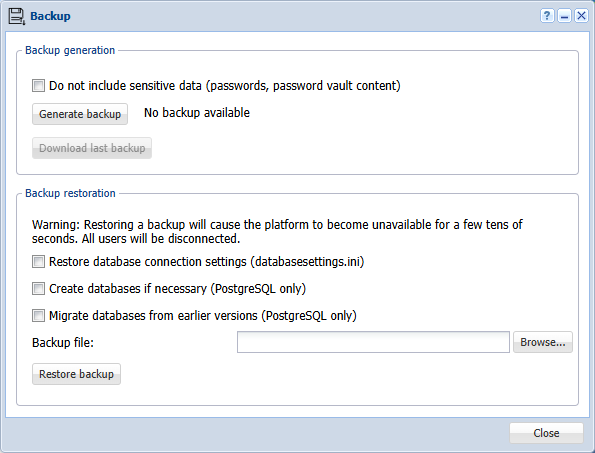
Two options exist only on this side
The restore group carries, from the system console and from it alone, two extra checkboxes:
- Restore the database connection settings: also restores the database connection configuration, and not only their content;
- Create the databases if necessary: creates on the target server the databases that are not there yet.
Those two boxes are what makes it possible to bring a platform back up on another server. Without them, a restore assumes that the databases already exist and that the server knows how to connect to them.
What a backup contains, and what it does not
The Do not include sensitive data option produces a backup of the configuration only.
A backup without sensitive data does not bring a platform back into service
It contains neither the passwords nor the vaults. It is a configuration record, not a recovery means. The console warns, moreover, when such a file is restored, that the features that depend on them (including portal access) will become unusable, and only carries out the operation after confirmation.
Restoring cuts everybody off
The platform becomes unavailable, and the consoles with it
The screen announces it: restoring makes the platform unavailable for a few tens of seconds and disconnects every user. During the operation, the system console itself refuses to load: that is normal, and there is nothing to do but wait and reconnect.
Microsoft SQL Server is handled separately
SQL Server databases do not travel inside the file
When the databases are of the Microsoft SQL Server type, two warnings appear. At generation, the databases are backed up on the SQL servers themselves, in their default folder, not in the downloaded file. At restore, the operation does not act on those databases: restoring them remains the responsibility of the SQL server administrator.
In which order to bring a platform back up on another server
- Install the platform on the new server, and apply its licence and certificates to it.
- Restore the backup with Restore the database connection settings ticked and, if the databases do not exist yet, Create the databases if necessary.
- Check the virtual hosts, which describe the network exposure of the old server.
- Reconnect and check the creation state of the organisations.
Limits
- The console keeps only the last generated backup: the download button targets it, and nothing allows an older one to be retrieved. Downloading the file after each generation is therefore the only way to keep several.
- No scheduling is offered by this screen: every backup is triggered by hand.
- No integrity check of the file is offered before a restore.
- On a cluster, a backup generated on the other node is reported as such by the status line, without its date being given.
The detail of the fields and of the states is in the module reference.