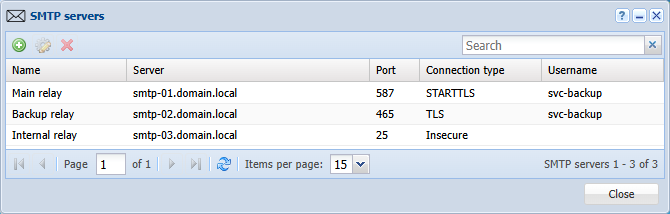
SMTP servers
An SMTP server is the means by which the platform sends its e-mails. The module only declares it: it sends nothing by itself, and declaring a server triggers no notification.
Other screens use it, and each of them names the server to use. A server that is declared and cited nowhere is inert: that is not an error, and nothing signals it.
Uses of an SMTP server
Six mechanisms send e-mails, and each one picks its server independently of the others:
- the notification profiles;
- the OTP generators that send a code by e-mail;
- the automatic logs;
- the workflow notifications and the API key expiry reminders, both set in the general options;
- the authentication domains, for the messages they address to users.
There is no "default" server: each of those screens requires a server to be named explicitly, and none of them creates one.
Configuration test
The module sends a test message without saving anything, using the values currently typed in the form. It is the only way to check a configuration before saving it; the order is therefore: type, test, then validate.
Mail service
The test takes the same path as real deliveries. The console does not communicate with the SMTP server directly: it goes through the platform's mail service. If that service is restarting, the test waits and retries for about fifty seconds before concluding. A slow answer therefore does not mean the remote server is slow.
Test sender address
The test sender address is not the one used by real deliveries. The test uses the Reply recipient field as its sending address, and that address is not kept with the server. A server that restricts sending addresses may therefore reject the test while accepting real deliveries, since their sender is set by whichever screen triggers them.
Deleting a server
The protection against deletion is partial.
Deletion is refused when the server is cited by an automatic logs schedule, by a notification profile or by an OTP generator. The console then names the servers it did not delete.
Unprotected uses
The other uses do not prevent deletion and are lost without a message. A server cited by an authentication domain, by the workflow notifications or by the API key reminders is deleted without any warning: the reference is emptied. The setting that carried it stays active but without a server, and the first symptom is an e-mail that never arrives. Before deleting a server, check those three uses by hand.
Limits
- The password is never returned to the console. When modifying, leaving it empty keeps the stored one; there is no way to read it back.
- A server name is unique within the organisation, and a duplicate is refused both on creation and on rename.
- The module does not test deliverability: a successful test proves the server accepted the message, not that it delivered it.
- There is no visible queue, no delivery history and no failure notification: an e-mail that does not leave shows up in no screen of the module.
Availability
The module is always present.
The field-by-field detail (list, form, test block) is in module reference.