Logger settings
This screen decides what leaves the platform: the traces sent to a syslog, local or remote, and those sent by email. It also carries the switch that allows or forbids organisations to feed their own syslog.
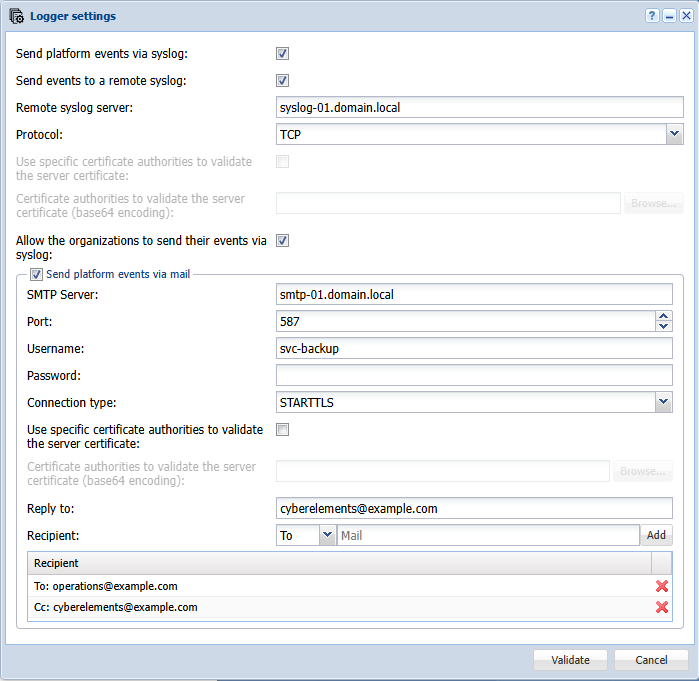
What actually leaves, and what does not
This is the most important point of this screen, and the wording of the checkboxes does not say it.
The syslog and the mail of this screen carry ONLY the system console logs
Both switches announce "the platform events". What they send are the entries of the system console logs: the connections to that console and the configuration changes made in it. No organization event (no user connection, no application launch, no session recording) leaves through this path.
Organisation events belong to an entirely different mechanism, described below.
Three flows, three different switches
| What leaves | What allows it |
|---|---|
| System console logs, to syslog | the Send platform events via syslog box, here |
| System console logs, by email | the Forward platform events via mail group, here |
| An organisation's logs, to syslog | the Allow the organizations… box here, and the corresponding setting in the organisation's general options |
The authorisation given to organisations is a lock, not a setting
The Allow the organizations to send their events via syslog box sends nothing itself: it makes possible the setting on the organisation side. As long as it is unticked, the corresponding boxes in the organisation's general options stay greyed out, and the value saved by the organisation is brought back to "no" anyway. Unticking it therefore cuts the sending of all organisations at once.
Once ticked, the organisation has two distinct settings: its administration logs, and its session events.
Syslog: local first, remote next
The main switch sends to the syslog of the machine. Forwarding to a remote server is a second box, which only makes sense after the first, and which opens the server name and the protocol.
Only TLS protects events in transit
Of the three protocols offered, TLS is the only one that encrypts. TCP and UDP send the events in clear text over the network.
In TLS, an additional block allows one's own certification authorities to be supplied to validate the syslog server certificate. The expected file is in base64 format and must weigh less than 20 KB; otherwise the console answers that it is not a valid certificate file. This block is required in TLS: without an authority, the syslog server is refused and no event reaches it (see Transport).
The port is guessed if it is not given
A server name without a port receives the default port of the chosen protocol: 6514 in TLS, 1468 in TCP, 514 in UDP. To impose another one, write it after the name.
The remote server receives every message that Bastion writes to the syslog of the machine: the system console logs, the events of the organisations allowed to send theirs, and the technical messages of the platform. Their list and their format are given in Sending events to a SIEM.
Email: an SMTP server, and at least one recipient
The mail group carries its own SMTP configuration: it is independent of the organisations', set in their administration console. The same security choice arises there, with the same consequences, and the same certification authority block.
At least one recipient of type To is required
The list accepts To and Cc recipients, but saving is refused if no To recipient has been added. A malformed or already present address is refused when added.
Adding a recipient is not enough
The list is sent only when the window is validated: a recipient added to the list but not saved is lost when the window closes.
What the screen does not say
- The SMTP password is rewritten only if it is entered: leaving it empty keeps the one in place.
- The language of the emails sent is that of the system console, set in Languages, not that of the recipient.
- The first message sent after an activation is the one that records the activation itself.
Limits
- No filter: everything or nothing is sent, there is neither a selection by event type nor a severity level to choose.
- One remote syslog server only, one SMTP server only.
- No test send is offered from this screen.
- The server validates almost nothing: a saving failure is reported without giving its reason.
The detail of the fields is in the module reference.