Applications
An application declares an access: the target machine, the protocol and the level of traceability. It is the object users see in their portal and launch; the rest of the configuration serves to bring them there.
An application grants no rights by itself. It becomes reachable when an access contract assigns it to a group.
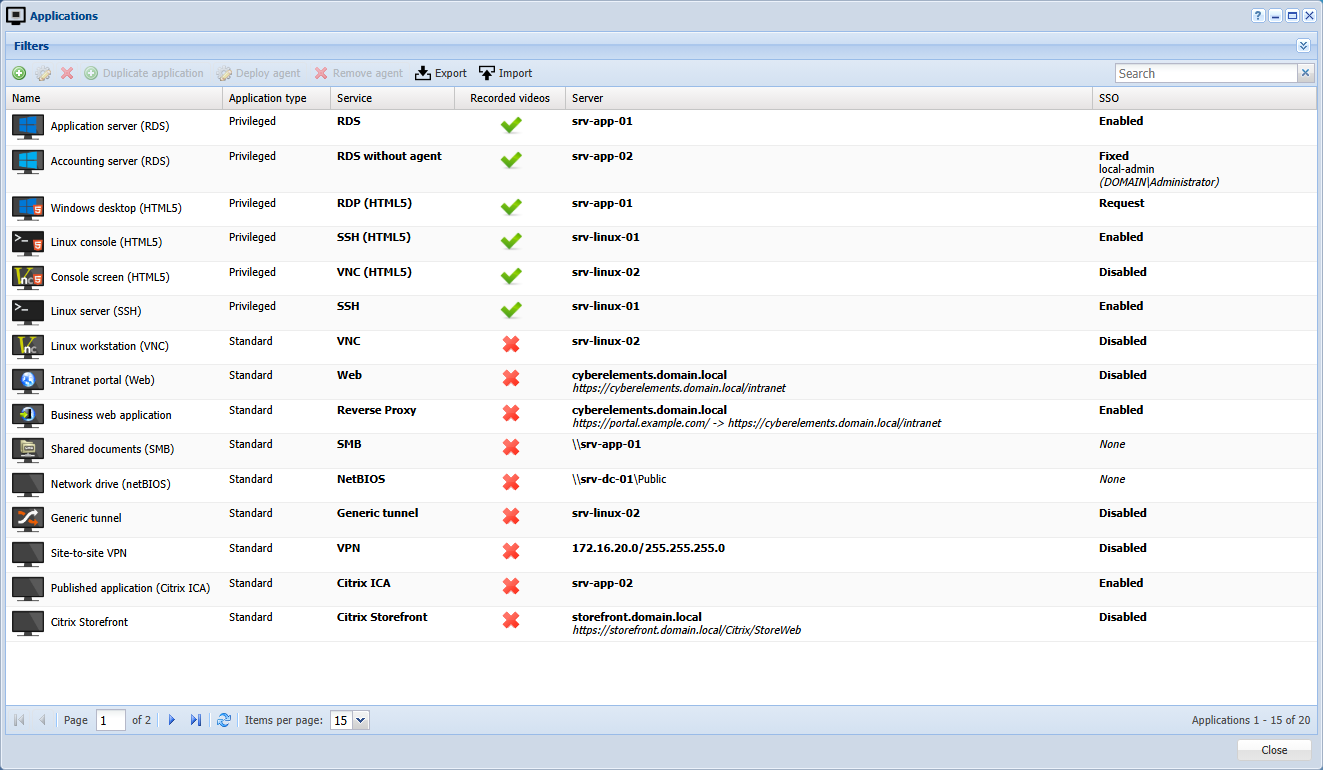
Application families
The families differ in traceability. This choice governs all the others and is made at creation.
Privileged applications record what happens during the session: the screen video, the events, and keystrokes depending on the type. They are intended for privileged access and sensitive targets, the product's core purpose.
Standard applications do not record. They only publish an access and suit everyday uses: remote working, a file share, an intranet.
Choice of family
The same protocol exists in both families: there is a privileged RDS and a standard RDS, a privileged SSH and a standard SSH. The difference lies not in the technology but in what must be provable afterwards. A standard application cannot become privileged: the type is chosen at creation.
Service types
Each family has its own types. The fact sheets cover, for each of them, what it is for, what it requires and what it cannot do.
Privileged applications
| Type | Video recording | Recording agent | CyberElements client | Desktop client | Direct access |
|---|---|---|---|---|---|
| HTML5 (RDP) | |||||
| HTML5 (SSH) | |||||
| HTML5 (VNC) | |||||
| Isolate (Web) | |||||
| MCP | |||||
| RDS | in agentless mode | ||||
| Reverse proxy | |||||
| SSH | |||||
| Virtual desktop | depending on the access mode | ||||
| VNC | |||||
| Web |
Standard applications
| Type | Video recording | CyberElements client | Desktop client |
|---|---|---|---|
| Citrix ICA | |||
| Citrix Storefront | |||
| Generic tunnel | |||
| HTML5 (RDP) | |||
| HTML5 (SSH) | |||
| HTML5 (VNC) | |||
| Isolate (Web) | |||
| netBIOS | |||
| RDS | |||
| Reverse proxy | |||
| SMB | |||
| SSH | |||
| Virtual desktop | depending on the access mode | ||
| VNC | |||
| VPN | |||
| Web |
Operating modes
Three operating modes combine with the types and determine what has to be deployed on workstations and on targets.
- Without a client: access happens in the browser. This is the case of the HTML5 types, the Reverse proxy and the Web type: nothing to install for the user. Only the HTML5 types need an HTML5 Gateway to run; the Reverse proxy and the Web type do not.
- With a client: the CyberElements client launches the application in its native program: RDP client, SSH client, Citrix client. This mode offers a better experience and device redirection, but requires software to deploy.
- With an agent: a recording agent installed on the target machine adds the fine-grained traceability that the flow alone cannot give. It only applies to certain privileged types.
Recording scope
Without an agent, recording covers what travels (the image, the keystrokes). With an agent, it also covers what happens on the machine: the windows opened, the processes. A type without an agent therefore gives no application-level traceability: the type and the mode are chosen first, based on what must be provable.
Implementation order
- The target exists and is reachable from an Edge Gateway of the intended site.
- The type's prerequisites are in place: HTML5 Gateway, hypervisor, RDS server, containerisation environment, depending on the case.
- The category that will classify it exists: it cannot be created from the application form, and it will allow the application to be assigned in bulk.
- The application is declared here, in its category.
- An access contract assigns it to groups: it only becomes visible at this step.
An application declared but placed in no contract is visible to nobody. The console does not treat this as an error and does not report it.
Dependencies
An application is referenced by several objects, which explains refusals to delete:
- the access contracts assigning it;
- the notification profiles;
- the assistance profiles;
- the executable authorisation contracts.
Import and export
The application list exports to CSV and imports back, which allows a configuration to be replayed from one environment to another, or applications to be created in series.
Import without update
The mechanism does not modify existing applications and does not carry over static SSO settings. Re-importing a file produced by an export therefore synchronises nothing: the import adds what is missing and leaves the rest as it is.
The import file follows a specific format (columns, delimiters), described in the module reference.
Limits
- The application type and the service type are chosen at creation.
- An application referenced by any of the objects above cannot be deleted while it is named.
- Access depends on the site's Edge Gateway: a target no gateway can reach is not reachable, whatever the application's configuration.
The details of the fields (list, filters, form, per-service-type tabs, agent actions, import and export) are in the module reference.
The API endpoints that drive this object are described in the API reference.