Super-user account
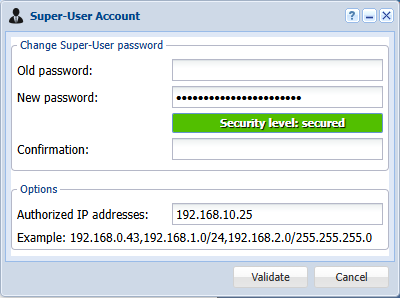
The su account is the only one that opens a session on the system console. This screen is the only place where it can be acted upon: its password is changed here, and here the addresses from which it may connect are restricted.
A single account, and nothing to replace it
There is only one super-user. The system console accepts no other login, and nothing in the product allows a second one to be declared, nor part of its rights to be delegated. This account belongs to no organisation and has no authentication domain: it is therefore not managed from the administration console.
Its initial password is the one supplied when the platform was installed. Changing it is the first thing to do on a new platform.
No other account can take over
The consequence of this uniqueness deserves to be stated before anything is touched: losing access to this account means losing access to the system console, hence to the licence, the organisations, the services and the backups. Nothing in either console restores it.
What the strength gauge imposes
The new password is scored as it is typed and saving is refused below the correct level: the message Password too weak is displayed and nothing is changed.
The score rewards length and a mix of character types. It penalises repeated characters, and
above all resemblance to the account name: a password that contains su or starts with it
loses a large share of its score. That is the most frequent reason for a password being refused
when it looks strong.
Restricting addresses: what is really at stake
The list of allowed addresses is checked at login, before the password is even examined. An address outside the list receives the message Incorrect login or password or forbidden IP, a message that does not say which of the two causes applies.
Leaving the list empty imposes no restriction: that is the default state, and it is also the only way back from this screen.
The address checked is the one the server sees
Behind a NAT, a reverse proxy or a load balancer, the address observed by the server is not that of the administrator's workstation. Entering the workstation address then forbids the system console to everyone, and there is no other account to undo the setting. Check the address actually seen (for instance in the system console logs, which record it at every connection) before saving a restriction.
Only IPv4 addresses are recognised
The three accepted forms are a single address, a CIDR prefix and a subnet mask, all in IPv4. An IPv6 address is not understood by the check.
The two groups are independent
Changing the addresses without touching the password is done by leaving the three password fields empty; the reverse works too. A single Validate button applies both, and the window closes once the change is accepted.
The lock after three failures is not an account block
Three unsuccessful attempts forbid any further attempt for two minutes, with the message Account locked. The counter resets as soon as an authentication succeeds, and the lock lifts by itself once the delay has elapsed.
This lock has nothing to do with blocked administrators
The blocked administrators list concerns the administrators of an organisation, who stay blocked until someone unblocks them. The super-user never appears there: its lock is temporary and automatic.
Limits
- A single account, which cannot be renamed or duplicated, and allows no delegation.
- No multi-factor authentication applies to this account: the system console asks for a password only.
- The address restriction covers the system console alone; organisations have their own restriction, set when each organisation is opened.
- The password cannot be reset from the administration console.
The detail of the fields and of the gauge levels is in the module reference.