Machines management
A machine is an RDP target declared for direct access. The declaration carries two things: how the platform recognises the machine, and which recording policy applies to its sessions: video or events only, integrity, archive retention.
It is the only object in the group that serves both RDP chains: one window declares two modes that have almost nothing in common.
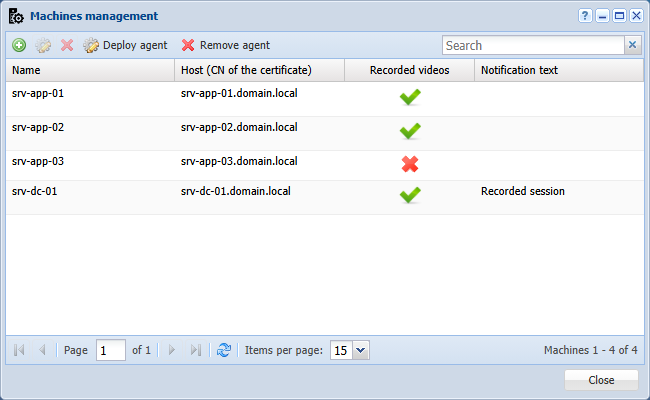
Agent mode and agentless mode
The Use agent mode and Use no agent mode boxes are both ticked at creation, and validation is refused if both are cleared. The two modes are the entry points of two distinct chains, not two variants of one access.
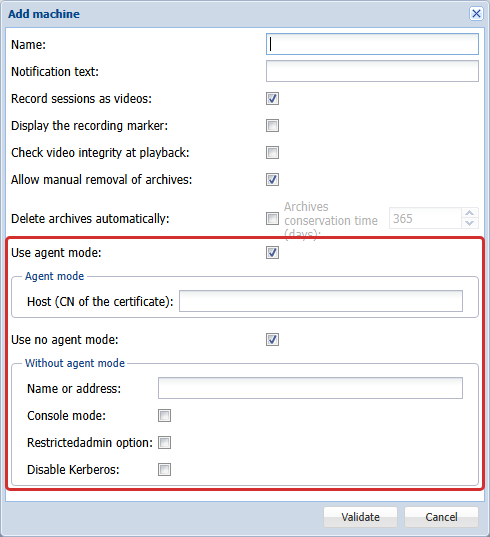
- Agent mode makes the machine eligible for direct recording configurations. The agent is installed on the machine, the platform is not on the session path, and the configuration only decides whether the session is recorded.
- Agentless mode makes the machine eligible for agentless direct RDP recording configurations. The session goes through an Edge Gateway, which opens it and records it.
Each of those two screens only offers the machines of the mode it concerns: a machine declared in agentless mode only will never appear in a direct recording configuration, and vice versa.
Clearing a mode
On save, clearing Use no agent mode removes the machine from every agentless direct RDP recording configuration that listed it; clearing Use agent mode removes it from every direct recording configuration. No confirmation and no message are displayed, and the change is accepted even when the machine was the only one in the configuration. The only clue is the machine counter on the affected screen, which decreases.
Machine identification
The two modes do not use the same field to recognise the machine, which is the most common source of error.
In agent mode the agent announces itself with the common name of the certificate installed on the machine, and that is the name the Host (CN of the certificate) field must reproduce. The certificate is indispensable: without it neither recording nor the agent deployment actions succeed.
In agentless mode no certificate is required. The machine is recognised by the name or address entered in the matching frame, because that is exactly what the user will type after the colon in their connection string.
Machine name
The Name field is only a management label: it identifies the machine in the console, in configurations and in logs. It has to be unique (creation is refused if a machine already bears that name), and it can no longer be changed once the machine has been created: the edit window displays it as plain text.
Multiple declarations
The certificate common name, on the other hand, is not unique. Nothing prevents declaring the same physical machine twice under two names, with two different recording policies. When a session opens in agent mode, if several declarations match the same certificate the platform keeps the one that records video; failing that, the first one found. Adding an "events only" declaration next to a "video" one therefore reduces nothing.
Recording policy
The recording policy is set here, machine by machine, and nowhere else: neither the configuration, nor the contract, nor the user touches it.
- Record sessions as videos, ticked by default. Cleared, events are still collected, but there is no video to replay.
- Display the recording marker, which warns the user on screen.
- Check video integrity at playback, which stores a fingerprint at recording time, a setting that only affects sessions recorded after it was enabled.
- Archive retention: whether manual deletion is allowed, and whether an automatic purge runs after a number of days.
Agent deployment and removal
The two toolbar buttons act remotely on a selection of machines, through an Edge Gateway and an account holding installation rights on the targets. Deployment is asynchronous: the console pushes a task and polls its state, and the report may stay in progress for a while.
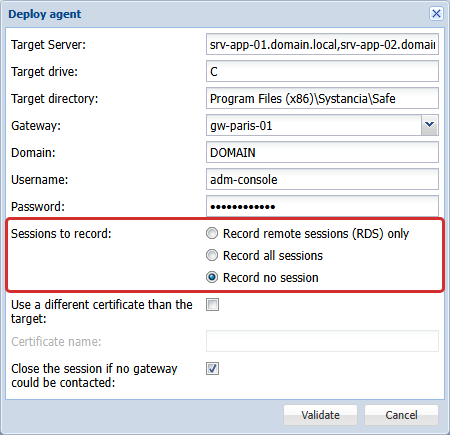
Default deployment option
The deployment window asks which sessions the agent must record, and the option selected by default is Do not record any session. An agent deployed with this option is therefore installed, reachable and visible, but records nothing. This is an agent setting, independent of the machine recording policy described above.
Agent uninstallation
Deleting a machine from this list does not uninstall its agent. It has to be removed first, while the machine can still be selected here.
Machine deletion
Deletion is refused, machine by machine, in two cases, and the report tells them apart.
- A direct access session is open on the machine.
- The machine is listed by a direct recording configuration, by an agentless direct RDP recording configuration or by a notification profile.
Deleting a selection is therefore partial by construction: the free machines are deleted, the others stay, and the window names the ones refused.
Limits
- A machine name is frozen at creation.
- A machine without a certificate cannot work in agent mode, and agent deployment fails if the name does not match the certificate common name.
- Agentless mode brings only three session options (console mode, restricted administration, Kerberos disabled), and they apply to every direct session on the machine, with no distinction of user.
- There is no way to test whether a machine is reachable from this screen.
The field-by-field detail, the two mode frames and the deployment windows are in the module reference.