Access conditions
An access condition is a rule evaluated at connection time. Attached to an access contract, it allows or denies access according to a technical criterion: where the user connects from, when, with which workstation, which browser, which certificate, or what their profile holds.
It is the only object in the product able to restrict. A contract only ever adds rights; a condition can refuse their use.
Condition direction
Every condition carries a direction, set when it is created:
- Allow if valid: access is open only if the condition is met;
- Deny if valid: access is closed when it is met.
The two are not equivalent when a condition cannot be evaluated (see below); this is the most frequent cause of unexpected behaviour.
Two further settings complete the direction: tell the user that the condition refused them, and log the refusal. Leaving both unticked produces a silent refusal, invisible to the user and absent from the logs: this avoids informing an attacker, but makes an access failure harder to diagnose.
Evaluation timing
By default a condition is evaluated once only, at connection time. A user who passed the check keeps their session even if the criterion stops being true (the workstation leaves the allowed address range, the time window closes, the antivirus is stopped): the session is not affected.
The General options button on the toolbar changes this behaviour. It opens three settings that apply to all conditions at once, not to the selected one:
- Keep checking the rules after users have connected: conditions are re-evaluated throughout the session;
- Rule check interval: the delay between two checks, in seconds. It stays greyed out, and without effect, until the previous box is ticked;
- Close the session if a validated access condition becomes invalid: the session ends as soon as a condition that was valid stops being so.
Re-evaluation without session closure
The last two boxes do not necessarily belong together. Enabling periodic checking without ticking the closure already has an effect: the contract whose condition has become invalid stops counting, so the user no longer sees the applications it served and can no longer launch them. Their session stays open, and their portal no longer shows what they are no longer entitled to. The third box ends the session itself. The choice is between withdrawing access and interrupting work in progress.
Effects of periodic checking
A session may close in the middle of work, including for a transient cause: an antivirus restarting, a network glitch changing the apparent address. The interval sets the balance: too short and it multiplies those closures; too long and it leaves the session open well after the criterion stopped being true.
Three mandatory fields
All three fields are mandatory: validation refuses an incomplete form.
Condition types
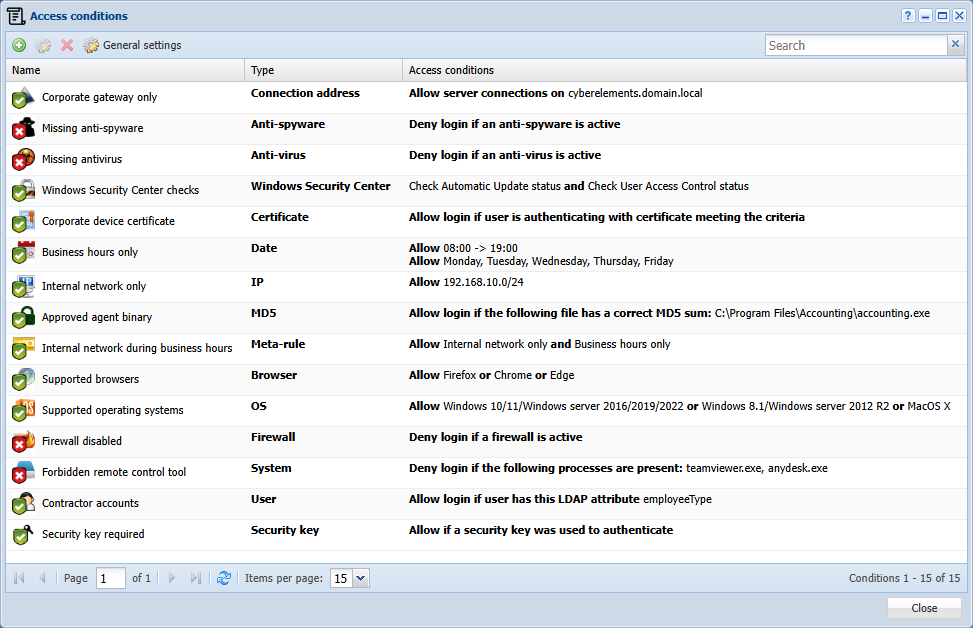
The table below lists the fifteen types and states, for each, whether the check needs the client installed on the workstation.
| Type | What is checked | Client required |
|---|---|---|
| Connection address | The Mediation Controller URL the user arrived through. | |
| IP | The source IP address: list, range or subnet. | |
| Date | Date range, time range, months, days of the week. | |
| Browser | The browser used (and the Desktop client, which appears as one). | |
| Certificate | The certificate presented to the browser, and one of its fields. | |
| FIDO2 | The presentation of a security key. | |
| User | An attribute of the user profile. | |
| Metarule | A logical combination of other conditions. | depends on the combined conditions |
| Operating system | The workstation OS. | except in User-Agent mode |
| Antivirus | An active antivirus being present. | |
| Antispyware | An active antispyware being present. | |
| Firewall | An active firewall being present. | |
| Windows Security Center | The state of Windows security settings. | |
| MD5 | A file being present, and its checksum. | |
| System | File, volume, disk, process, registry key. |
Conditions requiring the client
Seven types rely on a local inspection of the workstation, which only the Bastion client can perform. When the client is absent the check does not happen, and the condition is then held to be not valid.
Invalid condition and condition direction
An Allow if valid condition that cannot be evaluated closes access. A Deny if valid condition in the same situation leaves it open. The same technical criterion, set one way or the other, therefore does not protect in the same way when the client is missing. This applies in particular to connections made from the user portal without a client, and from Cleanroom Desktop.
Local checks by system
Besides the presence of the client, the user's system determines which checks are possible: several checks rely on mechanisms specific to Windows and have no equivalent elsewhere.
| Check | Windows | macOS | Ubuntu |
|---|---|---|---|
| Antivirus | |||
| Antispyware | |||
| Windows Security Center | |||
| Firewall | |||
| System (file, process) | |||
System (C:\ volume, disk serial, registry) |
|||
| MD5 | |||
| Operating system |
Windows accepts every check; macOS loses the three posture checks tied to the Windows ecosystem and the three hardware-or-registry modes of the System condition; Ubuntu additionally loses the firewall.
Unavailable check
A macOS or Ubuntu workstation cannot perform an antivirus check: the condition is therefore not valid, with the effect described above, which depends on the direction chosen. An antivirus condition set to Allow if valid therefore closes access to every non-Windows workstation. ➡ On a heterogeneous estate, express the posture through an OR metarule ("compliant Windows workstation or stronger authentication") rather than through a single requirement only one side can ever satisfy.
Order of setup
- Create the condition: the type cannot be changed after the first save.
- Choose its direction, and decide whether refusal is reported and logged.
- Attach it to an access contract: while it is attached to nothing, it has no effect at all, and nothing says so.
Limits
- The type is final: a wrong type means recreating the condition and reattaching it to its contracts.
- The name must be unique.
- A condition acts only through the contract naming it; it has no global scope.
- A metarule cannot reference itself, nor a metarule already present in its own hierarchy.
The details of each type's fields are in the module reference.