License and certificates
The licence opens the platform and sets the number of user sessions it may serve. The certificates are those the platform presents to whatever connects to it. Two tabs, two subjects, and a single thing in common: both are applied before the first organisation.
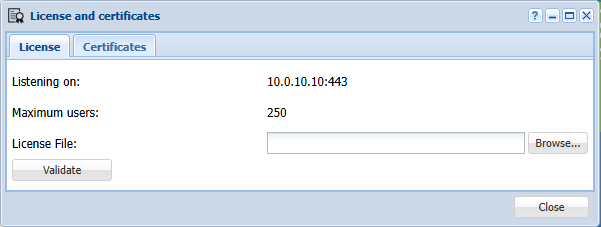
What the licence commands
The License tab first displays what the current licence allows: the addresses and ports on which the SSL Router listens, and the maximum of users.
That maximum is not decorative: it is the pool from which each organisation draws its share. The sum of the sessions granted to the organisations cannot exceed it, and an organisation created with no room left is refused.
Without a licence, no organisation can be created
As long as the licence is not applied, the Organizations module refuses to open its creation window, with the message Please fill in the licence and certificates first before creating an organization. The licence is therefore the very first operation on a new platform, before the virtual hosts and before the organisations.
When the licence cannot be read
If the SSL Router does not answer or has no licence, the two displayed values are replaced by an unavailability text. That is the normal state of a freshly installed platform.
The three certificates, and what each protects
The Certificates tab carries three independent forms, each with its own validation button: applying one does not apply the others.
- The SSL server certificate: the one seen by access clients and gateways connecting to the SSL Router. It is the most visible of the three.
- The plugin certificate: the one that secures exchanges with the client component.
- The watchdog certificate: that of the internal supervisor.
The file format must match what is announced
The plugin certificate is uploaded in PKCS#12 or PEM format, and the chosen file must carry the extension of the selected format, otherwise it is refused before any upload. The SSL server and watchdog certificates accept PKCS#12 only.
A wrong password is reported, a content error is not
A password that does not unlock the file produces a dedicated message. Any other cause of failure (wrong format, incomplete chain) receives a generic error message.
What takes effect only after a restart
The licence and two of the three certificates wait for the SSL Router
Once the licence is applied, the console announces that the SSL Router must be restarted for it to be taken into account; the same message accompanies the SSL server certificate, and its equivalent the watchdog certificate. Until then, the previous value stays in force. The restart is done from Services, and it cuts the sessions in progress.
The plugin certificate, on the other hand, is announced as taken into account immediately.
The relationship with PKIs
The certificates on this page are the ones the platform presents. The authorities it trusts are declared in PKIs. The two do not overlap: applying a server certificate does not make its authority trusted.
Limits
- One certificate per slot: they replace each other, they do not stack.
- No expiry date is displayed nor monitored from this screen.
- No automatic renewal, no certificate request: the file is supplied from outside.
- The list of cipher suites is displayed, but cannot be changed here.
The step-by-step procedure is in Apply the licence and certificates, and the detail of the fields in the module reference.