Direct recording configurations (no agent)
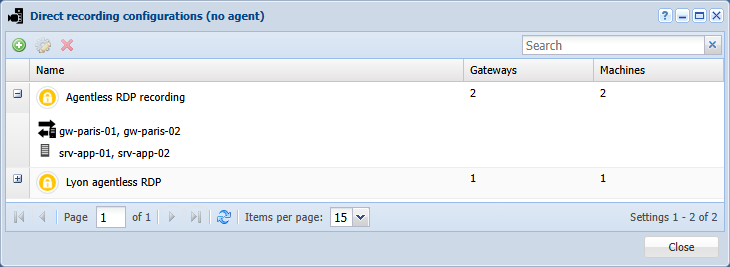
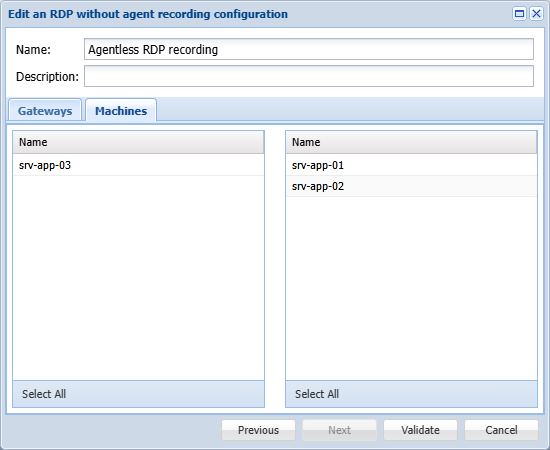
An agentless direct RDP recording configuration associates Edge Gateways with machines. It delimits what a user can reach by pointing their RDP client at the gateway, and therefore what will be recorded.
It is the object of the RDP chain by machine of direct access, and only machines whose agentless mode is filled in are offered here.
Connection authorisation
This configuration grants access, unlike direct recording configurations, which only decide on recording.
The user points their RDP client at an Edge Gateway and enters, as the login, their logon name followed by a colon and the name or address of the machine. The gateway queries the Mediation Controller, which only accepts if that machine, recognised by its agentless-mode name or address, belongs to a configuration listing that gateway. Otherwise the connection is refused, and the refusal is logged.
Examples of logon names
| Entered as the login in the RDP client | Account passed to the machine | Target machine |
|---|---|---|
Administrator:srv-app-01 |
Administrator |
the machine srv-app-01, declared for agentless mode under its name srv-app-01 |
op-support@domain.local:10.0.10.22 |
op-support@domain.local |
the machine srv-app-02, declared for agentless mode under its address 10.0.10.22 |
Everything before the first colon is the account on the machine; what follows must repeat the name or address declared for agentless mode. Without a colon, the connection is refused: no menu for choosing the machine is offered. The password is then asked for in a window opened inside the session.
There is therefore no such thing as an unrecorded session here: what gets through is recorded, what is not declared does not get through.
No identity check
No authentication domain is involved. What precedes the colon is passed on to the machine as is, and the machine will ask for the password and decide on its own. As a consequence there is no group, no contract and no notion of user in this configuration: the only control CyberElements Bastion exercises is on the gateway, machine pair.
The choice of Edge Gateways is therefore decisive: it is the only lever to narrow the perimeter; anyone able to reach a gateway's direct recording service can reach every machine its configurations cover.
Edge Gateway recording service
Direct RDP recording is handled by a dedicated xrdp instance on the Edge Gateway, which is not started at installation time: it listens on the network, which would needlessly widen the attack surface of platforms that do not use the feature.
A configuration declared here therefore has no effect until the service has been enabled on each of the selected Edge Gateways. This is a system operation, not a console setting, and this screen does not report its absence.
Instance shared with the contracts
The same service carries the chain by machine described here and the chain by application of the RDP without agent record contracts. Enabling it once is enough for both; not enabling it deprives both.
Session settings
The session settings come not from the configuration but from the machine itself: its notification text, console mode, restricted administration, Kerberos disabled, and its whole recording policy: video or events only, marker, integrity, retention.
A given machine will therefore behave the same way whichever configuration made it reachable, and whoever the user is.
Configuration deletion
No condition prevents a configuration from being deleted. Deletion is immediate, and so is its effect: the machines it made reachable from those gateways stop being reachable. Unlike the agent chain, the loss is visible: the next connection is refused.
Limits
- A configuration name is unique.
- The validation button stays inactive until at least one gateway and one machine have been selected.
- No group, no site, no domain: the configuration cannot restrict by user.
- No alerts and no network filtering: both functions belong to the agent chain only.
- The direct recording service has to be enabled by hand on each Edge Gateway.
The field-by-field detail, the two tabs and the gateway prerequisites are in the module reference.