Access contracts
An access contract is the object that grants rights. The objects created before it (domains, groups, applications, conditions) have no effect until a contract brings them together. The contract is the meeting point of the configuration; it defines:
- Who: the user groups concerned;
- What: the applications allowed, and their restrictions;
- Where: the site serving the access;
- Under what conditions: the access conditions, the alerts, the network filtering.
Accumulation of rights
Rights add up; they do not subtract:
- a group may appear in several contracts;
- a user may belong to several groups;
- a contract may cover several groups, and belonging to any one of them is enough.
In all three cases, rights accumulate. No contract removes an access granted elsewhere: a right is removed where it is given, not by adding a contract meant to forbid it.
Restricting an access
Restriction goes through an access condition attached to the contract: it can be set to Deny if valid. A second contract only adds rights.
Effect of accumulation by setting
Accumulation is not limited to lists of applications: it applies to every setting of the contract, and the least constraining one wins.
Restricted application. Contract A grants the application SRV-PROD and marks it
restricted, so the user has to request it. Contract B grants the same application
without restricting it. The application is then available directly, with no
workflow involved. The restriction set in A is cancelled by B: an
application restricted in one contract and unrestricted in another stops being restricted.
Network filtering. If any one of the contracts granting the application does not enable network connections, no filtering applies at all, even if all the others define some. The rules only apply when every contract concerned filters, and the user then gets the union of their rules, not their intersection.
Access condition. When a condition attached to contract A is not met, A is set aside for that session, but B, granting the same applications with no condition, goes on serving them. A condition attached to a contract therefore protects nothing while another contract offers the same access without it.
Request form
The Ask the user to fill in a form when requesting access setting follows the opposite logic: it is enough for one of the contracts restricting the application to ask for it for the form to be required. It is the only contract setting where the most constraining one wins, and it only applies if the application did remain restricted.
Checking the effect of a contract
Checking what a contract actually does means examining every contract serving the same groups, not only the contract being edited. A tightly framed contract can be entirely neutralised by a more permissive one, and the console does not report it.
Order of setup
The objects referenced must exist beforehand: the console does not create them from the contract.
- The domain and its groups.
- The applications, and their categories to designate them in bulk.
- The access conditions, if access is to depend on a criterion.
- The contract, which assembles the whole.
Enabling and disabling
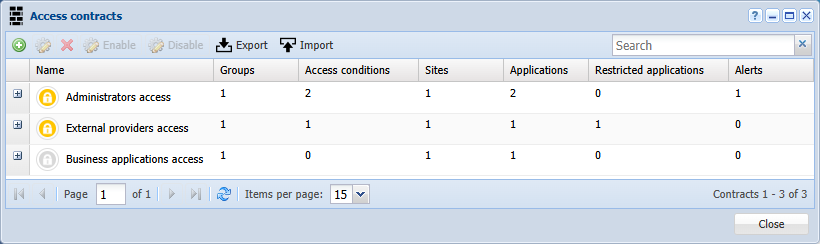
A contract is disabled without being deleted, with the Disable button of the list; it is re-enabled with Enable. A disabled contract, shown with a greyed padlock, no longer grants any right, but keeps its whole configuration: it is the way to suspend an access without rebuilding it afterwards.
Restricted applications
An application can be marked restricted in the contract. It is then no longer launched directly: the user must request it from their portal, and an approver grants or denies it in Workflow. This mechanism suits exceptional access, or access subject to approval, rather than creating and deleting a contract for every need.
Other contract settings
Besides groups, applications, site and conditions, a contract carries four settings, described in the module reference:
- personal aliases: allowing users to employ their own aliases on the chosen applications of the contract;
- revealable aliases: the vault aliases whose password can be revealed through this contract, if password display is allowed in the general options;
- alerts: the alerts raised by the use of the contract's accesses;
- network connections: the networks the user can reach from an RDS, HTML5 (RDP), SSH or HTML5 (SSH) session. This filtering is only effective if the target server carries the matching agent (Windows recording agent, Linux network filtering agent).
Limits
- A contract never removes a right granted by another contract.
- The objects it names must pre-exist; deleting one of them means first removing it from the contracts that designate it, otherwise the deletion is refused.
- Export and import of contracts allow a configuration to be replayed from one environment to another, but the import does not modify an existing contract. The import file follows a specific format (columns, delimiters), described in the module reference.
The details of the fields (list, add form, per-application restrictions, export and import) are in the module reference.
The API endpoints that drive this object are described in the API reference.