Cluster settings
Once the server has become a cluster node through Switch mode, this screen sets how the cluster behaves: what makes a node hand over, and which virtual addresses the cluster carries.
What makes a node hand over
Three conditions can be ticked, and they are independent.
- Disable VIP when the wire is unplugged from the NIC: the node gives up its virtual addresses as soon as it loses the physical link. Without this box, an unreachable node keeps its addresses and the cluster does not fail over.
- Disable ping: the node stops answering pings.
- Check gateway connections: the health of the node then depends on its gateway connections. Ticking the box reveals the gateway pattern, which designates those to take into account.
Unticking the gateway check does not clear the pattern
When the box is unticked, the pattern is no longer saved: the previous value stays in place server-side, even if the field looks empty on screen. To really change the pattern, do it with the box ticked.
Virtual addresses: two families, two behaviours
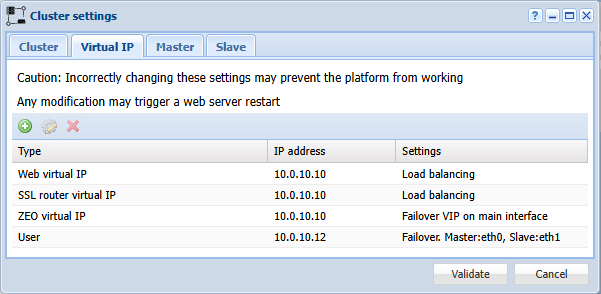
The virtual IP tab lists the addresses on which the cluster answers, whatever node is active. They are not equivalent.
- The three system addresses (web virtual IP, SSL Router virtual IP and ZEO virtual IP) are the ones entered in Switch mode. They can be modified here, but cannot be deleted: the button stays greyed out when one of them is selected.
- The addresses added from this screen are of type User. They are the only ones that can be deleted.
A virtual address applies on click, not on save
Adding, modifying or deleting a virtual IP is applied immediately, without going through the window's save button. Closing the screen without saving therefore does not undo those operations, whereas it does undo the changes made in the other tabs.
Load balancing or failover: the choice is made address by address
Each virtual address is either shared between the nodes (load balancing) or carried by a single node at a time and moved to the survivor (failover). It is here, and not in Switch mode, that the distinction is set.
Failover comes in two forms:
- on the main interface of each node, the one declared in the Master and Slave tabs;
- on a designated interface, in which case both the master's and the slave's must be named. Omitting one makes saving fail with You must set a network interface.
The two per-node tabs
The Master and Slave tabs carry the same fields for two different machines: the real addresses of each node, the address monitored by the watchdog, and above all the main network interface, the one designated by the virtual address option above.
Limits
- These settings do not create the cluster: the role is chosen in Switch mode, and this screen exists only for a server that is no longer standalone.
- The server validates almost nothing of what is entered: a malformed value is not refused, it is simply ignored, and saving reports success. Re-reading the values after saving is the only check.
- No network interface is verified: naming an interface that does not exist is accepted.
- A cluster of more than two nodes is not set here.
The screen says it itself: a mistake can stop the platform
Each group recalls that any incorrect change to these parameters may prevent the platform from working, and that any change may trigger a web server restart. These settings are changed during a maintenance window.
Availability
The screen appears only if the server is not standalone. On a platform in the Standalone role it is absent, and that is normal.
The detail of the fields, of the columns and of the virtual address windows is in the module reference.