API keys
An API key authenticates a call to the platform's public API. Seen from the system console, a key belongs to an organisation: it is on behalf of that organisation that the integration carrying it will work.
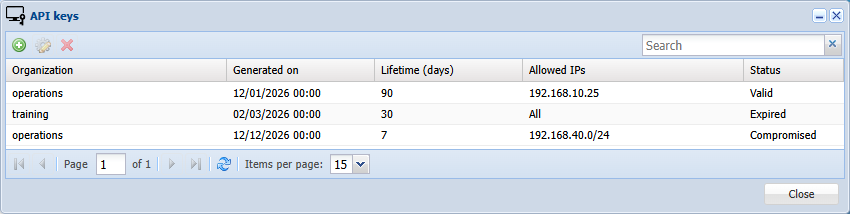
What separates this page from its namesake
The administration console carries a module of the same name, and it is the same screen: only the first column changes, and with it the nature of what owns the key.
- Here, one key per organisation. The list shows the organisation, and generating a key amounts to choosing an organisation.
- There, one key per owner: a local administrator of the organisation.
The two sets of keys coexist and do not see each other.
One key per organisation only
Generating a second key is refused
If the organisation already has one, generation answers A key already exists for this owner. Use "Renew" on the existing row. There is therefore no rotation by overlap: one key replaces the other.
Renewing invalidates the previous key immediately
On a still valid key, the console asks for confirmation and says it: renewing makes it immediately unusable. Any integration using it stops working at that very second. Plan to carry the new key into the integration before renewing, not after.
The key is displayed only once
It is never displayed again
At generation as at renewal, a window presents the key with a copy button, and warns that it will never be shown again. The platform keeps only a fingerprint of it: if the key is lost, there is nothing to recover, a new one must be generated.
Lifetime and allowed addresses
The lifetime is expressed in days, from 0 to 3650, and defaults to 90 days. The value 0 means unlimited: it is the only way to obtain a key that does not expire, and it is a choice to be assumed.
The allowed addresses restrict the origin of the calls. The list cannot be empty: either at
least one entry is put in it, or * to allow them all. Three forms are accepted: an address,
a range, a network with its mask or its prefix.
A subnet is given by its network address
Entering a machine address instead of the network address makes saving fail: the console
explicitly asks for the 10.0.0.0/24 form.
Three statuses, and what each imposes
- Valid: the key works.
- Expired: its lifetime has elapsed. It can be renewed.
- Compromised: the row has been modified outside the console. The platform detects it and refuses renewal: the only way out is to revoke the key and generate a new one.
Revoking
Revoking a valid key asks for confirmation, recalling that any integration using it will stop working. An expired or compromised key is revoked without confirmation.
Limits
- One key per organisation, without exception.
- No overlap possible between the old and the new key during a renewal.
- The key is displayed only at its creation.
- No scope restriction: the key is valid for the whole public API open to the organisation, with no notion of partial rights.
Availability
The module appears only if the public API is enabled on the platform. When it is not, it is neither visible nor usable.
The namesake module of the administration console is described in API keys.