Main work panel
The main work panel covers day-to-day operation: who connects, to what, through where, and what the platform keeps of it. It is the work panel the console opens on.
Its home is a synoptic: a clickable map where modules are grouped by theme.
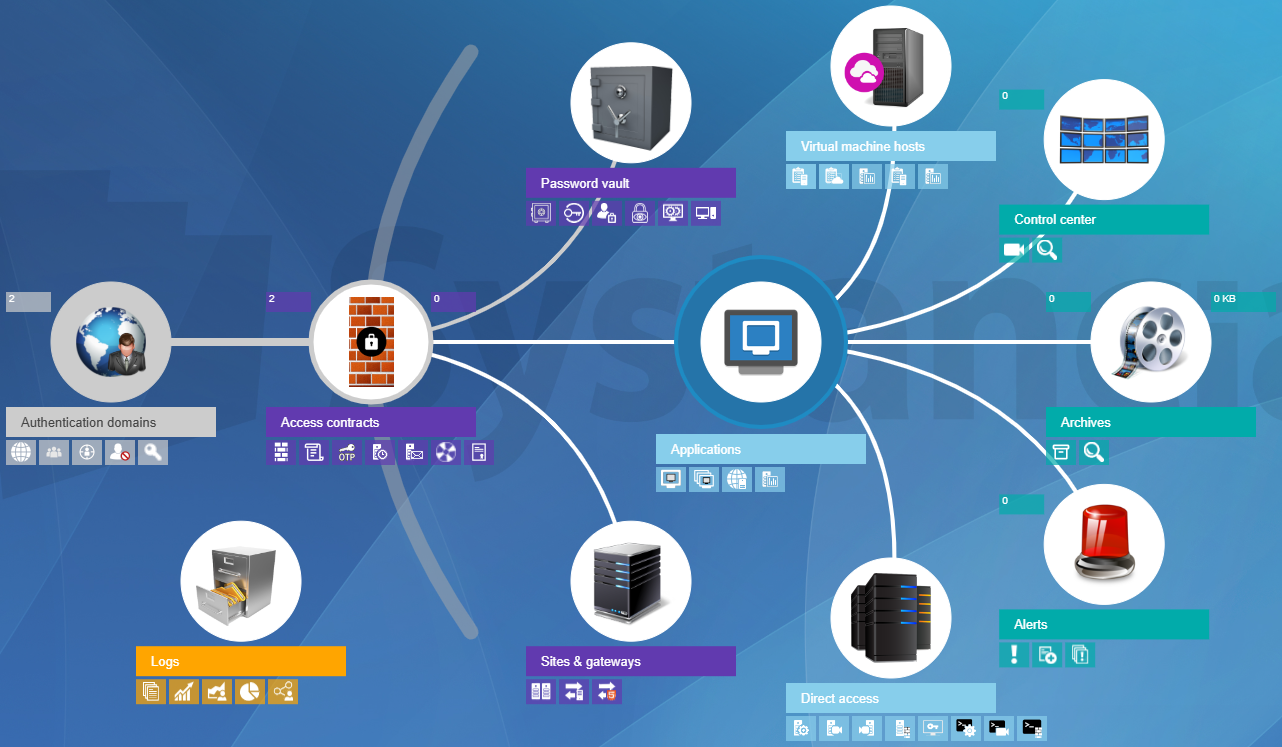
Synoptic groups
| Group | Content |
|---|---|
| Authentication domains | where users come from, and how they prove their identity |
| Access contracts | who gets what, under which conditions, with which notifications |
| Applications | what is published: the target, the protocol, the level of traceability |
| Password vault | the secrets handed to applications in the user's place |
| Sites and gateways | which route accesses take |
| Direct access | the accesses that do not go through the portal |
| Virtual machine hosts | the machines the platform clones or containerises |
| Control center | sessions in progress, and control over them |
| Archives | finished sessions and their recordings |
| Alerts | what should raise a signal |
| Logs | what the platform has kept of its own operation |
Configuration order
The groups are not independent: each builds on the previous ones. A first working access takes four steps, in this order.
- A site and its Edge Gateway: with no reachable Edge Gateway, nothing is reachable either, whatever follows.
- An authentication domain and its groups: that is where users come from.
- An application: the target, and the (final) choice of the privileged or standard family.
- An access contract assigning the application to a group. Until a contract does so, nothing appears in the portal.
The other elements are configured afterwards: access conditions, vault, alerts, recordings.
Central role of the access contract
The access contract is the only object that names at once a user group, applications and a site. When a user does not see what they should, the contract is almost always the element to check first, before the application and before the domain.
Group availability
The content of the synoptic varies with the configuration, and a missing group is not an anomaly:
- the vault does not show the same modules depending on the mode chosen (integrated, CyberElements Access, Keeper Security, LockSelf or Bitwarden), and that mode is set in the general options;
- virtual machine hosts depend on Virtual Desktop or Browser Isolation being enabled;
- the Workplace modules appear only if the Workplace association is active;
- a delegated administrator sees every group: the modules their profile does not grant them in read mode appear greyed out.
Each page states its own availability condition.
The details of each screen's fields are described in the reference page of its module, linked at the bottom of each page of this work panel.