Storage space
The Storage space screen shows the state of the Edge Gateway disks, on which session recordings are written. It is the only place in the console that indicates the room left before saturation.
The screen shows one row per gateway, two fill bars (graphic archives and SSH archives) and one detail panel per location.
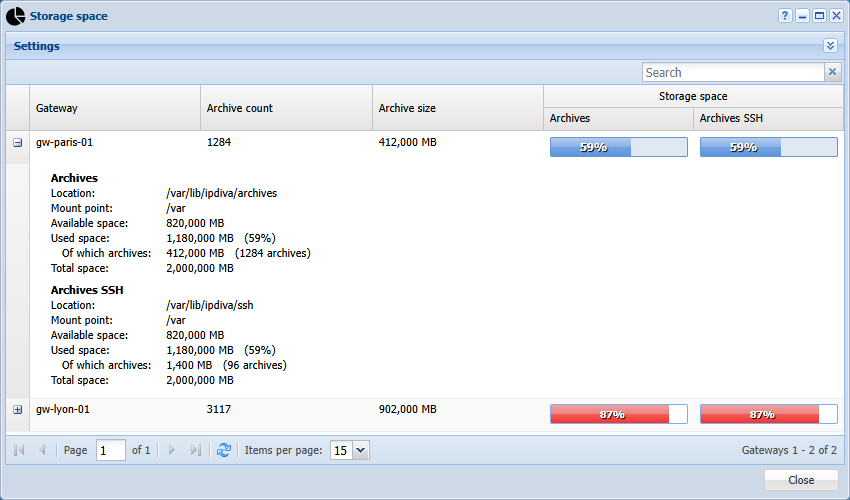
Bar measurement
The bars do not measure the room taken by the recordings: they measure how full the file system holding them is. Everything stored on the same volume counts towards it, including whatever is unrelated to CyberElements Bastion.
The Of which archives line of the detail panel isolates the share genuinely occupied by recordings. Comparing the two values is meaningful: a location at 90 % whose archives only account for 10 % will not be freed by deleting sessions.
Gateways shown
The list only shows Edge Gateways that are enabled and connected at the time of consultation. A gateway that is stopped, disabled or unreachable does not appear.
Missing gateways
Nothing signals the absence: the list does not indicate how many gateways are missing, and its pagination counter only covers those that answered. An unreachable gateway is therefore indistinguishable, on this screen, from a gateway that does not exist. This list is to be compared with the gateways list: every absence is to be explained before concluding that storage is in good shape.
Freshness of the values
The console queries each gateway for the state of its disks, then keeps the answer for about an hour. Opening the screen therefore does not necessarily trigger a fresh measurement: the figures shown may be stale. The refresh button of the pagination bar, on the other hand, forces a fresh query: that is the one to use before any conclusion about saturation.
Unreadable location
When the measurement could not be obtained (a gateway that does not answer, a location
whose total size is unknown), the bar reads ???% full and in red, exactly like a bar
at 100 %. Colour alone is therefore not enough to read the screen: it is the value written
inside the bar that tells saturation from missing measurement.
"Other location" blocks
The detail panel may show, alongside the archives and the SSH archives, one or more Other location blocks. They signal recordings sitting at a path that is no longer the one the gateway declares for its archiving.
Those recordings still take room, and they are counted in neither of the two bars: only the archive count and archive size columns, which cover the whole gateway, include them. This is why a gateway may show an archive volume unrelated to what its two bars would suggest.
80 % threshold
The bar turns red from 80 % occupancy. This threshold is a display marker only: the console purges nothing at that threshold, and there is no automatic retention of recordings: no setting makes them expire after a given time.
Freeing space therefore means deleting sessions from Archives, one at a time or by selection. This is as much a decision about evidence retention as a technical operation, to be prepared before the disk fills up.
Limits
- Offline or disabled gateways are absent, with no mention.
- Values may be up to an hour old; only an explicit refresh recomputes them.
- Two bars only, for the two declared archiving locations; other locations are visible only by expanding the row, and cannot be sorted on.
- No export: the data is read on screen.
- The search field works on the gateway name and on its archiving paths, which makes it possible to find every gateway writing to a shared path.
- The screen is a snapshot, not a history: it keeps no trace of how the filling evolved, and so gives no way to estimate a saturation date.
The detail of the columns, the detail panel and the unit selector is described in the module reference.