Agents for password monitoring
An agent is the CyberElements Access component installed on a machine. It lists the accounts, changes their passwords when they fall due, and passes the new secret on to the usages it has discovered. With no agent, a policy applies nowhere.
This screen does not deploy agents: it configures those already installed.
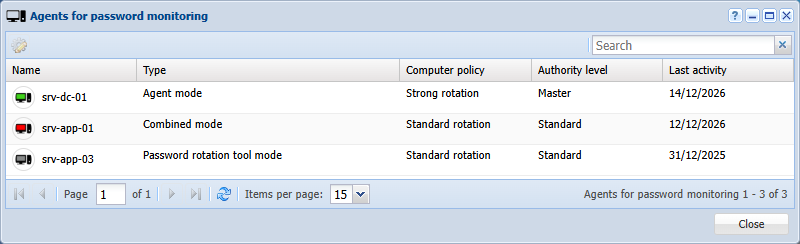
Agent type
The agent type is decided at deployment. It is read in the list and cannot be changed from the console:
- Agent mode: the machine looks after its own local and service accounts;
- Password rotation tool mode: the machine rotates the passwords of domain accounts, shared between several machines;
- Combined mode: both at once.
Authority level
The Authority level field is disabled as soon as the agent is in Agent mode: it rotates no domain account, so it has no authority to exercise on a remote machine. The field is only active in password rotation tool mode or in combined mode.
State icon
The icon at the head of the row distinguishes three situations, and is the first element of diagnosis when a rotation does not happen:
- enabled and online: the agent is reachable;
- enabled but offline: the agent is configured but no longer reports in; nothing but this icon and the last activity date says so;
- disabled: the Enable agent checkbox has been unticked in the console.
The Last activity column confirms the reading: a date that stops moving is the symptom of an offline agent.
Computer policy
A machine carries one policy, necessarily a local account policy. The Computer policy field is mandatory and read-only; it is filled through the selector to its right, which opens the list of password policies.
Policies offered by the selector
The list opened from an agent is filtered: service account policies do not appear in it. A service account policy therefore cannot be assigned to a machine from this screen: it applies through its account perimeter, not through an assignment. A policy searched for in vain in that selector is probably of that type.
Implementation order
- Access to the vault is configured and the server answers.
- The agent is deployed on the machine, which the console does not do.
- A local account policy exists, ready to be assigned to the machine.
- The agent is configured here: policy, authority level, enabling.
- The accounts and their usages come up on their own.
Limits
- Neither deployment nor uninstallation from this module: the toolbar carries the Edit action only. An agent appears in the list because it was installed on the machine, and it stays there until it is removed from it.
- The agent type cannot be changed from the console.
- An agent carries one computer policy only, and there is no inheritance: no agent group, no bulk assignment.
- Disabling an agent removes from the console neither the accounts nor the usages it has already reported: both lists stay as they are.
The detail of the columns, the fields and the authority levels is in the module reference.