Preskočiť na obsah

Installation of the Edge Gateway Server

Security hardening of the appliance

The appliance applies part of the recommendations of the advanced security hardening guide when it is built; the state of each recommendation, and what remains to be done after deployment, is given in Security hardening of the Edge Gateway appliances.

Values used on this page

The following values are used in several commands and configuration files of this page. Enter them here: the commands displayed on this page are updated as you type.
A value used by a single command is entered in a table placed just before that command.

Value Variable Definition
GW_CERT_FILE Name of the certificate file of the Edge Gateway instances.
RIP_MC_SSL_MASTER Secondary real IP address of the MASTER Mediation Controller: the SSL Router is reached through it.
PORT_MC_SSL_MASTER Listening port of the SSL Router of the MASTER Mediation Controller (usually 443).
GW_CERT_PASSWORD Password of the certificate of the Edge Gateway instances.
RIP_MC_SSL_SLAVE Secondary real IP address of the SLAVE Mediation Controller: the SSL Router is reached through it.
PORT_MC_SSL_SLAVE Listening port of the SSL Router of the SLAVE Mediation Controller (usually 443).
CARE_CERT_FILE Name of the certificate file of the recording service.
HTML5_CERT_FILE Name of the certificate file of the HTML5 Gateway.
HTML5_CERT_PASSWORD Password of the certificate of the HTML5 Gateway.
URL_HTML5 Content of the URL field of the HTML5 Gateway declared in the administration console (for example HTML5-2).
GW_NAME Name of the Edge Gateway through which the Mediation Controller reaches the HTML5 Gateway; the | character at the end of the line must be kept.
ORGANIZATION_NAME Name of the organisation to which the Edge Gateways connect.

Initial system settings

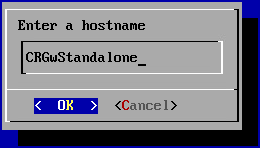
When the Edge Gateway Cluster appliance is started for the first time, the Gateway setup initial configuration wizard appears (the machine name is pre-filled with CRGwCluster). This wizard allows you to initialise the system-specific configuration as well as those specific to the use of CyberElements Bastion.

Systems settings

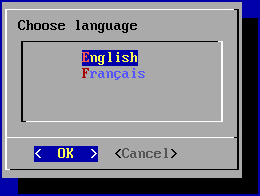
The wizard begins by asking you to select a language:
Information

The language you choose will affect both the system display language and the keyboard layout. In English, the keyboard will have a QWERTY layout, while in French it will be AZERTY.

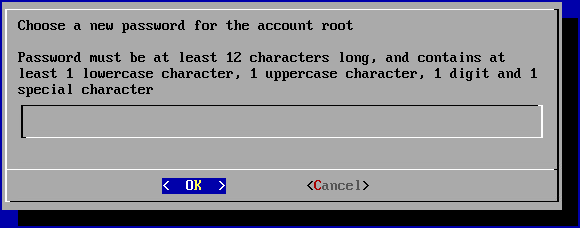
The wizard then asks you to add a new password for the root system account (make sure it meets the required complexity):
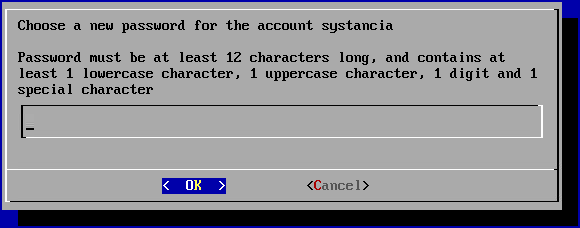
Next, you need to change the systancia system user account password (make sure it meets the required complexity):
Finally, you need to enter the machine name:
Network settings

Once the system settings have been applied, the wizard switches to the machine's network settings.

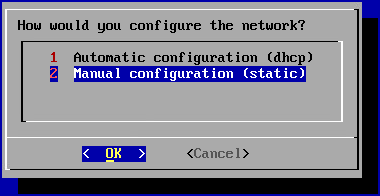
The first panel asks you to choose between a static configuration and a dynamic configuration via DHCP:
Recommendation

It is recommended that you use a static configuration for the machine's network settings, particularly for the direct access feature.
DHCP can also be used if the IP address is set at the DHCP server level.

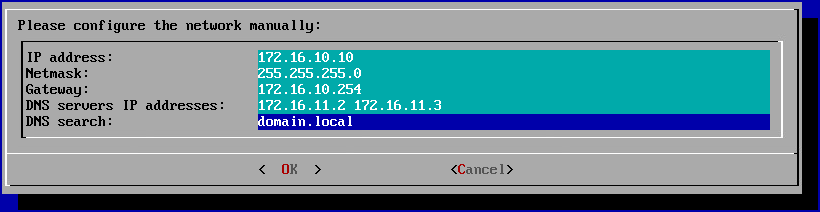
If the static configuration is chosen, the wizard will ask for the following network settings:
Tip

Several DNS servers can be entered (3 maximum) by separating them with spaces. Similarly, several DNS suffixes can be added by separating them with a space.

Proxy

After the network settings, the wizard asks for the URL of the proxy through which the Edge Gateway reaches the Mediation Controllers; leave the field empty if no proxy is needed:
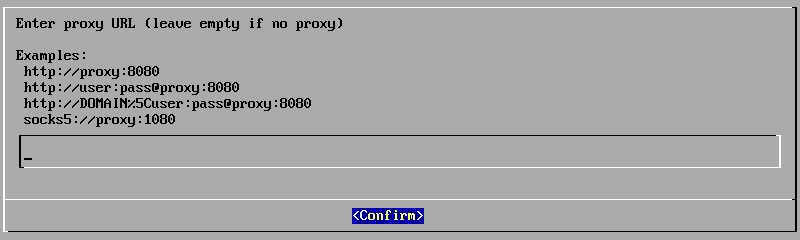
The accepted forms are the same as for the Standalone Edge Gateway appliance.

Leaving the pairing wizard

The wizard then offers the pairing mechanism of the Edge Gateway (Enter the mediation address). It is not used on this page: the Edge Gateway instances are connected to the two Mediation Controllers through their configuration files. Leave the wizard with the Cancel button (two presses of the Tab key move from the input field to Cancel):

Confirm with Yes:

Then validate the two following messages:

The wizard no longer appears at the next connections, and the automatic connection as root is disabled.

Connecting as root

Once the initial configuration wizard has finished, the root account is not accepted directly, neither in console mode nor over SSH (PermitRootLogin no). Log in with the systancia account, then switch to the root account with the following command and the root password set in the wizard:

1
su -

Settings specific to CyberElements Bastion operation

Once the network settings have been applied, you still need to connect the Edge Gateway and HTML5 Gateway instances to the Mediation Controllers.
To do this, the first Edge Gateway and HTML5 Gateway instances will connect to the MASTER Mediation Controller, while the second instances will connect to the SLAVE Mediation Controller.

Attention!

If the Edge Gateway installation is not located within the LAN and therefore the addresses RIP_MC_SSL_MASTER and RIP_MC_SSL_SLAVE are not accessible (even with NAT).
In that case, you will only need to configure the first instance of Edge Gateway and HTML5 Gateway, which will be set up to connect to VIP_MC_SSL.

In this context, the Standalone virtual appliance can be used. The Cluster virtual appliance is preconfigured with two instances, whereas its Standalone counterpart is preconfigured with a single instance.

Before continuing with the following instructions, make sure you have the following items:

  • Certificate for the Edge Gateway and HTML5 Gateway instances to be connected
  • Certificate for the recording service
  • An SSH client (on Windows, you can use PuTTY)
  • An SCP client (on Windows, the WinSCP or FileZilla tools can be used)

Transfer the certificates to the /tmp/ directory of the machine.

Connecting Edge Gateways

Copy the certificate file from the Edge Gateway to the /etc/ipdiva/gateway/ssl/ and /etc/ipdiva/gateway-slave/ssl/ directories. You can do this by running commands similar to the following as root:

1
2
cp /tmp/GW_CERT_FILE /etc/ipdiva/gateway/ssl/
mv /tmp/GW_CERT_FILE /etc/ipdiva/gateway-slave/ssl/

Configure the Edge Gateway instances to allow them to connect to the Mediation Controllers.
The configurations differ depending on the Mediation Controller to be contacted. Perform both settings:

Edit the file /etc/ipdiva/gateway/gateway.xml and fill it in using the following information (several sections have been omitted and are indicated by […]):

 1
 2
 3
 4
 5
 6
 7
 8
 9
10
<gateway>
    <server>RIP_MC_SSL_MASTER:PORT_MC_SSL_MASTER:ssl</server>
[…]
    <ssl>
        <cert>/etc/ipdiva/gateway/ssl/GW_CERT_FILE</cert>
        <password>GW_CERT_PASSWORD</password>
[…]
    </ssl>
[…]
</gateway>
Example

Taking into account the following information:

  • RIP_MC_SSL_MASTER equals: 10.0.10.11
  • SSL Router listening port: 443
  • Certificate file name: edge-gateway.p12
  • Certificate password: Str0ngP@ssw0rd

The /etc/ipdiva/gateway/gateway.xml file would be configured as follows:

 1
 2
 3
 4
 5
 6
 7
 8
 9
10
<gateway>
    <server>10.0.10.11:443:ssl</server>
[…]
    <ssl>
        <cert>/etc/ipdiva/gateway/ssl/edge-gateway.p12</cert>
        <password>Str0ngP@ssw0rd</password>
[…]
    </ssl>
[…]
</gateway>
Complete file
 1
 2
 3
 4
 5
 6
 7
 8
 9
10
11
12
13
14
15
16
17
18
19
20
21
22
23
24
25
26
27
28
29
30
31
32
33
34
35
36
37
38
39
40
41
42
43
44
45
46
47
48
49
50
51
52
53
54
55
56
57
58
59
60
61
62
63
64
65
66
67
68
69
70
71
72
73
74
75
76
77
78
79
80
81
<gateway>
        <server>10.0.10.11:443:ssl</server>
        <pipe>
                <ping-timeout>60000</ping-timeout>
                <rout-max-lock>20000</rout-max-lock>
        </pipe>
        <timeout>
                <reconnect>15000</reconnect>
        </timeout>
        <ticket><hmac></hmac></ticket>
        <proxy>
                <type>no</type>
                <address></address>
                <login></login>
                <password></password>
                <domain></domain>
        </proxy>
        <periodic-licence-check>false</periodic-licence-check>
        <session>
           <sslconf name="default">
              <ca-dir>/etc/ssl/certs</ca-dir>
              <verify-cert>true</verify-cert>
           </sslconf>
        </session>
        <ssl>
                <cert>/etc/ipdiva/gateway/ssl/edge-gateway.p12</cert>
                <password>Str0ngP@ssw0rd</password>
                <ca-dir>/etc/ipdiva/gateway/ssl/ca</ca-dir>
                <min-version>tls1.3</min-version>
                <max-version></max-version>
                <cipherlist>!ADH:!AECDH:!MD5:kEECDH+AES:kEDH+AES:AES256+RSA:3DES+RSA</cipherlist>
                <cipherlist-tls1.3>TLS_CHACHA20_POLY1305_SHA256:TLS_AES_256_GCM_SHA384:TLS_AES_128_GCM_SHA256</cipherlist-tls1.3>
                <verify-cert>true</verify-cert>
                <verify-certhostnamematch>true</verify-certhostnamematch>
        </ssl>
        <webaccess>
                <proxy></proxy>
                <useragent>true</useragent>
                <autoauth>true</autoauth>
                <forceauth>false</forceauth>
                <forcebasic>false</forcebasic>
                <persistentbasicauth>true</persistentbasicauth>
                <cache-date>Thu, 14 Dec 2006 09:28:00 GMT</cache-date>
                <reverse-proxy>
                        <headers>
                                <x-forwarded-for enabled='false'/>
                                <x-forwarded-host enabled='false'/>
                        </headers>
                </reverse-proxy>
                <davenport compatibilityMode="false">127.0.0.1:8070</davenport>
        </webaccess>
        <rpc-listen>127.0.0.1:9080</rpc-listen>
        <network-id></network-id>
        <services>/etc/ipdiva/gateway/services.xml</services>
        <compression>zlib</compression>
        <vlan>
                <prefixe></prefixe>
        </vlan>

        <openvpn>
                <ssl>
                        <cert>/usr/local/ipdiva/share/gw-controller-openvpnng/keys/allInOne.pem</cert>
                        <ca-file>/usr/local/ipdiva/share/gw-controller-openvpnng/keys/tmp-ca.crt</ca-file>
                        <version>tls1</version>
                </ssl>
                <client-ov>
                        <ip-type>V4</ip-type>
                        <dev-type>tun</dev-type>
                        <link-mtu>1507</link-mtu>
                        <tun-mtu>1500</tun-mtu>
                        <proto>TCPv4_CLIENT</proto>
                        <cipher>[null-cipher]</cipher>
                        <auth>[null-digest]</auth>
                        <keysize>0</keysize>
                        <key-method>2</key-method>
                        <tls-type>tls-client</tls-type>
                </client-ov>
        </openvpn>
    <useoldprotocol>false</useoldprotocol>
    <rate>0</rate>
</gateway>

Finally, start the Edge Gateway instance to load the new settings and connect it to the MASTER Mediation Controller:

1
systemctl start ipdiva-gateway.service

Edit the /etc/ipdiva/gateway-slave/gateway.xml file and complete it using the following information (several sections have been omitted and are indicated by […]):

Value Variable Definition
GW_SLAVE_RPC_PORT Free TCP port of the machine for the RPC interface of the Edge Gateway instance connected to the SLAVE Mediation Controller (9081 is commonly used).
 1
 2
 3
 4
 5
 6
 7
 8
 9
10
11
12
<gateway>
    <server>RIP_MC_SSL_SLAVE:PORT_MC_SSL_SLAVE:ssl</server>
[…]
    <ssl>
        <cert>/etc/ipdiva/gateway-slave/ssl/GW_CERT_FILE</cert>
        <password>GW_CERT_PASSWORD</password>
[…]
    </ssl>
[…]
    <rpc-listen>127.0.0.1:GW_SLAVE_RPC_PORT</rpc-listen>
[…]
</gateway>
Example

Taking into account the following information:

  • RIP_MC_SSL_SLAVE is equal to: 10.0.10.13
  • SSL Router listening port: 443
  • Certificate file name: edge-gateway.p12
  • Certificate password: Str0ngP@ssw0rd
  • Available RPC port: 9081

The /etc/ipdiva/gateway-slave/gateway.xml file would be configured as follows:

 1
 2
 3
 4
 5
 6
 7
 8
 9
10
11
12
<gateway>
    <server>10.0.10.13:443:ssl</server>
[…]
    <ssl>
        <cert>/etc/ipdiva/gateway-slave/ssl/edge-gateway.p12</cert>
        <password>Str0ngP@ssw0rd</password>
[…]
    </ssl>
[…]
    <rpc-listen>127.0.0.1:9081</rpc-listen>
[…]
</gateway>
Complete file
 1
 2
 3
 4
 5
 6
 7
 8
 9
10
11
12
13
14
15
16
17
18
19
20
21
22
23
24
25
26
27
28
29
30
31
32
33
34
35
36
37
38
39
40
41
42
43
44
45
46
47
48
49
50
51
52
53
54
55
56
57
58
59
60
61
62
63
64
65
66
67
68
69
70
71
72
73
74
75
76
77
78
79
80
81
<gateway>
        <server>10.0.10.13:443:ssl</server>
        <pipe>
                <ping-timeout>60000</ping-timeout>
                <rout-max-lock>20000</rout-max-lock>
        </pipe>
        <timeout>
                <reconnect>15000</reconnect>
        </timeout>
        <ticket><hmac></hmac></ticket>
        <proxy>
                <type>no</type>
                <address></address>
                <login></login>
                <password></password>
                <domain></domain>
        </proxy>
        <periodic-licence-check>false</periodic-licence-check>
        <session>
           <sslconf name="default">
              <ca-dir>/etc/ssl/certs</ca-dir>
              <verify-cert>true</verify-cert>
           </sslconf>
        </session>
        <ssl>
                <cert>/etc/ipdiva/gateway-slave/ssl/edge-gateway.p12</cert>
                <password>Str0ngP@ssw0rd</password>
                <ca-dir>/etc/ipdiva/gateway-slave/ssl/ca</ca-dir>
                <min-version>tls1.3</min-version>
                <max-version></max-version>
                <cipherlist>!ADH:!AECDH:!MD5:kEECDH+AES:kEDH+AES:AES256+RSA:3DES+RSA</cipherlist>
                <cipherlist-tls1.3>TLS_CHACHA20_POLY1305_SHA256:TLS_AES_256_GCM_SHA384:TLS_AES_128_GCM_SHA256</cipherlist-tls1.3>
                <verify-cert>true</verify-cert>
                <verify-certhostnamematch>true</verify-certhostnamematch>
        </ssl>
        <webaccess>
                <proxy></proxy>
                <useragent>true</useragent>
                <autoauth>true</autoauth>
                <forceauth>false</forceauth>
                <forcebasic>false</forcebasic>
                <persistentbasicauth>true</persistentbasicauth>
                <cache-date>Thu, 14 Dec 2006 09:28:00 GMT</cache-date>
                <reverse-proxy>
                        <headers>
                                <x-forwarded-for enabled='false'/>
                                <x-forwarded-host enabled='false'/>
                        </headers>
                </reverse-proxy>
                <davenport compatibilityMode="false">127.0.0.1:8070</davenport>
        </webaccess>
        <rpc-listen>127.0.0.1:9081</rpc-listen>
        <network-id></network-id>
        <services>/etc/ipdiva/gateway-slave/services.xml</services>
        <compression>zlib</compression>
        <vlan>
                <prefixe></prefixe>
        </vlan>

        <openvpn>
                <ssl>
                        <cert>/usr/local/ipdiva/share/gw-controller-openvpnng/keys/allInOne.pem</cert>
                        <ca-file>/usr/local/ipdiva/share/gw-controller-openvpnng/keys/tmp-ca.crt</ca-file>
                        <version>tls1</version>
                </ssl>
                <client-ov>
                        <ip-type>V4</ip-type>
                        <dev-type>tun</dev-type>
                        <link-mtu>1507</link-mtu>
                        <tun-mtu>1500</tun-mtu>
                        <proto>TCPv4_CLIENT</proto>
                        <cipher>[null-cipher]</cipher>
                        <auth>[null-digest]</auth>
                        <keysize>0</keysize>
                        <key-method>2</key-method>
                        <tls-type>tls-client</tls-type>
                </client-ov>
        </openvpn>
    <useoldprotocol>false</useoldprotocol>
    <rate>0</rate>
</gateway>

Finally, start the Edge Gateway instance to load the new settings and connect it to the SLAVE Mediation Controller:

1
systemctl start ipdiva-gateway@-slave.service

Mediation Controller behind NAT

When the log of the Edge Gateway (/var/log/IPdivaGateway.log) shows the peer certificate is only valid for …, the address entered in <server> (typically an address translated by NAT) is not a name of the certificate of the Mediation Controller: declare the accepted names in cert-peernames (<ssl> section of gateway.xml).

Values already set on the appliance

On the appliance, the rpc-listen element of /etc/ipdiva/gateway-slave/gateway.xml is already set to 127.0.0.1:9081: only the address of the server, the certificate and its password remain to be entered.

Configuration of the recording service

Move the certificate for the recording service to the /etc/ipdiva/careserver/ directory with a command similar to this:

1
mv /tmp/CARE_CERT_FILE /etc/ipdiva/careserver/

Next, configure the service by modifying the following file: /etc/ipdiva/careserver/careserver.xml. The configuration of the file should be something like this (the following section omits many lines in the file marked with […]):

Value Variable Definition
CARE_CERT_PASSWORD Password of the certificate of the recording service.
 1
 2
 3
 4
 5
 6
 7
 8
 9
10
11
12
13
14
15
<?xml version="1.0" ?><careserver>

    <listen>0.0.0.0:8443</listen>
[…]
    <ssl>
        <cert>/etc/ipdiva/careserver/CARE_CERT_FILE</cert>
        <password>CARE_CERT_PASSWORD</password>
[…]
    </ssl>
    <xmlrpc-connect>
        <element>http://127.0.0.1:9080</element>
        <element>http://127.0.0.1:9081</element>
    </xmlrpc-connect>
[…]
</careserver>

Make the following changes:

  • Change the listening IP address of the recording service to 0.0.0.0 (listens on all available IP addresses)
  • Add the line <element>http://127.0.0.1:9081</element>
Example

Taking into account the following information:

  • Certificate file name: fqdn.edge-gateway.local.p12
  • Certificate password: Str0ngP@ssw0rd

The file /etc/ipdiva/careserver/careserver.xml would be configured as follows:

 1
 2
 3
 4
 5
 6
 7
 8
 9
10
11
12
13
14
15
<?xml version="1.0" ?><careserver>

    <listen>0.0.0.0:8443</listen>
[…]
    <ssl>
        <cert>/etc/ipdiva/careserver/fqdn.edge-gateway.local.p12</cert>
        <password>Str0ngP@ssw0rd</password>
[…]
    </ssl>
    <xmlrpc-connect>
        <element>http://127.0.0.1:9080</element>
        <element>http://127.0.0.1:9081</element>
    </xmlrpc-connect>
[…]
</careserver>
Complete file
 1
 2
 3
 4
 5
 6
 7
 8
 9
10
11
12
13
14
15
16
17
18
19
20
21
22
23
24
25
26
27
28
29
30
31
<?xml version="1.0" ?><careserver>

    <listen>0.0.0.0:8443</listen>


    <archivesdirectory>/var/lib/ipdiva/carerecord/archives</archivesdirectory>
    <recordingdirectory>/var/lib/ipdiva/carerecord/recording</recordingdirectory>
    <ssl>
        <cert>/etc/ipdiva/careserver/fqdn.edge-gateway.local.p12</cert>
        <password>Str0ngP@ssw0rd</password>
        <ca-dir>/etc/ipdiva/gateway/ssl/ca</ca-dir>
        <min-version>tls1.2</min-version>
        <max-version/>
        <cipherlist>!ADH:!AECDH:!MD5:kEECDH+AES:kEDH+AES:AES256+RSA:3DES+RSA</cipherlist>
        <cipherlist-tls1.3>TLS_CHACHA20_POLY1305_SHA256:TLS_AES_256_GCM_SHA384:TLS_AES_128_GCM_SHA256</cipherlist-tls1.3>
        <verify-cert>true</verify-cert>
        <no-fail-if-no-peer-cert>true</no-fail-if-no-peer-cert>
    </ssl>
    <gopsize>10</gopsize>
        <webgopsize>5</webgopsize>
    <webfakeframespersec>2</webfakeframespersec>
        <webhlslistsize>20</webhlslistsize>
    <webcaptureinterval>10000</webcaptureinterval>
    <webcapturetimeout>30000</webcapturetimeout>
    <captureinterval>250</captureinterval>
    <hlslistsize>20</hlslistsize>
    <xmlrpc-connect>
        <element>http://127.0.0.1:9080</element>
        <element>http://127.0.0.1:9081</element>
    </xmlrpc-connect>
</careserver>

Validate the new settings by restarting the recording service:

1
systemctl restart ipdivacarerecord

Values already set on the appliance

On the appliance, the listen element of careserver.xml is already set to 0.0.0.0:8443 and the <element>http://127.0.0.1:9081</element> line is already present: only the certificate and its password remain to be entered.

Connecting HTML5 Gateway instances

The two HTML5 Gateway instances (html5gateway and html5gateway-slave) are installed and enabled on the appliance; they start once configured.

Copy the certificate file from the HTML5 Gateway to the /etc/ipdiva/html5gateway/ssl/ and /etc/ipdiva/html5gateway-slave/ssl/ directories. You can do this by running commands similar to the following as root:

1
2
cp /tmp/HTML5_CERT_FILE /etc/ipdiva/html5gateway/ssl/
mv /tmp/HTML5_CERT_FILE /etc/ipdiva/html5gateway-slave/ssl/

Configure the HTML5 Gateway instances to allow them to connect to the Mediation Controllers.
The configurations differ depending on the Mediation Controller to be contacted. Perform both settings:

Edit the /etc/ipdiva/html5gateway/html5gateway.xml file and complete it using the following information (several sections have been omitted and are indicated by […]):

 1
 2
 3
 4
 5
 6
 7
 8
 9
10
<gateway>
    <server>RIP_MC_SSL_MASTER:PORT_MC_SSL_MASTER:ssl</server>
[…]
    <ssl>
        <cert>/etc/ipdiva/html5gateway/ssl/HTML5_CERT_FILE</cert>
        <password>HTML5_CERT_PASSWORD</password>
[…]
    </ssl>
[…]
</gateway>
Example

Taking into account the following information:

  • RIP_MC_SSL_MASTER equals: 10.0.10.11
  • SSL Router listening port: 443
  • Certificate file name: html5-gateway.p12
  • Certificate password: Str0ngP@ssw0rd

The /etc/ipdiva/html5gateway/html5gateway.xml file would be configured as follows:

 1
 2
 3
 4
 5
 6
 7
 8
 9
10
<gateway>
    <server>10.0.10.11:443:ssl</server>
[…]
    <ssl>
        <cert>/etc/ipdiva/html5gateway/ssl/html5-gateway.p12</cert>
        <password>Str0ngP@ssw0rd</password>
[…]
    </ssl>
[…]
</gateway>
Complete file
 1
 2
 3
 4
 5
 6
 7
 8
 9
10
11
12
13
14
15
16
17
18
19
20
21
22
23
24
25
26
27
28
29
30
31
32
33
34
35
<gateway>
        <server>10.0.10.11:443:ssl</server>
        <pipe>
                <ping-timeout>60000</ping-timeout>
                <rout-max-lock>20000</rout-max-lock>
        </pipe>
        <timeout>
                <reconnect>15000</reconnect>
        </timeout>
        <ticket><hmac></hmac></ticket>
        <proxy>
                <type>no</type>
                <address></address>
                <login></login>
                <password></password>
                <domain></domain>
        </proxy>

        <ssl>
                <cert>/etc/ipdiva/html5gateway/ssl/html5-gateway.p12</cert>
                <password>Str0ngP@ssw0rd</password>
                <ca-dir>/etc/ipdiva/html5gateway/ssl/ca</ca-dir>
                <min-version>tls1.3</min-version>
                <max-version></max-version>
                <cipherlist>!ADH:!AECDH:!MD5:kEECDH+AES:kEDH+AES:AES256+RSA:3DES+RSA</cipherlist>
                <cipherlist-tls1.3>TLS_CHACHA20_POLY1305_SHA256:TLS_AES_256_GCM_SHA384:TLS_AES_128_GCM_SHA256</cipherlist-tls1.3>
                <verify-cert>true</verify-cert>
                <verify-certhostnamematch>true</verify-certhostnamematch>
        </ssl>

        <rpc-listen>127.0.0.1:9088</rpc-listen>
        <network-id></network-id>
        <compression>zlib</compression>

 </gateway>

Finally, restart the HTML5 Gateway instance to load the new settings and connect it to the MASTER Mediation Controller:

1
systemctl start ipdiva-html5gateway.service

Edit the /etc/ipdiva/html5gateway-slave/html5gateway.xml file and complete it using the following information (several sections have been omitted and are indicated by […]):

Value Variable Definition
HTML5_SLAVE_RPC_PORT Free TCP port of the machine for the RPC interface of the HTML5 Gateway instance connected to the SLAVE Mediation Controller (9089 is commonly used).
 1
 2
 3
 4
 5
 6
 7
 8
 9
10
11
12
<gateway>
    <server>RIP_MC_SSL_SLAVE:PORT_MC_SSL_SLAVE:ssl</server>
[…]
    <ssl>
        <cert>/etc/ipdiva/html5gateway-slave/ssl/HTML5_CERT_FILE</cert>
        <password>HTML5_CERT_PASSWORD</password>
[…]
    </ssl>
[…]
    <rpc-listen>127.0.0.1:HTML5_SLAVE_RPC_PORT</rpc-listen>
[…]
</gateway>
Example

Taking into account the following information:

  • RIP_MC_SSL_SLAVE is equal to: 10.0.10.13
  • SSL Router listening port: 443
  • Certificate file name: html5-gateway.p12
  • Certificate password: Str0ngP@ssw0rd
  • Available RPC port: 9089

The /etc/ipdiva/html5gateway-slave/html5gateway.xml file would be configured as follows:

 1
 2
 3
 4
 5
 6
 7
 8
 9
10
11
12
<gateway>
    <server>10.0.10.13:443:ssl</server>
[…]
    <ssl>
        <cert>/etc/ipdiva/html5gateway-slave/ssl/html5-gateway.p12</cert>
        <password>Str0ngP@ssw0rd</password>
[…]
    </ssl>
[…]
    <rpc-listen>127.0.0.1:9089</rpc-listen>
[…]
</gateway>
Complete file
 1
 2
 3
 4
 5
 6
 7
 8
 9
10
11
12
13
14
15
16
17
18
19
20
21
22
23
24
25
26
27
28
29
30
31
32
33
34
35
<gateway>
        <server>10.0.10.13:443:ssl</server>
        <pipe>
                <ping-timeout>60000</ping-timeout>
                <rout-max-lock>20000</rout-max-lock>
        </pipe>
        <timeout>
                <reconnect>15000</reconnect>
        </timeout>
        <ticket><hmac></hmac></ticket>
        <proxy>
                <type>no</type>
                <address></address>
                <login></login>
                <password></password>
                <domain></domain>
        </proxy>

        <ssl>
                <cert>/etc/ipdiva/html5gateway-slave/ssl/html5-gateway.p12</cert>
                <password>Str0ngP@ssw0rd</password>
                <ca-dir>/etc/ipdiva/html5gateway-slave/ssl/ca</ca-dir>
                <min-version>tls1.3</min-version>
                <max-version></max-version>
                <cipherlist>!ADH:!AECDH:!MD5:kEECDH+AES:kEDH+AES:AES256+RSA:3DES+RSA</cipherlist>
                <cipherlist-tls1.3>TLS_CHACHA20_POLY1305_SHA256:TLS_AES_256_GCM_SHA384:TLS_AES_128_GCM_SHA256</cipherlist-tls1.3>
                <verify-cert>true</verify-cert>
                <verify-certhostnamematch>true</verify-certhostnamematch>
        </ssl>

        <rpc-listen>127.0.0.1:9089</rpc-listen>
        <network-id></network-id>
        <compression>zlib</compression>

 </gateway>

Finally, restart the HTML5 Gateway instance to load the new settings and connect it to the SLAVE Mediation Controller:

1
systemctl start ipdiva-html5gateway@-slave.service

Configurations prior to connecting HTML5 Gateways

The wizard of the Mediation Controller appliances has already configured, on both servers, the access to the first HTML5 Gateway: the /HTML5/ URL, which leads to the Edge Gateway named in the wizard (Gateway name). Declare this HTML5 Gateway in the administration console with the URL HTML5.

Each additional HTML5 Gateway, for example the one of a second Edge Gateway, requires its own section, with its own URL (HTML5-2, HTML5-3, …), added on both Mediation Controller servers, next to the section created by the wizard, as indicated below.

In order for HTML5 applications to work, additional settings must be configured on the Mediation Controller servers. Log in to the MASTER and SLAVE Mediation Controller servers as root.

Create or edit the /etc/ipdiva/httpd/commonParameters.extra.conf file to add a section equivalent to the following for the HTML5 Gateway:

 1
 2
 3
 4
 5
 6
 7
 8
 9
10
11
12
13
14
15
16
17
18
19
20
21
<Location /URL_HTML5/>
        Order allow,deny
        Allow from all
        RequestHeader set X-Forwarded-Proto "https"
        RequestHeader set X-IPdiva-Gateway GW_NAME|
        RequestHeader set X-IPdiva-Orgname ORGANIZATION_NAME
        RequestHeader set X-IPdiva-Service 127.0.0.1:8080

        ProxyPass http://127.0.0.1:9016/systanciaHTML5-6.0/ flushpackets=on
</Location>

<Location /URL_HTML5/websocket-tunnel>
        Order allow,deny
        Allow from all
        RequestHeader set X-Forwarded-Proto "https"
        RequestHeader set X-IPdiva-Gateway GW_NAME|
        RequestHeader set X-IPdiva-Orgname ORGANIZATION_NAME
        RequestHeader set X-IPdiva-Service 127.0.0.1:8080

        ProxyPass ws://127.0.0.1:9016/systanciaHTML5-6.0/websocket-tunnel
</Location>
Example

For a platform with the following settings:

  • Organisation name: my-organization-name
  • Declaration of the first HTML5 Gateway in the administration console:
    • Name: html5-gateway-1
    • URL: HTML5-1
    • Protocol: WebSocket
  • Declaration of the second HTML5 Gateway in the administration console:
    • Name: html5-gateway-2
    • URL: HTML5-2
    • Protocol: WebSocket
  • An Edge Gateway server on the first HTML5 Gateway has:
    • An Edge Gateway service named edge-gateway-1
    • An HTML5 Gateway service named html5-gateway-1
  • An Edge Gateway server on the second HTML5 Gateway has:
    • An Edge Gateway service named edge-gateway-2
    • An HTML5 Gateway service named html5-gateway-2

The configuration file /etc/ipdiva/httpd/commonParameters.extra.conf created will be set up as follows:

 1
 2
 3
 4
 5
 6
 7
 8
 9
10
11
12
13
14
15
16
17
18
19
20
21
22
23
24
25
26
27
28
29
30
31
32
33
34
35
36
37
38
39
40
41
42
43
<Location /HTML5-1/>
        Order allow,deny
        Allow from all
        RequestHeader set X-Forwarded-Proto "https"
        RequestHeader set X-IPdiva-Gateway edge-gateway-1|
        RequestHeader set X-IPdiva-Orgname my-organization-name
        RequestHeader set X-IPdiva-Service 127.0.0.1:8080

        ProxyPass http://127.0.0.1:9016/systanciaHTML5-6.0/ flushpackets=on
</Location>

<Location /HTML5-1/websocket-tunnel>
        Order allow,deny
        Allow from all
        RequestHeader set X-Forwarded-Proto "https"
        RequestHeader set X-IPdiva-Gateway edge-gateway-1|
        RequestHeader set X-IPdiva-Orgname my-organization-name
        RequestHeader set X-IPdiva-Service 127.0.0.1:8080

        ProxyPass ws://127.0.0.1:9016/systanciaHTML5-6.0/websocket-tunnel
</Location>

<Location /HTML5-2/>
        Order allow,deny
        Allow from all
        RequestHeader set X-Forwarded-Proto "https"
        RequestHeader set X-IPdiva-Gateway edge-gateway-2|
        RequestHeader set X-IPdiva-Orgname my-organization-name
        RequestHeader set X-IPdiva-Service 127.0.0.1:8080

        ProxyPass http://127.0.0.1:9016/systanciaHTML5-6.0/ flushpackets=on
</Location>

<Location /HTML5-2/websocket-tunnel>
        Order allow,deny
        Allow from all
        RequestHeader set X-Forwarded-Proto "https"
        RequestHeader set X-IPdiva-Gateway edge-gateway-2|
        RequestHeader set X-IPdiva-Orgname my-organization-name
        RequestHeader set X-IPdiva-Service 127.0.0.1:8080

        ProxyPass ws://127.0.0.1:9016/systanciaHTML5-6.0/websocket-tunnel
</Location>

Before applying the new settings, you must check that the new configuration does not cause any blocking errors for the Apache2 web server.
To do this, run the following command:

1
apache2ctl configtest

If the response is Syntax OK then the changes can be applied with the command below. Otherwise, check your configuration in the /etc/ipdiva/httpd/commonParameters.extra.conf file.

1
systemctl reload apache2

Configuring an NTP time server

It is recommended to set up a time server to keep the system clock up to date. The necessary steps are described on the NTP configuration page.