HTML5 (RDP)
Application fact sheet
| Video recording | CyberElements client | Desktop client |
|---|---|---|
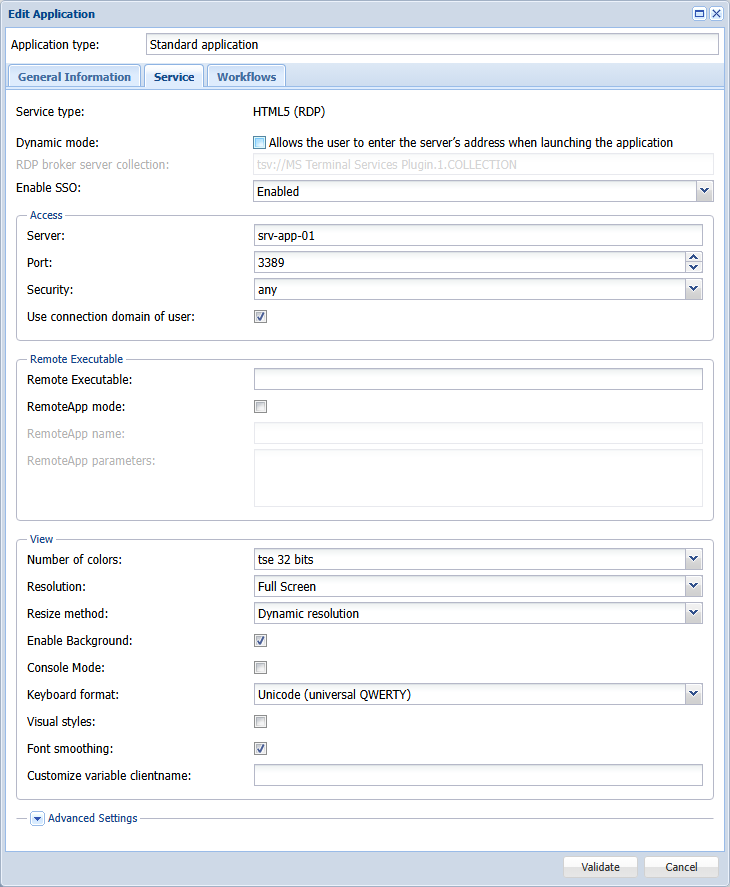
The HTML5 (RDP) type renders a Windows Remote Desktop session in the browser. Nothing has to be installed on the user's workstation: the HTML5 Gateway turns the RDP stream into a web page.
Comparison with RDS
| Criterion | HTML5 (RDP) | RDS |
|---|---|---|
| On the workstation | nothing | CyberElements client |
| In the site | HTML5 Gateway online | Edge Gateway only |
| Smartphone and tablet | available | absent |
The choice rests on this criterion alone: HTML5 (RDP) for an unmanaged workstation, a contractor or a mobile device; RDS when the client can be deployed and experience comes first.
RDS farm addressed through a broker
When the application targets an RDS farm through its broker (RDS Broker option), the
session is redirected by the broker to one of the farm's servers. The application's authorised
networks must therefore contain the brokers and the RDS servers of the farm, each by
its IP address, with port 3389 (for example 10.0.10.20:3389): the field only
accepts IP addresses, not names. A redirection to a machine missing from that
list does not succeed.
File transfer
File transfer is disabled by default: the application's Enable file transfer checkbox allows it.
The user then finds an additional drive in the session, whose Download folder receives the files
to download; they are stored temporarily in the /home/systanciahtml5share/ directory of the HTML5
Gateway, created when the gateway is installed.
Prerequisites
- The HTML5 feature enabled on the organisation. Without it the type is not offered at creation time: it only stays visible for editing on existing applications.
- An HTML5 Gateway online in the target site.
- The RDS server reachable from an Edge Gateway of that site.
Limits
- No video recording: traceability for this type belongs to its privileged variant.
- No assistance session sharing. Assistance profiles only offer privileged HTML5 applications: the criterion is the application type, not the protocol.
- No embedded gateway and no agentless mode: those settings belong to the privileged variant.
- If the HTML5 feature is turned off on the organisation, existing applications remain editable but the type disappears from the creation list.
Passed credentials and SAML domains
Passing the user's credentials assumes the platform knows their password, which is not the case on a SAML domain, where it is entered at the identity provider. For those users, plan an SSO that takes the credentials elsewhere: entry at launch time, or an alias from the vault.
The details of the fields are in the module reference.
The API endpoints that drive this object are described in the API reference.