Switch mode
Switch mode decides what the server is: a platform on its own, or one of the two nodes of a cluster. The chosen role then commands the addresses the server carries, and the very existence of the Cluster settings screen.
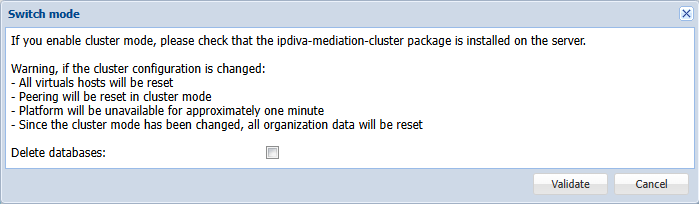
The most destructive operation of the console
Changing the role deletes every organisation
This is not an indirect consequence: it is what the operation does. As soon as the role changes (Standalone to Master mode, Master mode to Slave mode, in any direction) every organisation on the platform is deleted, with its domains, its accounts, its contracts and its vaults. The confirmation window says so in one line: the mode having been changed, organization data will be reset.
This switch is therefore made on a new platform. Doing it later is a reset, and there is no way back.
The refusal that protects an associated organisation does not apply here
An organisation that takes part in an association of organisations cannot be deleted from Organizations. Switch mode, however, does not observe that rule: it deletes all organisations, associated ones included. Undo the associations before switching.
To that, announced by the same confirmation, are added: the reset of the virtual hosts, the reset of the pairing in cluster mode, and about a minute of platform unavailability.
Choosing a role
Three values, and only one is an isolated server.
- Standalone: the server carries everything. This is the default role.
- Master mode and Slave mode: the two nodes of a cluster, which share the load and take over from each other in case of failure.
The role decides what the window then asks for: a standalone server enters only its own addresses; a cluster node enters those of the master, those of the slave, and the virtual addresses on which the cluster answers whatever node is active.
The distribution mode cannot be chosen
A second field, Mode, appears for a cluster role but stays inactive: the only value offered is Loadbalancing. The cluster therefore always works in load balancing; failover is set address by address, in Cluster settings.
The prerequisite that nothing checks
The cluster package must be installed before the switch
The confirmation asks to check that the ipdiva-mediation-cluster package is indeed
installed on the server, and it really is a request, not a check: nothing prevents
switching a server that does not have it. Verification is the administrator's
responsibility, and it is done before, not after.
Server without the CyberElements Gate console
After validating, run on each Mediation Controller, as root:
/usr/local/ipdiva/bin/disable_watchdog_zope.py
What the "Delete databases" checkbox changes
The box appears only if the role has actually changed, and it is not ticked by default.
- Ticked, the databases of the deleted organisations are destroyed on the server that hosts them, vaults included.
- Unticked, the organisations disappear from the platform but their databases stay in place, with nothing left to reference them.
This is the only moment when the question is asked: after the switch the organisations no longer exist and the box is offered nowhere.
Changing a port or an address without changing the role
Correcting a listening port or an IP address without touching the role deletes nothing: the warning line about organisation data and the database deletion box do not appear. What remains are the reset of the virtual hosts and the unavailability announced, which apply to any change.
What the window asks for, according to the role
Always: the web port and the SSL Router port.
Then, according to the role: the IP addresses of the standalone server, or those of the master and of the slave, plus three virtual addresses (web, SSL Router and ZEO). All addresses are expected in IPv4.
In which order
- Install the cluster package on both servers.
- Switch the role, before creating a single organisation.
- Check the virtual hosts, which the operation has reset.
- Set the failover conditions in Cluster settings, which appears only once the server has left the Standalone role.
- Create the organisations.
Limits
- No address or port validation server-side: only the browser checks the IPv4 form of the addresses entered.
- The distribution mode is not configurable.
- A cluster of more than two nodes is not declared here.
- The switch cannot be prepared: the fine cluster settings are reachable only after the role has changed.
Availability
The screen disappears once the server has joined a multi-node cluster. On such a platform the role is no longer changed from the system console.
The detail of the fields and of the confirmation window is in the module reference.