Virtual desktop
Application fact sheet
| Video recording | Recording agent | CyberElements client | Desktop client | Direct access |
|---|---|---|---|---|
| depending on the access mode |
The Virtual desktop type hands the user a complete desktop, cloned on demand from a reference machine and released when it closes. It constitutes a temporary administration workstation: isolated from the user's own machine, built from a controlled model, and disposable.
Depending on how the reference machine is prepared, that desktop can carry whatever the access requires: thick clients, IT administration tools, remote access or VPN software.
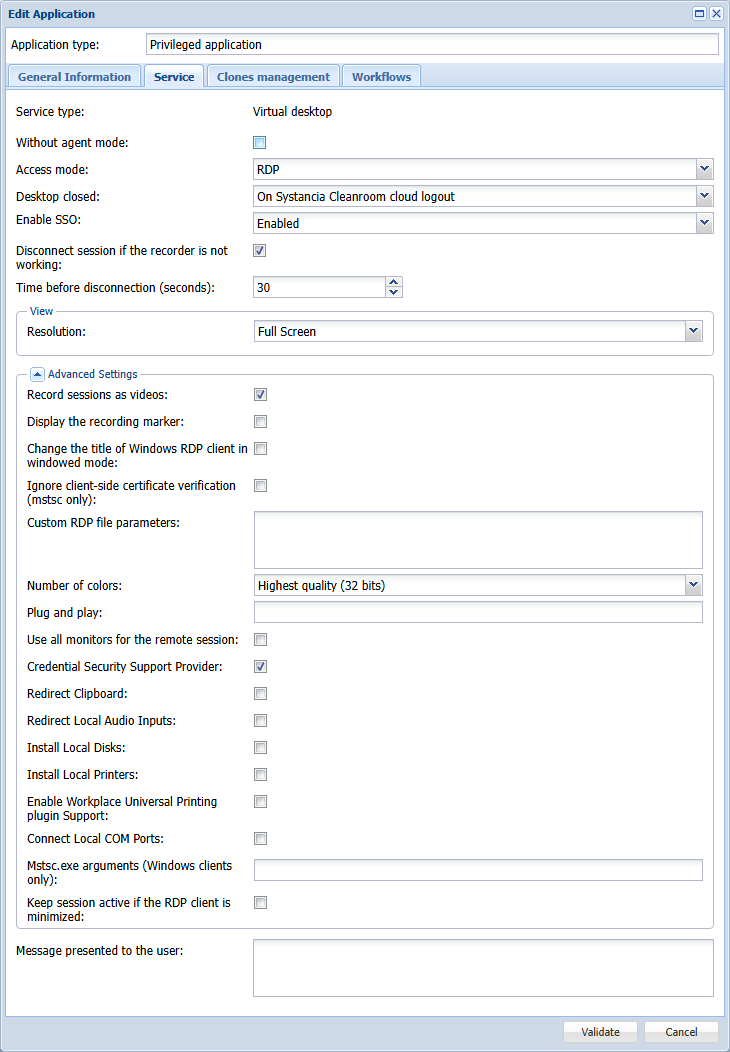
Access modes
Four modes exist, with different properties:
- hypervisor console: the display goes through VMware or Proxmox, in the browser. This mode guarantees connectivity whatever happens to the machine: network card disabled, VPN raised from the clone, operating system other than Windows.
- RDP: a Remote Desktop session in the native client. It brings the functions of RDP: authentication during connection, adaptive resolution, device redirection, multi-monitor.
- through the platform proxy: a mode reserved for privileged applications.
- user's choice: the modes are offered at launch.
The hypervisor console and RDP modes require the recording agent on the reference machine.
Console mode and network loss
Console mode is the only one that survives the clone losing its network, and that is its reason for being: an administrator raising a VPN from the virtual desktop, or disabling the network card, keeps control. An RDP access depends on the network of the very machine it displays.
Recording agent deployment
The recording agent is deployed from the console. This capability, new in 4.7, differs from what the other types allow.
Selection for deployment
The Deploy agent and Remove agent actions accept either one Virtual desktop application, or a set of RDS / HTML5 (RDP) applications, never both, and never two virtual desktops together. A mixed selection leaves the buttons inactive, with no message explaining why.
When the agent is not used, the access mode and the recording mode are forced: the display goes through the platform proxy, which performs the recording.
Prerequisites
- Virtual machine management enabled on the platform: without it the type does not appear.
- A declared virtualisation host, VMware or Proxmox, with the locations where clones are to be created.
- A reference machine prepared on that host.
- The CyberElements client if RDP mode is chosen; the browser is enough in console mode.
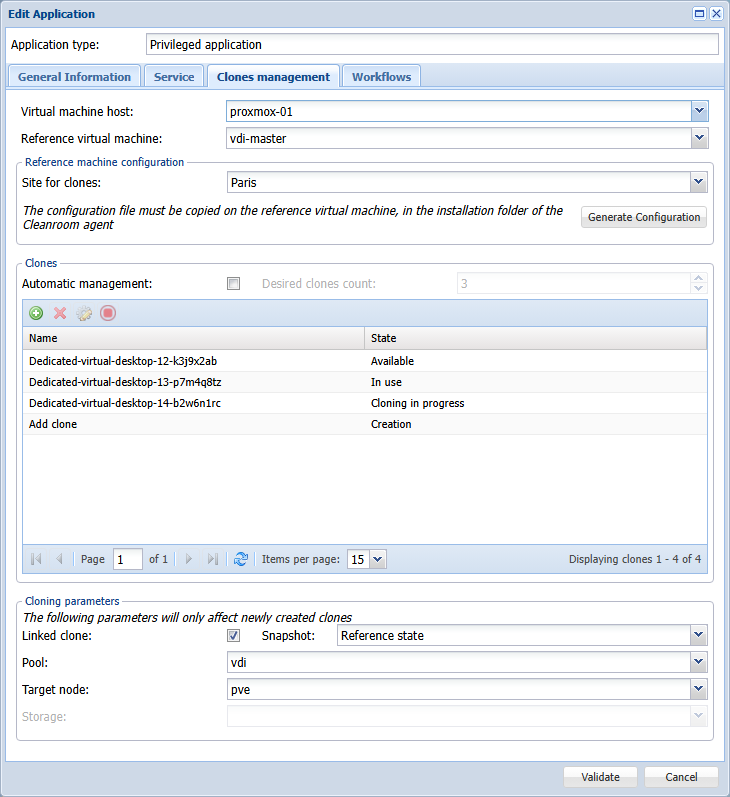
The host, the reference machine and the clones are set in the Clones management tab:
Limits
- Cannot be duplicated: the console refuses to duplicate an application of this type, unlike every other one.
- Not exported to CSV: it does not appear in the application export.
- No target server to fill in: the target is a clone, created on demand.
- No direct access.
- The host and the reference machine can no longer be changed while the application has clones. A clone removed from the list is deleted from the host on saving; if it cannot be, it is kept and the console reports it. Likewise, an application one of whose clones could not be deleted from the host is not deleted.
- Agent deployment is limited to one application at a time.
- Clone closing is configurable (on logoff, at the end of the session, or on user action), but closing on logoff is not available without the agent.
Passed credentials and SAML domains
Passing the user's credentials assumes the platform knows their password, which is not the case on a SAML domain, where it is entered at the identity provider. For those users, plan an SSO that takes the credentials elsewhere: entry at launch time, or an alias from the vault.
The details of the fields, including the Clones management tab, are in the module reference.
The API endpoints that drive this object are described in the API reference.