User condition
Availability of the condition
| Works without the client | Requires the client | Windows | macOS | Ubuntu |
|---|---|---|---|---|
As no attribute is returned outside LDAP and local domains, the condition is never valid on a SAML or anonymous domain, whatever the system.
The User condition tests an attribute of the profile of the person connecting: its presence, or its value. It allows access to be based on what the directory already knows (a department, a status, an employee number) without creating another group.
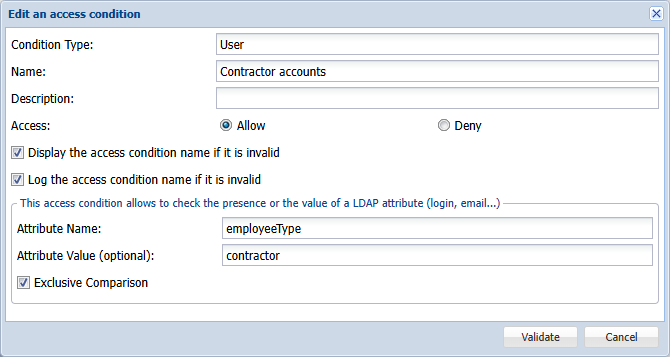
Defining the condition
- Attribute name: the one to read from the profile (
mail,employeeID,mobile, or any attribute the directory publishes). - Attribute value: optional. Left empty, the condition only checks that the attribute holds a value, which is often enough.
- Exclusive comparison: ticked, the expression must match from the start of the value; unticked, it may match anywhere within it.
Group and attribute
A group is more legible and visible in the console; an attribute avoids creating a group for a criterion the directory already carries, and follows changes to the record automatically.
In practice, the group suits what structures rights, the attribute a cross-cutting nuance ("internal staff only", "only those with a mobile number on file").
Domain types
Domains without attributes
Attributes are read from the directory for an LDAP domain and from the database for a local directory. For other types (SAML in particular), nothing is returned, and the condition is therefore never valid there.
The consequence depends on the direction chosen: as Allow if valid it closes access to every SAML user, as Deny if valid it never filters them. Either way the effect is total and silent: this is to be checked before attaching the condition to a contract serving several domain types.
Limits
- Attributes available only on LDAP and local domains.
- The comparison is textual; there is no numeric operator and no date comparison.
- A missing attribute is treated as an unmet condition, not as an error.
The details of the fields are in the module reference.