Organizations
An organisation is the first-level partition of CyberElements Bastion: it has its own
database, its own administration console, its own local directory and its own admin account.
Two organisations on the same platform share none of their content.
This screen is the only place where an organisation is created, sized and deleted.
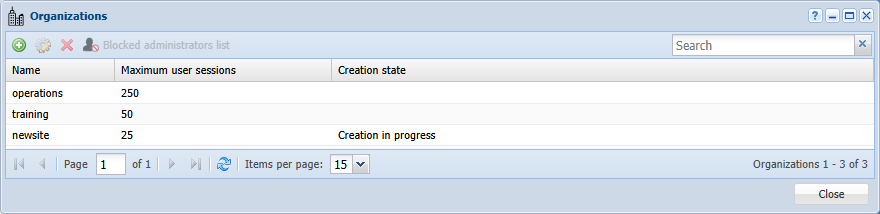
What creating an organisation produces
Creating an organisation is not declaring a row in a list. The operation puts in place, in one go:
- the organisation's database, created on the indicated server, or simply checked if it already exists;
- its local domain and its guest domain, on which assistance requests depend;
- the admin account of that local domain, with the password entered in this window: that is the account that will open the organisation's administration console;
- its embedded vault;
- a restart of the web server, so that the new database is taken into account.
The licence commands, and it commands first
Two refusals come from the licence, and they arrive in this order.
No licence, no organisation
As long as the licence is not applied, the add button answers Please fill in the licence and certificates first before creating an organization. and the creation window does not open.
The Maximum user sessions field then draws on a common pool: the licence sets a total number of sessions for the platform, and the sum of what the organisations have been granted cannot exceed it. A line below the field permanently recalls what is left available.
Overrun is refused, at creation as well as at modification
Asking for more than the available balance makes saving fail with You cannot allocate more user sessions than available in the licence. At modification, the computation takes into account what the organisation already held: it can therefore reclaim its own sessions, never another organisation's.
The name can no longer be changed
An organisation name accepts only letters, digits, - and _, and it is lowercased as it is
typed; any other character is refused by The name contains forbidden characters. The name
cleanroom_infra is reserved for the platform and rejected by Invalid Name.
The name is fixed for good
At modification, the name is nothing more than displayed text. It names the organisation's database and its connection configuration: there is no renaming operation, and the only way to change it is to re-create the organisation.
Database settings are asked only once
The database configuration group (engine type, account, server, port, SSL mode, PKI and certification authority, gateway tunnel) is offered only at creation. At modification it is no longer displayed at all.
What stays modifiable afterwards
The maximum number of sessions, the password of the admin account, the list of allowed
addresses, the authorisation of HTML5 connections and that of ACM. Everything else is
decided at creation.
Creation is asynchronous, and its state is a column
The organisation appears in the list as soon as the request is accepted, before it is usable. The Creation state column is the only place that says where the operation stands: Creation in progress, Waiting for the following gateways to connect:, or An error occured during creation: followed by the reason. An organisation whose creation has run to completion displays nothing in this column. The list refreshes by itself as long as a creation is under way.
Until creation is finished, the row is nearly inert
Properties and the blocked administrators list button stay greyed out for any organisation whose creation is not complete. Deletion, on the other hand, remains possible on an organisation in error or waiting for gateways (that is how a failed creation is cancelled), but not on a creation in progress.
The database tunnel gives the gateways fifteen minutes
When the database is reached through a tunnel, creation waits for all the designated gateways to connect, on every Mediation Controller. After fifteen minutes, creation switches to error and names those that did not show up.
What the organisation authorises, and what is decided here
Two checkboxes in this window open whole features in the organisation's administration console.
- The authorisation of HTML5 connections commands the presence of the HTML5 gateway management module. It is not ticked by default: an organisation that has to serve in-browser accesses is created with this box ticked, or modified afterwards to add it.
- The authorisation of ACM opens the work panel of the same name. It is offered only if ACM is available on the platform.
The list of allowed IPs restricts the addresses from which this organisation can be reached, not to be confused with that of the super-user account, which protects the system console only.
Deleting an organisation
Deletion asks for a confirmation that carries a Delete database checkbox. It is not ticked by default: without it, the organisation disappears from the platform but its database stays in place on the server that hosts it.
An associated organisation cannot be deleted
If the organisation takes part in an association of organisations with Systancia Gate, deletion is refused. The association must be undone first.
If the database cannot be deleted, the organisation is kept
When the box has been ticked and deleting the database fails, the organisation is not removed either: the console names those that could not be deleted. This is the intended behaviour: it avoids leaving an orphan database with no owner.
Limits
- The name, the engine and the database connection parameters can no longer be modified after creation.
- No organisation is moved from one server to another from this screen: that is a backup and a restore.
- The system console shows nothing of an organisation's content; it only sets its
adminpassword at creation, and can unblock its administrators. - The number of sessions granted is not a soft quota: it is taken from the platform pool as soon as it is entered, whether the organisation uses it or not.
The step-by-step procedure is in Adding a new organisation, and the detail of the fields in the module reference.
The API endpoints that drive this object are described in the API reference.