History of exposure (Embedded mode)
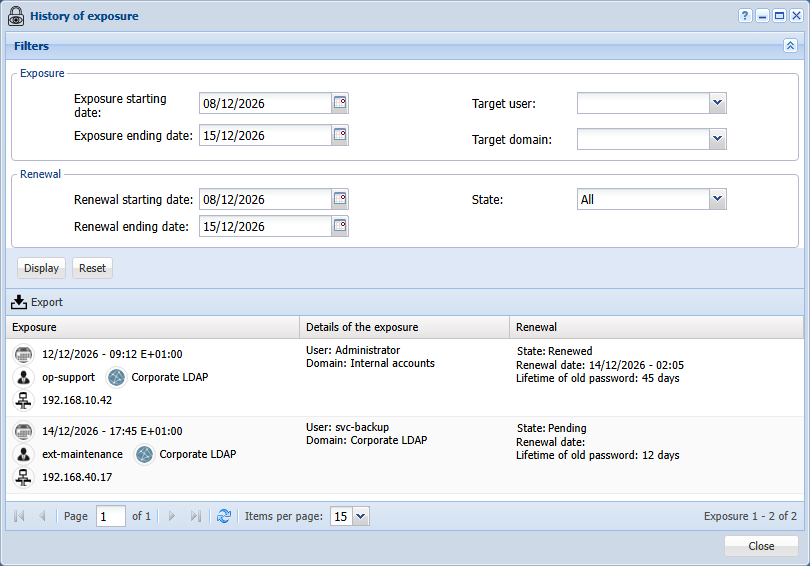
An exposure is the fact that an administrator displayed the current password of a vault account. The History of exposure screen keeps the trace of those lookups and of the rotation each one triggers.
It is the counterpart of the Display current password button: the vault agrees to reveal a secret, on condition that the reveal is traced and the secret replaced.
Creation of an entry
An entry is created by a click on Display current password, from an alias edition window. It records who looked, from which address, when, and the date at which rotation is scheduled: the moment of the lookup plus the renewal period set in the general options.
Successive lookups
While the scheduled rotation has not been triggered, a further lookup of the same alias creates no second entry and does not push the deadline back. The number of rows therefore counts distinct exposures, not lookups: two administrators looking up the same password within the same window do not both appear.
Nothing else creates an entry: neither an ordinary rotation, nor a forced one, nor normal use of the alias by a user.
Rotation at the end of a session
The general options carry two checkboxes that extend this mechanism beyond the console, and that are unrelated to the renewal period:
- Trigger rotation for the used password at the end of any recorded session: every recorded session rotates the password of the alias it used;
- Trigger rotation for the used password at the end of any recorded session if it is exposed and not yet renewed: the same, restricted to aliases carrying a pending exposure.
Rotation delay
In both cases, the end of the session marks the alias as due for renewal; the change happens on the rotation service's next pass. A gap of a few minutes between the session closing and the actual change is normal.
Renewal state
The right-hand column distinguishes three situations, to be told apart in an audit:
- Renewed: the password has effectively changed since the exposure;
- Pending: rotation is scheduled but has not completed yet;
- an error reason in red: the last attempt failed, and the exposure remains open.
Export
The Export button produces a CSV file of the exposures matching the active filters; its content is detailed in the module reference.
Export content
The renewal state and the error reason are not exported: they can only be read in the grid. An export is therefore not enough to prove that an exposure was followed by a rotation: the grid is needed for that. The number of rows is also capped by a limit belonging to the platform.
Limits
- The history is read-only: no entry can be added, corrected or purged from the console.
- The account Type column does not appear in Embedded mode: it comes from the CyberElements Access agents.
- The filter panel is collapsed on opening and offers the last seven days by default, but those dates are not applied until Display is clicked: the initial list covers the whole history.
The detail of the columns, the filters and the exported file is in the module reference.