Web
Application fact sheet
| Video recording | Recording agent | CyberElements client | Desktop client | Direct access |
|---|---|---|---|---|
The Web type publishes a recorded web application: the user reaches it from their browser, with no client and no tunnel. Browsing is recorded, and the URLs visited are logged as events.
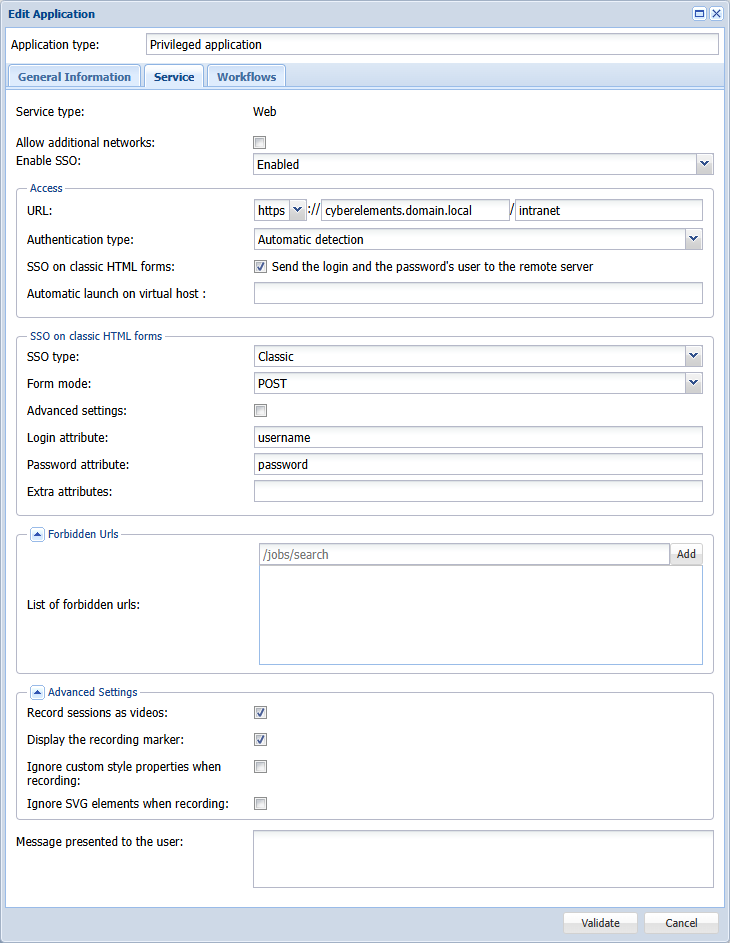
Comparison with Reverse proxy
| Criterion | Web | Reverse proxy |
|---|---|---|
| SSO mechanisms | four | three |
| Virtual host | optional | mandatory |
| Additional networks | ||
| Compatible web applications | all | those that accept being served by a reverse proxy |
A web application compatible with the reverse proxy works with both types; an application that is not only works with the Web type.
SSO mechanisms
- Classic: the credentials are posted to the application's form.
- Form preloading: the form is loaded, filled in and submitted automatically. This mechanism suits forms protected by a CSRF token, which the prior loading allows to be retrieved.
- Injection: the configuration produced by the browser plug-in injects the credentials (see Configure SSO by injection).
- Pre-authentication: a series of requests is sent before the final redirection, for applications requiring a token obtained beforehand.
Deprecated pre-authentication
The list of SSO types shows it as Preauthentication (deprecated). It remains selectable; the label announces that it is set to disappear, so a new application should preferably rely on one of the other three mechanisms.
The Web type is also the only one to allow additional networks, which allows publishing an application whose pages call resources hosted outside the declared target.
Automatic launch on the virtual host
The Automatic launch on virtual host field associates the application with a host name, for
example intranet.example.com, for a user who opens that address in their browser, or who follows
a link or a bookmark pointing to it:
- if they are not authenticated, they are redirected to the user portal to authenticate;
- once authenticated, if they have access to the application, it launches by itself, on the requested page.
The user does not have to look for the application in the portal, and the links already circulating to it remain valid.
During the session, a new access to that address reuses the application already launched, without going through the SSO again.
Conditions
- The host name must be declared in the system console as a web virtual host of type Web VPN, enabled on a web interface.
- It must also resolve to the platform in DNS and be covered by its certificate.
- The user must have access to the application; otherwise, the portal opens as usual.
- If several applications are associated with the same name, the first one the user has access to is launched.
Prerequisites
- The target web application, reachable from an Edge Gateway of the intended site.
- The authentication sequence of the application, if SSO is expected.
Limits
- No recording agent: traceability comes from the web stream and the URLs visited, nothing is observed on the target server.
- No session sharing: assistance covers only the three HTML5 types.
- No direct access: access always goes through the user portal.
Passed credentials and SAML domains
Passing the user's credentials assumes the platform knows their password, which is not the case on a SAML domain, where it is entered at the identity provider. For those users, plan an SSO that takes the credentials elsewhere: entry at launch time, or an alias from the vault.
The details of the fields are in the module reference.
The API endpoints that drive this object are described in the API reference.