RDS
Application fact sheet
| Video recording | CyberElements client | Desktop client |
|---|---|---|
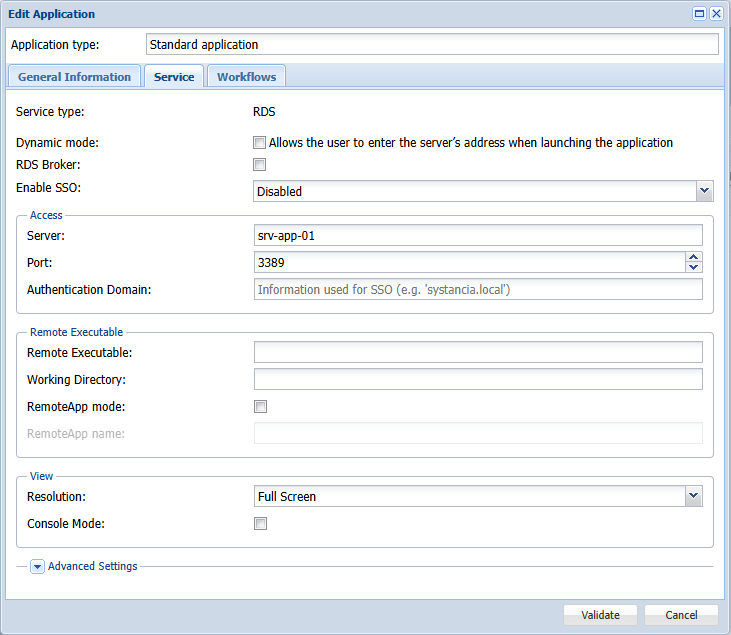
The RDS type opens a Windows Remote Desktop session in the workstation's native RDP client, through the platform.
Comparison with HTML5 (RDP)
| Criterion | RDS | HTML5 (RDP) |
|---|---|---|
| On the workstation | CyberElements client | nothing |
| In the site | Edge Gateway only | HTML5 Gateway online |
| Smartphone and tablet | absent | available |
The choice rests on this criterion alone: RDS when the client can be deployed and experience comes first; HTML5 (RDP) for an unmanaged workstation, a contractor or a mobile device.
RDS farm addressed through a broker
When the application targets an RDS farm through its broker (RDS Broker option), the
session is redirected by the broker to one of the farm's servers. The application's authorised
networks must therefore contain the brokers and the RDS servers of the farm, each by
its IP address, with port 3389 (for example 10.0.10.20:3389): the field only
accepts IP addresses, not names. A redirection to a machine missing from that
list does not succeed.
Prerequisites
- The CyberElements client on the workstation.
- The RDS server reachable from an Edge Gateway of the site.
Limits
- No video recording: that is the definition of the family.
- The Deploy the agent and Remove the agent toolbar actions do not apply: they only target privileged RDS and HTML5 (RDP) applications.
- No alternative client program: replacing
mstscis reserved for the privileged variant.
Passed credentials and SAML domains
Passing the user's credentials assumes the platform knows their password, which is not the case on a SAML domain, where it is entered at the identity provider. For those users, plan an SSO that takes the credentials elsewhere: entry at launch time, or an alias from the vault.
The details of the fields are in the module reference.
The API endpoints that drive this object are described in the API reference.