Workplace association
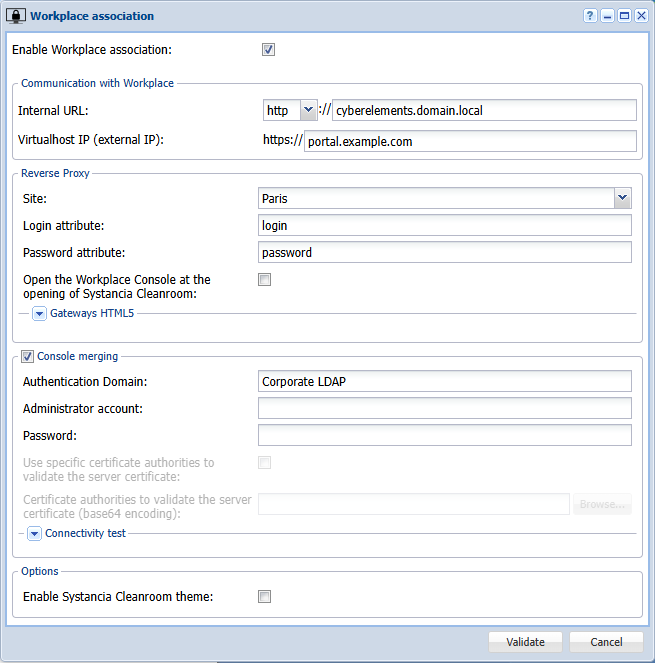
The Workplace association connects CyberElements to a Systancia Workplace instance: CyberElements publishes the Workplace desktops through its reverse proxy and can, on request, integrate the Workplace console into its own.
It is the only screen in the console that creates objects in the main work panel, and deletes them when it is switched off. For that reason it is set up early and rarely revisited.
Availability
The module is only displayed when the Workplace integration is enabled on the platform; its activation is requested from CyberElements Support.
Association levels
A single box, Enable Workplace association, commands the whole screen: as long as it is unticked, the four sections stay inactive. The association, however, has two degrees, which do not yield the same screens.
The association alone is enough to publish Workplace through CyberElements and brings up the SSO modes for Workplace.
Console merging, an additional section enabled by the box in its title, additionally brings up the firewall for Workplace, the Workplace access contracts, the VDI desktops, the virtualisation hosts and the virtual machines.
Console reload
Enabling or disabling merging makes modules appear or disappear from the menu. The console offers to reload the page; until the page is reloaded, the menu shows the previous state while the configuration is already saved.
Objects created and deleted
This mechanism is the least visible of the screen, and it explains the rest of its behaviour.
Ticking the box and validating automatically creates a reserved category and two applications that the console manages itself. Unticking the box and validating deletes them.
Granting the applications
A user only reaches Workplace if an access policy grants him the application. The two applications created here are visible to nobody until an access policy grants them to a group. That is the most frequent cause of a correctly configured association whose effect no user ever sees.
Disabling the association
Disabling the association empties the contracts that cited those applications: since the applications are deleted, the contracts that carried them lose them. Re-enabling the association recreates them but puts them back in no contract: the whole granting work has to be redone.
Reverse proxy site
The Reverse Proxy section asks for a site. That site serves the console: it is through an Edge Gateway of that site that CyberElements reaches Workplace to read and write its settings, and to ask for its version.
The sites through which users reach their Workplace desktops are those of their access policies, not this one.
Edge Gateway required
With no online Edge Gateway in that site, nothing works from the console: both the connectivity test and the save fail with a gateway-unavailable message. The site chosen must therefore carry at least one online Edge Gateway able to reach the Workplace server.
Test and save
The test button queries Workplace with the values currently typed, without saving anything. Three failure causes are named: incomplete parameters, no gateway available, credentials refused.
Failure on save
A failure on save does not mean nothing was saved. The configuration is written first, and the Workplace version is queried afterwards. If that query fails, the console displays an error (gateway unavailable, connection impossible, credentials refused) while the values are already in place. Reopening the screen shows them as they were typed: this is not an anomaly.
Order of implementation
- Have a site whose online Edge Gateway reaches the Workplace server.
- Fill in the communication (protocol and internal address of the Workplace server, external address under which CyberElements exposes it), then the reverse proxy: site, SSO attributes, HTML5 gateways if Workplace applications are to open in the browser.
- Test connectivity, then save.
- Enable console merging if the Workplace modules are to appear in the console, and reload the page.
- Grant the created applications in an access policy.
- Set the SSO modes, then the firewall if merging is in place.
Limits
- Only two generations of Workplace server are recognised: 6.1 and 6.2 build 12 and above. The connector tries the two matching access paths and, if it finds neither, concludes the version is incompatible.
- Only one Workplace instance can be associated with the tenant.
- The administrator account password is rewritten only if it is typed, or if the account changes. Leaving it empty keeps the stored one; it is never returned to the screen.
- The optional certificate authority file must be under 20 KB and in PEM format; it is only
offered if the communication uses
https. - The HTML5 server certificate must be present on the user's workstation: the console displays a reminder on every gateway added, and nothing on its side can make up for it.
The section-by-section field detail is in module reference.