OTP Radius generator
The OTP - Radius generator delegates the second factor to a Radius server. The platform produces no code: it forwards the request and applies the answer.
This channel is suited to an organisation that already has a strong authentication infrastructure (hardware tokens, a vendor MFA solution) and wants to reuse it rather than add a second one.
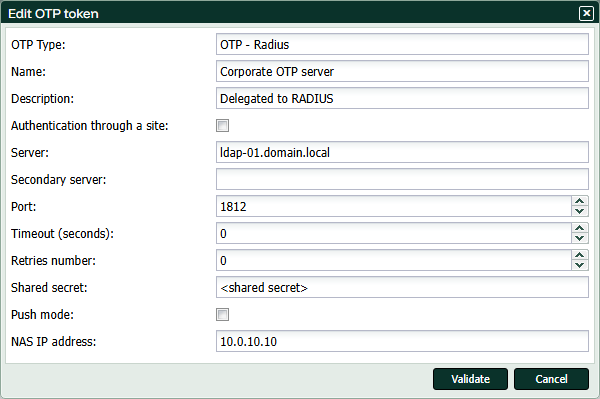
Prerequisites
- the address of the server, and of a secondary server if there is one;
- the port (1812 by default) and the shared secret;
- the NAS IP address as declared on the Radius server side, in strict IPv4: this is the identity the platform presents itself under, and a Radius server filtering by source rejects every request if it does not match.
Two robustness settings complete the configuration: the timeout (10 seconds by default) and the number of attempts (2 by default).
Code entry and Push mode
Without Push mode, the user types a code at login, the one given by their authentication solution (hardware token, application). The platform passes it to the Radius server, which accepts or refuses it. The server can also answer with a challenge (challenge / response): the login page then displays the server's message, and the user enters the expected answer, which the platform sends back to the server with the state of the challenge.
With the Push mode option, the user does not type a code: they approve the connection from their application. This is faster and less error-prone, provided the Radius solution in use supports it. If the server does not answer within the timeout, the approval is considered expired.
Redundancy
The secondary server is optional but recommended: without it, the Radius server's unavailability prevents any authentication on the domains using it, administrators included. The principle is the same as for the multiple servers of an LDAP domain.
Domain Radius option and OTP generator
An LDAP domain can carry its own Radius option, which can only be enabled at creation. The OTP generator, by contrast, is associated and dissociated freely, which is the reason to prefer it, unless the Radius coupling must happen as early as the password check.
Limits
- No code is produced by the platform: everything depends on the Radius server.
- The NAS address is in strict IPv4.
- Push mode assumes the Radius solution supports it; the console does not verify this.
The details of the fields are described in the module reference.