Managed accounts usages
A usage is a place where a managed account is actually used: a Windows service that starts under it, a scheduled task that runs under its identity, a vault alias that presents it, an SSH or Microsoft SQL Server access.
The screen shows, account by account, what a password rotation would affect, and allows a given usage to be excluded from rotation.
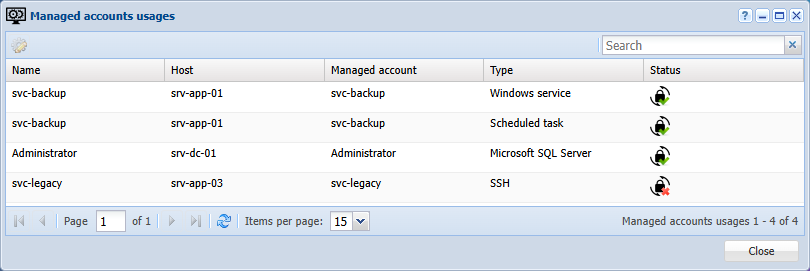
Origin of the list
It is the agents that report the usages, and they alone. The console offers neither creation nor deletion: the toolbar carries a single action, Edit.
Discovery conditions
A usage only appears if an agent covers the machine it lives on, if that agent is enabled, and if its policy includes the matching perimeter: services management for a Windows service, scheduled tasks management for a task. A list shorter than expected is therefore diagnosed on the agent and policy side, never here.
The refresh button in the window footer forces a resynchronisation with the CyberElements Access server, rather than settling for the data already known.
Participation in rotation
The edition window is entirely read-only, save for one checkbox: Apply password rotation.
- Ticked, the usage takes part in the rotation of the account's password.
- Unticked, it is excluded from it.
Scope of the checkbox
The checkbox bears on the usage, not on the account: unticking it does not interrupt the account's rotation, which stays commanded by its policy and by the agent. It removes one usage from the perimeter handled, so whatever had to be done for it remains to be done some other way. Keeping a critical service out of rotation is an operational decision, not a pause: it requires knowing how that service will receive the new secret.
Usages of type Alias
A vault alias always follows the rotation of the account it presents: there is no sense in withdrawing it, and the checkbox is disabled in that case.
Usage natures
| Nature | What it designates, and where it is set |
|---|---|
| Windows service, scheduled task | discovered by the machine's agent; they depend on its policy's perimeter |
| Alias | the link is made in the vault; it is removed by deleting the alias |
| SSH, Microsoft SQL Server | access to a machine or a database; the only natures the account form provides for entering by hand, but that section is never displayed, see below |
| CyberElements Access administration service | usage internal to the CyberElements Access server |
Manual entry of a usage
The form of a managed account holds an Applications block that provides for declaring an SSH or Microsoft SQL Server usage by hand, with its host and port. That block is hidden in all circumstances: no manipulation brings it up, and no screen allows that entry. In practice, every usage therefore comes from agent discovery, including those two natures.
Limits
- Neither creation nor deletion from this module: a usage appears and disappears according to what the agent discovers.
- Only the participation in rotation can be changed; the name, the host, the attached account and the nature of the usage are read-only.
- The module only exists in CyberElements Access mode. In Embedded mode the platform discovers nothing, and the notion of usage does not exist.
- A usage still visible after the service has been removed from the machine will only disappear at the next synchronisation.
The detail of the columns and the fields is in the module reference.