Comments
A comment is a piece of text attached to one session, and to it alone. It makes it possible to explain why an access took place, or what an administrator noticed while reviewing it, so that the recording remains understandable months later.
Access to comments
Comments are not browsed globally: the window opens from a session, selected in the Control center, on the tile of a running session, on a row of the archives, or from the detailed view of a session. It then shows the comments of that session, and nothing else.
Control center permission
Reading, writing and deleting a comment are controlled by the Control center permission, not by a permission of its own. This is consistent with delegated administration, where the Comments permission requires the Control center and both its sections as a prerequisite: a delegated administration profile granting comments without the Control center would give access to nothing.
Comment origins
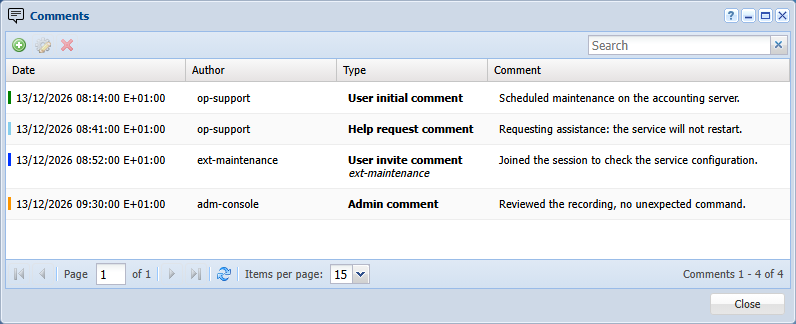
The type column distinguishes four origins, each marked by a colour. Only one corresponds to the administrator:
- the user initial comment, entered when launching the application from the user portal: this is the one that states why the access took place;
- the help request comment, written by the user when asking for assistance on their session;
- the user invite comment, written by the user who invites a third party; it also carries the email address of the invitation's recipient;
- the admin comment, the only one the console allows to be written.
The first three therefore come from the portal and from assistance, described in Assistance profiles. The console does not produce them, and rewriting them is to be avoided: editing them amounts to altering a statement made by the user.
Comment and custom event
A comment is about the whole session. To annotate a precise moment of a recording (the moment when something happens), a custom event is placed from the archive player: it takes its place in the timeline, next to the captured events, and is found by content searches.
Limits
- A comment attaches only to a session: there is no comment on a user, an application or an access policy.
- An empty comment is not saved, and the screen does not indicate it.
- Comments disappear along with the session that carries them: deleting a recording also deletes what explained it.
- The search field of the window only covers the text of the comments of the session that is open.
The detail of the screen (columns, form and actions) is described in the module reference.