Image templates
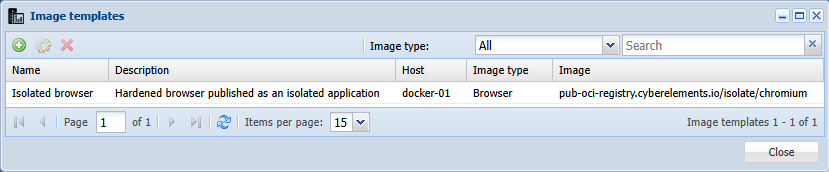
An image template is the blueprint of the container the platform starts each time an Isolate (Web) application (privileged and standard) is opened. It states which browser image to use, which registry to fetch it from, with what memory and processor limits, which ports to expose and which security options to set.
It is the only object that consumes it. A template cited by no application is never instantiated.
Availability
The module only appears once the Isolate feature is enabled on the platform. While it is not, neither this screen nor the Isolate (Web) application type is offered. Its activation is requested from CyberElements Support.
The module is new: it did not exist in 4.6.
Template contents
The template describes both an image (a name, a tag, an optional command) and the conditions of its execution (memory, processor, ports, security options).
The Image type field offers a single value, Browser, and stays greyed out: that is the only use catered for today.
Host field
The Host field designates a registry, not the machine that will run the container. The combo only offers hosts declared as Docker registries, and what the platform draws from it when a session opens is the credentials of where to download the image: URL, login, password. Running the container is entrusted to the Browser Isolation engine.
As a consequence, with no host of the Docker registry type declared, the combo is empty, and since the field is mandatory, no template can be created.
Exposed ports
At least one port is required: the console refuses to save without one, and pre-fills port
10000 on creation. These are the ports the container opens on the docker server; they are
what the platform later calls back on to build the session's address.
Checks on saving
Image and tag
Both fields are free text and no call is made to the registry on entry. A typo is saved without a message and is only discovered when a user launches the application, in the shape of a session opening error.
The product's only reachability test lives in the container or virtualisation hosts screen, and it covers the registry, not the contents of an image.
Security options are entirely free key/value pairs: no allowed-key list, no format validation. The console only refuses to add the same key twice.
The memory bounds (64 MB minimum, 512 by default) and processor bounds (1 minimum and by default) are set by the form; there is no ceiling.
Template deletion
A template cited by an Isolate (Web) application cannot be deleted: the console refuses and names the templates concerned. The applications using it must be modified or deleted first.
Deleting a selection
Deleting a selection is partial, not atomic. When several templates are selected and only one is in use, the others are deleted before the error message appears. The refusal does not roll the operation back.
Registry deletion
The link between a template and its host is a cascade: deleting the host declared as a Docker registry deletes every template that cites it, without the hosts screen warning of anything. The Isolate (Web) applications that relied on those templates then stop working. Check what depends on a registry before removing it.
Limits
- A single image type exists, Browser, and the field cannot be changed.
- The name is unique, but the check trims the spaces at both ends of the name entered, not of the names already saved: two names differing only by those spaces can coexist.
- No export and no import of templates from this screen; importing applications, on the other hand, cites the template by name and fails if that name cannot be found.
- Modifying a template entirely replaces its ports and security options, it does not merge them.
- The Properties button requires a single selection; deletion accepts a multiple one.
- No contextual help is attached to this screen in the product.
The API endpoints that drive this object are described in the API reference.