Managed accounts (Embedded mode)
In Embedded mode, the Managed accounts screen allows no declaration: it presents a state. It gives the list of the accounts actually held by the embedded vault, with the date of their last rotation and the number of rotations already performed.
It is the only screen in the console that shows whether an account is really being rotated, and since when, without going through the audit trail.
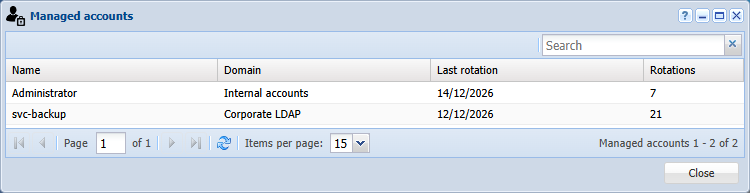
Origin of the list
A managed account is not an object created in Embedded mode. The list is computed from the embedded vault's aliases: every distinct user/domain pair carried by an alias appears there once.
Presence of an account in the list
To make an account appear, create the matching alias; to make it disappear, delete the alias or aliases that carry it. No other operation is needed, or possible.
Toolbar
The toolbar is empty in Embedded mode: no creation, no edition, no deletion, no Force password renewal. The refusal is not merely a matter of display: the server rejects those four operations as long as CyberElements Access mode is not active.
Identifying the mode in force
A toolbar with no button and a grid with no Type column are the quickest indicator: the vault is in Embedded mode. If the buttons are present, it is in CyberElements Access mode.
Related screens
| Operation | Screen |
|---|---|
| declare an account and its secret | Embedded vault, as an alias |
| change the rotation period or pattern | Password policies |
| force an immediate rotation | Embedded vault, Force password renewal action on the alias |
| check that a lookup was indeed followed by a rotation | History of exposure |
Limits
- No operation is available from this module in Embedded mode.
- The Type column (local account or service account) does not exist: the distinction is carried by the agents, and there are none in this mode.
- The module knows nothing about the uses of the account: neither the Windows services nor the scheduled tasks that rely on it. That discovery is the job of the CyberElements Access agents, and the Managed accounts usages screen is not offered here.
- An account whose alias has never rotated shows no date: the cell reports a pending rotation.
The detail of the columns is in the module reference.