Password vault
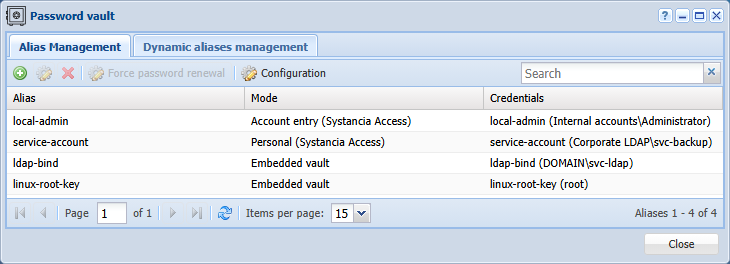
The password vault holds the credentials of the accounts the platform presents on the user's behalf: they launch an application, and the session opens under an account whose password they have never known. The object handled is an alias: a short name tied to an account and its secret.
An alias has no effect on its own: it becomes active when an application designates it, at which point that application's SSO setting switches to Fixed.
Vault mode
The password vault mode is not set in this module: it is a setting of the general options, and therefore global to the tenant. Only one mode is active at a time, and it determines who holds the secrets, who rotates them, and which screens the work panel offers.
- Embedded: the platform holds the secrets itself, in its own database. Rotation is carried by the password policies declared in the console.
- CyberElements Access: an external CyberElements Access server holds the secrets, and agents deployed on the machines rotate them and discover where the accounts are used.
- Keeper Security, LockSelf, Bitwarden: an external vault holds the secrets; the console only reads them. The three share the same screen, described in Keeper Security, LockSelf and Bitwarden.
Former name of the CyberElements Access mode
The console displays "Systancia Access" in the mode list, in the Mode column of the alias list and in its error messages. That is the former name of CyberElements Access: it designates the same product, and this documentation uses the current name.
Features per mode
| Feature | Embedded | CyberElements Access | Keeper Security, LockSelf, Bitwarden |
|---|---|---|---|
| Holder of the secrets | the platform, in its database or a remote database | the CyberElements Access server | the external vault |
| Component to deploy | none | CyberElements Access server, agents | external vault |
| Creating and editing aliases in the console | read only | ||
| Password aliases | |||
| SSH key aliases | |||
| Automatic password rotation | |||
| Renewal of SSH keys (RSA, ECDSA) | |||
| Forced renewal from the console | |||
| Display of the current password, traced | |||
| Exposure history | |||
| Dynamic aliases | |||
| Discovery of accounts and of where they are used | |||
| Secrets served to the applications of remote machines (ACM) |
Screens offered per mode
| Work panel screen | Embedded | CyberElements Access | Keeper Security, LockSelf, Bitwarden |
|---|---|---|---|
| Password vault (the aliases) | replaced by the vault's own screen | ||
| Password policies | |||
| Managed accounts | read-only | ||
| History of exposure | |||
| Managed accounts usages | |||
| Agents for password monitoring |
Screens removed with an external vault
Password policies, Managed accounts, History of exposure and the two agent screens are no longer offered: the external vault carries its own rules, and the platform rotates nothing there. There is therefore neither a policy nor an exposure history while such a mode is in force.
Change of mode
The change applies as soon as the general options are saved, and it reloads the console. Whatever was declared under the previous mode is not converted.
Applications detached
When moving to an external vault, or away from it, the console asks for confirmation, naming the vault concerned, then applies effects that cannot be undone:
- from Embedded or CyberElements Access to an external vault: every application in Fixed SSO loses the aliases it designated and reverts to Enabled SSO. The previous mode's configuration and aliases are kept, but no longer serve any purpose;
- away from an external vault: towards any other mode, including another external vault: that vault's aliases are deleted, its configuration is wiped, every application left with no alias reverts to Enabled SSO, and every automatic password injection setting for SSH and HTML5 (SSH) is deleted.
In both cases, each application concerned has to be revisited to designate an alias again.
Aliases from other modes
The Vault screen is shared by the Embedded and CyberElements Access modes, and its list shows the aliases of both, whichever mode is active; the Mode column says which one produced them:
- in Embedded mode, the aliases created earlier under CyberElements Access;
- in CyberElements Access mode, the aliases of the embedded vault.
The aliases of the other mode can be deleted, but no longer edited: the edit button stays inactive as long as the selected alias does not belong to the current mode.
The aliases of an external vault never appear there: they are read from that vault, and deleted when the mode leaves it (see Change of mode).
Migration from one mode to another
Migrating from one mode to another therefore happens in two steps: create the new aliases under the new mode and attach them to the applications, and only then delete the old ones. The two sets coexist without interfering.
Dynamic aliases
A dynamic alias lets an application carry a single alias that designates, for each
user, their own account. Typical case: each administrator has a personal privileged
account, declared in the vault under a name that follows a convention (adm-jdupont,
adm-mmartin…). Without a dynamic alias, it would take one application per administrator, or
attaching all those aliases to the same application and letting each one pick theirs at
launch. With the dynamic alias adm-%UPN_PREFIX%, the platform computes at launch the name of
the connected user's alias and opens the session under their account, with no choice to make.
The module's second tab, Dynamic aliases management, therefore declares not a secret but a naming rule. It is offered in Embedded mode as well as in CyberElements Access mode. A dynamic alias carries a pattern in which the platform substitutes, at launch time, parts of the connected user's identity:
%USER%: the full login;%UPN_PREFIX%and%UPN_SUFFIX%: what precedes and what follows the@in that login;%DOMAIN%: the Microsoft domain of the authentication domain, in lower case.
The pattern must contain at least one of those variables, otherwise the entry is refused. The computed name is then looked up among the existing aliases; if it designates none, the user gets nothing.
Pre-existing target aliases
A dynamic alias does not create the aliases it targets: the pattern %USER%_prod does not
manufacture one alias per user, it assumes they already exist. A dynamic alias attached to
an application therefore only serves the users for whom the matching alias has been
declared; for the others, nothing is reported.
The form carries a collapsed test block, in which a sample user and domain can be entered to count the aliases the pattern would reach. It is the only way to check a pattern before putting it into service.
Implementation order
- Choose the vault mode in the general options.
- Configure access to the vault, except in Embedded mode on the local database, which asks for nothing.
- Declare the rotation rules: password policies in Embedded mode, policies and agents in CyberElements Access mode. Nothing with an external vault.
- Declare the aliases, or the managed accounts they depend on.
- Attach the alias to an application, which then switches to Fixed SSO.
Administration rights on an external vault
The three external vault screens are three distinct modules in the delegated administrator profiles (Password Vault (Keeper Security), Vault (LockSelf) and Vault (Bitwarden)), but whichever is opened, it always works on the vault active in the general options. A delegated administrator therefore needs the right on the module of the active vault: in read-only, to browse it; in read-write, to change its configuration. The right on the Applications module is enough to browse the vault when choosing the alias of an application, not to configure it.
Limits
- The vault mode is single and global: two modes never coexist, and it is set neither per application nor per domain.
- Names are unique across the three families: an alias, a managed account alias and a dynamic alias cannot share a name.
- Personal aliases, which users create for themselves from their portal, do not appear in this module and are not administered here. In the portal, changing the username of a personal alias requires entering a new password or a new SSH key.
- When an application designates several aliases, the user has to pick one at launch: SSO stops being silent.
The detail of the fields (configuration, alias forms per mode, toolbar actions) is in the module reference.
The API endpoints that drive this object are described in the API reference.